
Join us on the Community Forums!
-
Community Guidelines
The Fitbit Community is a gathering place for real people who wish to exchange ideas, solutions, tips, techniques, and insight about the Fitbit products and services they love. By joining our Community, you agree to uphold these guidelines, so please take a moment to look them over. -
Learn the Basics
Check out our Frequently Asked Questions page for information on Community features, and tips to make the most of your time here. -
Join the Community!
Join an existing conversation, or start a new thread to ask your question. Creating your account is completely free, and takes about a minute.
Not finding your answer on the Community Forums?
- Community
- Features
- Fitbit App Gallery
- Enlighten Clock Face
- Mark Topic as New
- Mark Topic as Read
- Float this Topic for Current User
- Bookmark
- Subscribe
- Mute
- Printer Friendly Page
- Community
- Features
- Fitbit App Gallery
- Enlighten Clock Face
Enlighten Clock Face
- Mark Topic as New
- Mark Topic as Read
- Float this Topic for Current User
- Bookmark
- Subscribe
- Mute
- Printer Friendly Page

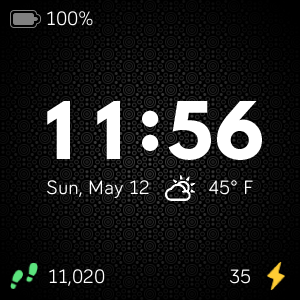
Enlighten Clock Face
Minimalist clock face with weather and basic activity stats. Icons for activity stats will change colors as you progress toward your goals. Customize the theme by changing the background pattern and color. Weather module provided by Grégoire Sage.
I developed this clock face in my free time to learn more about the platform and chose to provide it to the community at no cost. Please feel free to comment if you run into any issues, have feature suggestions, or simply would like to provide feedback. I cannot guarantee that I will be able to respond to everything, but I will do my best to address reasonable requests as time allows.
I hope some of you find it useful.
Available now in the Fitbit App Gallery
 Best Answer
- Labels:
-
App Gallery - Clock
@Redjoe100: Great! Glad it worked out. Yeah, it seems some options are only available through the web.

Thanks for clarifying. Just wanted to make sure I wasn't doing anything wrong (time is large enough as it is). Perfect clockface!
Best Answer
@Jorgmike: That is a symptom of the weather API getting overloaded with requests per minute (70 degrees is default text). Most weather sources have a limited number of calls that can be made over the course of a unit of time. After that, one needs to be on a paid plan. Unfortunately, since this watch face is offered for free, I cannot rationalize a paid plan.
In the past, as the requests spread out, it seems to resolve itself. However, I'll be looking into options for mitigating this issue in the future. This may involve using additional providers or providing an advanced option for users to specify their own API key.

Hi, is it possible to include the option to to disable the weather feature until it's fixed or polls correctly....apart for that it's great! Thanks
Best Answer
@Redjoe100: I've been a bit busy lately, but in the coming weeks I'll be looking into what can be done regarding the weather limitations. I think a combination of being able to specify your own API key and the option to disable weather entirely would be useful.

Hi Ruben
I really like this clock face. But theweather doesn't seem to be working. I installed it last night and I'm still seeing NaN for temperature. Do you know if there are any issues with that working?
Thanks!
Best Answer
@mls79: The weather functionality is provided by an external API to OpenWeatherMap that has a rate limit on the number of calls per minute. As more people use the clock face, this API limit has a higher likelihood of being exceeded. A future update will likely require users to specify their own API key to continue using the weather feature.
@Joemcd1: I'm not sure why that might be happening. Unfortunately, I don't have an Ionic to test with myself. If it happens again, do you mind taking a picture of the watch face? The display of those components are based on the settings in the app. Those settings should be backed by local storage (on watch) and also stored through the Fitbit app on your phone. It almost sounds like the data is getting cleared somehow.
I am also having the disappearing values on my Versa. The settings are on my Fitbit app on phone but I lose line at top (battery and heart) and line at bottom (steps etc).
Best Answer
Hi, that’s exactly what happened to mine, I deleted the face and reset my Ionic and downloaded it again, so far touch wood the problem hasn’t happened since
Best Answer
I am unable to change clock face to white. I have selected settings but red seems to be the only option that works. I have a versa watch. Love the look but not in red. Do you have a work around for this?
Best Answer