
Join us on the Community Forums!
-
Community Guidelines
The Fitbit Community is a gathering place for real people who wish to exchange ideas, solutions, tips, techniques, and insight about the Fitbit products and services they love. By joining our Community, you agree to uphold these guidelines, so please take a moment to look them over. -
Learn the Basics
Check out our Frequently Asked Questions page for information on Community features, and tips to make the most of your time here. -
Join the Community!
Join an existing conversation, or start a new thread to ask your question. Creating your account is completely free, and takes about a minute.
Not finding your answer on the Community Forums?
- Community
- Features
- Fitbit App Gallery
- Enlighten Clock Face
- Mark Topic as New
- Mark Topic as Read
- Float this Topic for Current User
- Bookmark
- Subscribe
- Mute
- Printer Friendly Page
- Community
- Features
- Fitbit App Gallery
- Enlighten Clock Face
Enlighten Clock Face
- Mark Topic as New
- Mark Topic as Read
- Float this Topic for Current User
- Bookmark
- Subscribe
- Mute
- Printer Friendly Page
- « Previous
- Next »

Enlighten Clock Face
Minimalist clock face with weather and basic activity stats. Icons for activity stats will change colors as you progress toward your goals. Customize the theme by changing the background pattern and color. Weather module provided by Grégoire Sage.
I developed this clock face in my free time to learn more about the platform and chose to provide it to the community at no cost. Please feel free to comment if you run into any issues, have feature suggestions, or simply would like to provide feedback. I cannot guarantee that I will be able to respond to everything, but I will do my best to address reasonable requests as time allows.
I hope some of you find it useful.
Available now in the Fitbit App Gallery
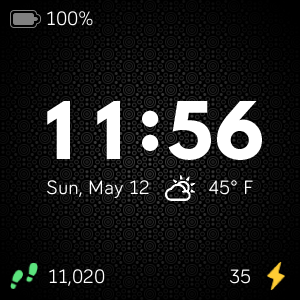
 Best Answer
- Labels:
-
App Gallery - Clock
Note: The development tools are back in working orders. I'm currently transitioning over the weather feature to use Fitbit's newer weather API instead of relying on a third party provider. This should hopefully make the feature more reliable. This is likely one of the last major changes I plan to make to Enlighten, but I nevertheless welcome your continued comments.
@Smeders Thanks, I'm glad you've enjoyed the watch face so far.

Yes, so agree with this.
@RubenInfante, understand the time is using images instead of numbers, but would love to request for a larger time font / change the font face. Perhaps something that spans (almost) side-to-side - something like "Smooth" would be awesome!!
Thanks for the hard work!


Hi! I downloaded the clock face a couple of days ago and it’s great! However, it will change to a black screen with just the time and date half way through out the day. I need to go on to the Fitbit app on my phone and customize the clock face to make it go back to how I want it… am I the only one having this issue? Is there something I’ve done to cause it to do this? help 😅
Best Answer
The weather/temperature feature isn’t working. Your clock face is my absolute favorite. I used on my versa 2 when it came out, found it for my versa 3, and now for my sense 2. I noticed when I downloaded it for the sense 2 that it wasn’t working like it did on the other devices and tried to troubleshoot the problem but I’m not “tech savvy”. Any suggestions? I really don’t want to use another clock face.

SunsetRunner
@RubenInfante Could you please update this awesome clock face to support the Sense 2? It says it is "not optimized". Thank you.

@RubenInfante can't unfortunately do anything as there is no SDK for Sense 2. Fitbit took the liberty to convert it for Sense 2, let me say it is a sort of "not authorized version" of the work by the original author.
SunsetRunner
Thanks. Fitbit Sense 2 feels very unpolished/unfinished, no app support, no Google Assistant. Not even custom faces support? Disappointing. I will very likely return it.
Best Answer

This is the best clock face I've found to date. However, I just had to factory reset my Versa 2 and now I can only get the time and date to show. It doesn't matter what options I have turned on. I've tried uninstalling and reinstalling. Any ideas on what might be preventing the other settings like heart rate, steps, zone minutes and battery from displaying?
Best Answer
Hi @RubenInfante,
I love this whatchface and I use it everyday!
It would be wonderful if you could add an Italian translation.
Thanks a lot!
Bye!
Best Answer

Hi @RubenInfante, this is my favorite watch face and I hope you're still active in this thread. I use it on my Sense2, if possible, would you be able to make the watch face work with Always On Display please. Since this does not support the Always On feature, the default Sense 2 one shows up and that ruins the whole experience. If you're able to add few more color options that would be amazing, if not that's okay too. But it's really lacking Always On feature. Hope you're able to add it. Thank you.
Best Answer
- « Previous
- Next »