Join us on the Community Forums!
-
Community Guidelines
The Fitbit Community is a gathering place for real people who wish to exchange ideas, solutions, tips, techniques, and insight about the Fitbit products and services they love. By joining our Community, you agree to uphold these guidelines, so please take a moment to look them over. -
Learn the Basics
Check out our Frequently Asked Questions page for information on Community features, and tips to make the most of your time here. -
Join the Community!
Join an existing conversation, or start a new thread to ask your question. Creating your account is completely free, and takes about a minute.
Not finding your answer on the Community Forums?
- Community
- Features
- Fitbit App Gallery
- Enlighten Clock Face
- Mark Topic as New
- Mark Topic as Read
- Float this Topic for Current User
- Bookmark
- Subscribe
- Mute
- Printer Friendly Page
- Community
- Features
- Fitbit App Gallery
- Enlighten Clock Face
Enlighten Clock Face
- Mark Topic as New
- Mark Topic as Read
- Float this Topic for Current User
- Bookmark
- Subscribe
- Mute
- Printer Friendly Page

Enlighten Clock Face
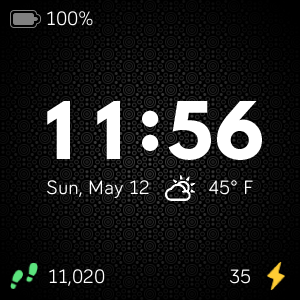
Minimalist clock face with weather and basic activity stats. Icons for activity stats will change colors as you progress toward your goals. Customize the theme by changing the background pattern and color. Weather module provided by Grégoire Sage.
I developed this clock face in my free time to learn more about the platform and chose to provide it to the community at no cost. Please feel free to comment if you run into any issues, have feature suggestions, or simply would like to provide feedback. I cannot guarantee that I will be able to respond to everything, but I will do my best to address reasonable requests as time allows.
I hope some of you find it useful.
Available now in the Fitbit App Gallery
 Best Answer
- Labels:
-
App Gallery - Clock
@BlaqPearl : Sorry to hear you're having difficulty. Usually if nothing is changing on the watch, it means the Bluetooth connection may not be working as expected. Please try restarting the watch and then syncing with the app.
@Frisky19 : No problem. I hope you were able to get it working. Let me know if you have additional questions.
Best Answer
Sent from my iPhone
Best Answer
Hi, I just wanted to let you know that this clock doesn't work. I tried to change the colors and patterns, allow heartrate and battery and activity to be shown but nothing happens. I already tried to restart my versa, but nothing shows up on my watch. Other clocks don't give me this issue so I don't think it's the bluetooth either. I did just install the new software update.
Best Answer
The colors change on there own. As far as the red, green, and gold colors. It depends on how active you are and how close you get to your step goal you should notice the colors change.
I just went with the blue color face. I thought it was a little brighter and easier for me to see.
Sent from my iPhone
Best Answer
@Laetha : Sorry to hear you are having issues changing the settings on the watch face. The settings for Enlighten do depend on Bluetooth and proper sync between the app and the watch. Generally, resetting the watch and then ensuring you can sync resolved these connection problems. I hope you are able to get it working!
@Frisky19 : Glad you got most of the features working. The weather does require a connection to the app as the watch can not make the location request on its own. In previous versions of the watch face (version 1.4.0 and lower), the default temperature would show "70°" if weather could not be fetched. In the latest version (released 9/12), this is handled a bit better and you will see "--°" instead.
Best Answer

Sent from my iPhone
Best Answer
@stlatham : At times, due to usage across all users of the watch face, the built-in API key can exceed the limits imposed by OpenWeatherMap. Using the option for specifying a personal weather API key, you will only be restricted by your own usage. Click this link for more information on how to apply for an API key: Create an OpenWeatherMap API Key.
The Enlighten watch face uses an open source
weather module to provide the temperature functionality. The module uses the location data provided through the connection to the Fitbit app on your phone to call the weather API. I cannot guarantee how the location information is used by either Fitbit or by OpenWeatherMap. However, I can confirm that there are no other uses of this data in the Enlighten watch face code that I control. I can also confirm that I personally receive no monetary compensation from the availability or use of the Enlighten watch face.
me the way it is the weather part of it not working doesn’t bother me I
just don’t know the lingoI don’t know about anybody else. But I think the
watch face is perfect for me the way it is the weather part of it not
working doesn’t bother me I just don’t know the lingo about API Stuff to
fix it. And I’m not even worried about it I picked my colors my background
and it works great. So thank you very much for the creator of this face.
Best Answer


I am requesting a Bluetooth connection status icon. Also the ability to change the bottom right corner of the screen to something other than active time, like the Bluetooth connection status, or the weather status.
Best Answer
@Hahachas : Thanks for the suggestion, but at this point I consider the main user interface elements of Enlighten to be finalized. I know it may not meet everyone's needs, but I feel that I accomplished what I set out to create from the beginning. A minimalist watch face that delivered just enough information.
@Lazy-sod : I believe I have also experienced the issue you are referring to. I'm still not sure what might be happening because it never seems to come up in the simulator during development. From what I can tell the Bluetooth "companion" connection to the watch face app seems to stop working correctly in some situations. When this has happened to me, I have been able to restore settings by either restarting the watch or restarting the connected phone and then syncing on the Fitbit app.
@AlexWest : Just a quick note that the blank pattern option will be available in v1.4.2 that was recently sent to Fitbit for review.

Hi,
I've been using this face for a while, but after getting a new Versa (my old one was broken) it won't show anything other than time/date. I have them all turned on in the settings, have restarted the watch multiple times, etc - nothing is working. I can change colors/themes/etc, so it's definitely connecting for those updates, but not showing anything in the corners or the weather. I never had this issue with my old Versa, so not sure what's going on. Thoughts?
Best Answer
@mls79 : I have experienced a similar issue, but I have not been able to figure out the root cause. In my case, after restarting my phone and syncing with the Fitbit app, the settings changes started being recognized again. Somehow there seems to be something that causes the Bluetooth "companion" to stop working on the watch face.
@AlexWest : Enlighten v1.4.2 with the blank background is now available.
Best Answer