
Join us on the Community Forums!
-
Community Guidelines
The Fitbit Community is a gathering place for real people who wish to exchange ideas, solutions, tips, techniques, and insight about the Fitbit products and services they love. By joining our Community, you agree to uphold these guidelines, so please take a moment to look them over. -
Learn the Basics
Check out our Frequently Asked Questions page for information on Community features, and tips to make the most of your time here. -
Join the Community!
Join an existing conversation, or start a new thread to ask your question. Creating your account is completely free, and takes about a minute.
Not finding your answer on the Community Forums?
- Community
- Features
- Fitbit App Gallery
- Re: Temperature from Celsius to Fahrenheit
- Mark Topic as New
- Mark Topic as Read
- Float this Topic for Current User
- Bookmark
- Subscribe
- Mute
- Printer Friendly Page
- Community
- Features
- Fitbit App Gallery
- Re: Temperature from Celsius to Fahrenheit
Temperature from Celsius to Fahrenheit
ANSWERED- Mark Topic as New
- Mark Topic as Read
- Float this Topic for Current User
- Bookmark
- Subscribe
- Mute
- Printer Friendly Page
10-10-2018
16:05
- last edited on
10-11-2018
05:25
by
MarreFitbit


10-10-2018
16:05
- last edited on
10-11-2018
05:25
by
MarreFitbit
I live in the US and the weather app on Fitbit charge 3 shows Celsius and I need it in Fahrenheit. My units are all u.s. measurements like feet, miles, ounces Etc but the degrees for the temperature are in Celsius. How do I get it to read in Fahrenheit?
Moderator edit: updated subject for clarity
Answered! Go to the Best Answer.
06-05-2020 19:05 - last edited on 01-21-2021 19:43 by LiliyaFitbit

06-05-2020 19:05 - last edited on 01-21-2021 19:43 by LiliyaFitbit
I didn't. So frustrating.
Moderator edit: personal info removed
I have followed the steps provided and when I check the weather on my Fitbit it will pop up/blink Fahrenheit then go right back to Celsius this is very aggravating been dealing with this for 6 months already.

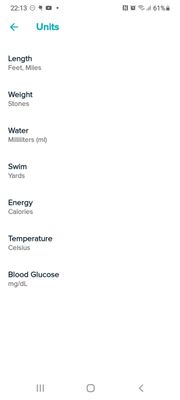
I can't get my charge 3 to change to Celsius, my app on my phone is ready changed and I keep syncing my watch but it still hasn't changed. I've read what to do BUT the only thing mine DOESN'T say on the screen after choosing is DONE then tap back...so I'm wondering if that is the problem. How change i sort this?
 Best Answer
Thank you that was just what I was looking for! It worked!
Best Answer
Hi, I tried this multiple times and my Fitbit seems to be stuck in Celsius. I just got my Fitbit and would like the temperature to be accurate. Any more ideas ?

This didn't work for me on my Sensa. App says unit is Fahrenheit, and then I re-sync, and my Sensa is still reading Celsius. Can you help, @MarreFitbit ?
Doesn't work for Versa 3. The apps time in the device page went away when I upgraded from a Versa 2 to a Versa 3.
Best Answer
I also live in the US. My weather app used to show Fahrenheit but since the new update it keeps showing Celsius. Yes I have tried checking the location, the permissions, the units in the app settings, syncing, re-syncing and restarting. It still says Celsius. So this is what I’ve done. I made a chart. 100°C is boiling, 37° C is body temperature, 30°C is a warm day, 10° C is a cool day, you may need gloves under 5°C, 0°C is freezing and 22°C is “just right” for a nice day.
Best Answer
I had the same issue with my Versa 3 until today. Had an online chat with customer service and received the help I needed. Hit profile pic, your device, gallery, weather. You can change to farenheight from there. So happy!
The steps for the newest iteration of the Fitbit app are:
- Click on profile pic in top right corner of Fitbit app
- Click on your device (ie Versa, Sense, etc.)
- Click on Gallery
- Look for Weather app and select it
- Select settings on the next screen
- Select Temperature > Unit and then tap on Fahrenheit
First step in my previous post should be upper LEFT corner, not right 🤦:male_sign:. Sorry for misunderstanding and thank you Fitbit for not having an "Edit" option for your posts 🙄.
I have tried this several times and it oddly does not work on my Sense. All other units are correct, and the app settings says Units are set to Fahrenheit yet when I open the app, it is still Celsius. Any other suggestions?
I see from a YouTube video that there used to be an Apps selection under the devices, in my case one device. It is no longer there.
The new correct method seems to be:
1-3. Same
4. Select "Gallery"
5. Scroll down past the list of watch faces you have displayed to the list of apps installed.
6. Select "Weather"
7. Select "Settings"
The important question is: Why on earth does it not use the settings provided in the Fitbit App in the first place? You define your units for all the various things, and then Apps simply don't bother to use those settings? The fact that the Apps are hidden now under "Gallery" instead of something sane like "Apps" is also a little obnoxious. No point in having a global selection for Units of Measurement if they aren't consistently used.
Food for Thought.
Fitbit App > Select Device > Gallery > Scroll to Weather > Settings > Temperature Unit - Unit > Change to desired setting.
Hope the above helps someone.
I was going to say, "Maybe the weather app creator didn't do the integration right so you have to change the settings in the app."
Except I just checked, my weather app is created by Fitbit.
Best Answer
Like most weather apps, these three numbers are showing you the current temperature and precipitation (or not) - this is the large middle number. Then the other two smaller numbers are the 24 hour low and high temps for that day. So, in the above images, Boston's temp was 75 with a low of 70 and a high of 79 that day. Hope this helps!
Best Answer

I called the tech support and the guy referred me to a higher level of tech support and gave me a case number. Seems like they're not paying attention to this bug as the threads are from 2019 for the same issue.
