
Join us on the Community Forums!
-
Community Guidelines
The Fitbit Community is a gathering place for real people who wish to exchange ideas, solutions, tips, techniques, and insight about the Fitbit products and services they love. By joining our Community, you agree to uphold these guidelines, so please take a moment to look them over. -
Learn the Basics
Check out our Frequently Asked Questions page for information on Community features, and tips to make the most of your time here. -
Join the Community!
Join an existing conversation, or start a new thread to ask your question. Creating your account is completely free, and takes about a minute.
Not finding your answer on the Community Forums?
- Community
- Features
- Fitbit App Gallery
- Re: Weather app
- Mark Topic as New
- Mark Topic as Read
- Float this Topic for Current User
- Bookmark
- Subscribe
- Mute
- Printer Friendly Page
- Community
- Features
- Fitbit App Gallery
- Re: Weather app
Weather app setting Fahrenheit to Celsius
ANSWERED- Mark Topic as New
- Mark Topic as Read
- Float this Topic for Current User
- Bookmark
- Subscribe
- Mute
- Printer Friendly Page
12-15-2017
05:30
- last edited on
08-16-2018
16:44
by
MattFitbit


12-15-2017
05:30
- last edited on
08-16-2018
16:44
by
MattFitbit
Can a setting be added to allow To change from Fahrenheit to Celsius. Otherwise this app is useless to anyone not in America.... Like almost all of them!
Moderator edit: updated subject for clarity
Answered! Go to the Best Answer.


 Community Moderators ensure that conversations are friendly, factual, and on-topic. We're here to answer questions, escalate bugs, and make sure your voice is heard by the larger Fitbit team. Learn more
Thanks for jumping in here @Fpfender, @LYDF, and @Donkeylady2000! Can you clicked on the link I've shared above or followed the steps provided by @Mister.J? See my image below:
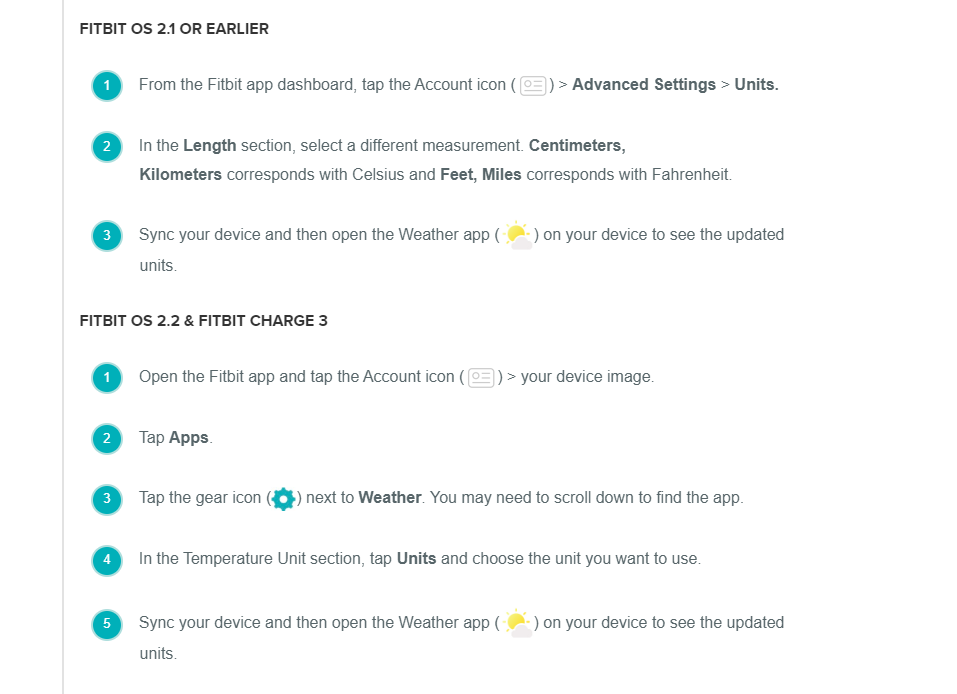
Let us know if they work for you and your device, we'll be around!
Was my post helpful? Give it a thumbs up to show your appreciation! Of course, if this was the answer you were looking for, don't forget to make it the Best Answer! Als...

I can't change my weather to Fahrenheit. Someone suggested changing unit length to miles instead of kilometer. That didn't work. Any suggestions?
 Best Answer
2. Upper Left corner click on your device
3. Select Apps
4. Select Weather
5. Select Settings
6. Select Fahrenheit / Celsius
Go all the way back and sync your device. That should do the trick.
I have the same problem. After a recent shutdown of my fitbit, my weather app reads in Celsius even though my distance is in miles.
Best Answer
It still doesn't change. I have tried it at least a dozen times and it still stays on celsius. It is so frustrating especially when technology is so advanced yet it can't change temperature from celsius to fahrenhiet.
Best Answer
Community Moderators ensure that conversations are friendly, factual, and on-topic. We're here to answer questions, escalate bugs, and make sure your voice is heard by the larger Fitbit team. Learn more
Hey there @arms1 and @Bdg88! If you've tried what @Mister.J suggested, I'd appreciate if you can verify if your Versa is already running OS 2.2 (32.32.12.24) or if you have Ionic, verify it's running OS 2.2 (27.32.12.24), and Charge 3 should be on (1.44.33)? If so, try doing the following steps:
- Open the Fitbit app and tap the Account icon > your device image.
- Tap Apps.
- Tap the gear icon next to Weather. You may need to scroll down to find the app.
- In the Temperature Unit section, tap Units and choose the unit you want to use.
- Sync your device and then open the Weather app on your device to see the updated units.
Let me know if this does the trick!
Was my post helpful? Give it a thumbs up to show your appreciation! Of course, if this was the answer you were looking for, don't forget to make it the Best Answer! Als...
1. Open Fitbit App
2. Upper Left corner click on your device
3. Select Apps
4. Select Weather
5. Select Settings
6. Select Fahrenheit / Celsius
Go all the way back and sync your device. That should do the trick.
changing right now but I am a teacher and we have funky wifi here! I'll
try this as soon as I get home!
Best Answer
Community Moderators ensure that conversations are friendly, factual, and on-topic. We're here to answer questions, escalate bugs, and make sure your voice is heard by the larger Fitbit team. Learn more
Great news @arms1!  I'm glad to hear you found it!
Thanks for all your help @Mister.J!
Don't hesitate to post back if you guys need further assistance !
!
Was my post helpful? Give it a thumbs up to show your appreciation! Of course, if this was the answer you were looking for, don't forget to make it the Best Answer! Als...
 Community Moderators ensure that conversations are friendly, factual, and on-topic. We're here to answer questions, escalate bugs, and make sure your voice is heard by the larger Fitbit team. Learn more
Music to my ears @arms1, @criis88, and @NJeanRob! I'm happy to hear that the steps worked for you my friends.
Hope to see you participating in the Community more often since I think it would be awesome for you to explore our Community. You can go ahead and log to any of the topics that might be of your interest in our Discussion boards. Feel free to comment and contribute with your knowledge and experience. 
Was my post helpful? Give it a thumbs up to show your appreciation! Of course, if this was the answer you were looking for, don't forget to make it the Best Answer! Als...
Best Answer
My OS is running 32.32.12.19. So clearly, it's not up to speed which may explain the issues I'm having. How do I upgrade the OS? Thanks.
PEL
Best Answer
Community Moderators ensure that conversations are friendly, factual, and on-topic. We're here to answer questions, escalate bugs, and make sure your voice is heard by the larger Fitbit team. Learn more
Hey there @pelevy, it's nice to see you here! Well, start charging your device before updating it, since updates can take several minutes to an hour and are demanding on the battery. Note that if you update your device at midnight (when your step count resets) you may see an inaccurate step count for 24 hours.
- Verify that the latest version of the Fitbit app is installed on your phone or tablet.
- With your charged watch or tracker nearby, open the Fitbit app.
- Tap or click the Account icon > your device image.
- Tap or click the pink Update button. You'll only see an option to update your device if an update is available.
- Follow the on-screen instructions and keep the device close to your phone, tablet, or computer during the update. Note that updates may take up to an hour to complete. If the update is slow, don't remove your device from your account as a troubleshooting measure.
- If the update process won't start or if it starts and then stops, see Why can't I update my Fitbit device?
For details about each type of update, see What's changed in the latest Fitbit device update? and What's changed in the latest Fitbit OS update?
Hope this helps, let me know if you need further assistance!
Was my post helpful? Give it a thumbs up to show your appreciation! Of course, if this was the answer you were looking for, don't forget to make it the Best Answer! Als...
Community Moderators ensure that conversations are friendly, factual, and on-topic. We're here to answer questions, escalate bugs, and make sure your voice is heard by the larger Fitbit team. Learn more
Welcome to the Community Forums @Birdzmail! While reading your post, I was wondering if the tips and recommendations provided along this thread have helped you?
Looking forward to your reply!
Was my post helpful? Give it a thumbs up to show your appreciation! Of course, if this was the answer you were looking for, don't forget to make it the Best Answer! Als...
Best Answer