
Join us on the Community Forums!
-
Community Guidelines
The Fitbit Community is a gathering place for real people who wish to exchange ideas, solutions, tips, techniques, and insight about the Fitbit products and services they love. By joining our Community, you agree to uphold these guidelines, so please take a moment to look them over. -
Learn the Basics
Check out our Frequently Asked Questions page for information on Community features, and tips to make the most of your time here. -
Join the Community!
Join an existing conversation, or start a new thread to ask your question. Creating your account is completely free, and takes about a minute.
Not finding your answer on the Community Forums?
- Community
- Health & Wellness
- Get Moving
- Re: How to add steps?
- Mark Topic as New
- Mark Topic as Read
- Float this Topic for Current User
- Bookmark
- Subscribe
- Mute
- Printer Friendly Page
- Community
- Health & Wellness
- Get Moving
- Re: How to add steps?
How to add steps?
ANSWERED- Mark Topic as New
- Mark Topic as Read
- Float this Topic for Current User
- Bookmark
- Subscribe
- Mute
- Printer Friendly Page


Accepted Solutions
Hi, @7000steps , yes, you can always manually add steps, either in the app or in the Fitbit web based dashboard.
On the app click on the exercise icon the. choose the stopwatch icon top right and then log or log previous and enter details there.
In the web based dashboard go to “log” (top menu) the choose activity and scroll to the bottom.
Be aware that manual logs won’t count for challenges or friends’ leaderboard.
If you need more hope with manual logging, let us know which system you are using so someone can help further.
Sense, Charge 5, Inspire 2; iOS and Android
Hi, @7000steps , yes, you can always manually add steps, either in the app or in the Fitbit web based dashboard.
On the app click on the exercise icon the. choose the stopwatch icon top right and then log or log previous and enter details there.
In the web based dashboard go to “log” (top menu) the choose activity and scroll to the bottom.
Be aware that manual logs won’t count for challenges or friends’ leaderboard.
If you need more hope with manual logging, let us know which system you are using so someone can help further.
Sense, Charge 5, Inspire 2; iOS and Android

It's a little confusing in the app, but make sure you are clicking the stopwatch after you open the exercise app on your phone, not the gear icon (that's for manually , then click 'log' (as opposed to track) then put in the time you started the walk, the duration (30 minutes or whatever) and distance in miles or km. Fitbit will calculate the steps based on your stride-length.
It is important to get the time and duration correct. For the time period of the log, fitbit will override whatever steps and distance the device recorded during that time period.
Scott | Baltimore MD
Charge 6; Inspire 3; Luxe; iPhone 13 Pro


Hi @Ccs65 You can't actually add steps on a tracker (except by doing them lol), only in the app, as was detailed above. But once added to the app they should sync through to your Charge 5

Helen | Western Australia
Want to discuss ways to increase your activity? Visit Get Moving in the Lifestyle Discussion Forum.

@Canadiana , you can add steps, but they must be added as part of an activity. If you want to add steps, just choose “walk” as your activity and follow the steps outlined above.
Sense, Charge 5, Inspire 2; iOS and Android
Hi, @BH55 you will find this on your Fitbit app, not on the device itself. I’ll share some pictures from the iOS app to help. The Android app is almost exactly the same, so if you use Android hopefully these pictures will be enough to give you guidance on how to do this:
On the opening screen of your app click on the exercise “tile”:

On the next screen (exercise screen) you will see the stopwatch top right

That will bring up a screen where you can log an exercise. You will see a list of recent exercises or just begin typing in the box to bring up any exercises built in to the Fitbit database or any custom exercises that you have already set up.

Hopefully this helps!
Sense, Charge 5, Inspire 2; iOS and Android

Hi, @UncleJoe2 , I am so sorry but I am unclear how to answer your question - though I am sure that I can…
There is no “website app” there is the app and there is the website
I am guessing you are on the website. In that case you will see at the top of every page Dashboard Log Community Store. Click on Log.
On the next page in the same area you can choose between Food, Activitities Weight Sleep.
Choose activities.
Then, as mentioned above, you cannot log steps except via logging activities. So choose one (presumably walk) and add in your steps there.
I hope this helps!
Sense, Charge 5, Inspire 2; iOS and Android
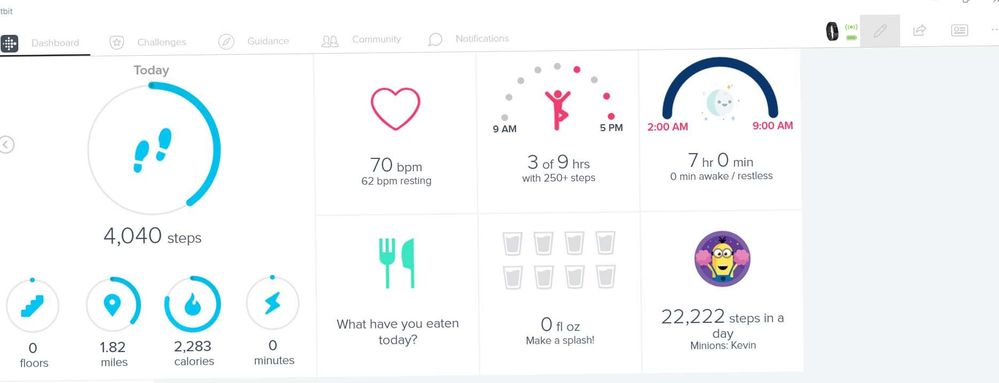
Hi, @UncleJoe2 , this looks like you may have some corporate version? Does your company supply your Fitbits? The standard web version has different tabs on the front.
What happens if when you are in logged in here n the forums if you go to the top of the page and click on “Dashboard” which you should see top : Help Dashboard Store
Do you see the same thing?
Sense, Charge 5, Inspire 2; iOS and Android
