
Join us on the Community Forums!
-
Community Guidelines
The Fitbit Community is a gathering place for real people who wish to exchange ideas, solutions, tips, techniques, and insight about the Fitbit products and services they love. By joining our Community, you agree to uphold these guidelines, so please take a moment to look them over. -
Learn the Basics
Check out our Frequently Asked Questions page for information on Community features, and tips to make the most of your time here. -
Join the Community!
Join an existing conversation, or start a new thread to ask your question. Creating your account is completely free, and takes about a minute.
Not finding your answer on the Community Forums?
- Community
- Health & Wellness
- Get Moving
- Re: Video: How to Customize Exercise Shortcuts
- Mark Topic as New
- Mark Topic as Read
- Float this Topic for Current User
- Bookmark
- Subscribe
- Mute
- Printer Friendly Page
- Community
- Health & Wellness
- Get Moving
- Re: Video: How to Customize Exercise Shortcuts
Video: How to Customize Exercise Shortcuts
- Mark Topic as New
- Mark Topic as Read
- Float this Topic for Current User
- Bookmark
- Subscribe
- Mute
- Printer Friendly Page
03-29-2020
08:45
- last edited on
03-30-2020
12:05
by
LizFitbit


03-29-2020
08:45
- last edited on
03-30-2020
12:05
by
LizFitbit
Hi everyone! I had some free time, so I thought I’d make a video on how to customize the exercise options that appear on your Fitbit device. If you’ve ever wanted to remove the “bike” or “swim” option or wanted to add “elliptical” to your Fitbit device, this short video will help you!
Happy Stepping!
Want to discuss ways to increase your activity? Visit Get Moving in the Lifestyle Discussion Forum.









@Gayblaze Not really. The best thing I can tell you to do is use the option simply called "Workout". Then when you're finished with your activity, you can go into the app and rename the activity to whatever you want. I've done this when I've mowed the lawn before. That's the closest way to do what you want.
Want to discuss ways to increase your activity? Visit Get Moving in the Lifestyle Discussion Forum.
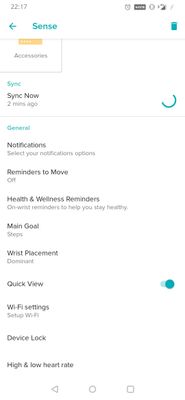
@SunsetRunner @SunsetRunner Yes, the Sense and probably the Versa 3 do not have these options. The Sense and Versa 3 already come loaded with all the exercise options, so there is no need to use this video for those devices. That video was recorded back in March.
Unfortunately at this time you cannot organize the exercises on the Sense or Versa 3. However, your top 3 most recent exercises will populate at the top of the list.
Want to discuss ways to increase your activity? Visit Get Moving in the Lifestyle Discussion Forum.
 Best Answer

@MItchfit66 Correct, rowing isn't an option. However, you can choose "Workout" instead and rename it to Rowing after the exercise is done in the Fitbit app. 🙂
Want to discuss ways to increase your activity? Visit Get Moving in the Lifestyle Discussion Forum.
Best Answer
Thank you Heather....:)
Mitch.
