
Join us on the Community Forums!
-
Community Guidelines
The Fitbit Community is a gathering place for real people who wish to exchange ideas, solutions, tips, techniques, and insight about the Fitbit products and services they love. By joining our Community, you agree to uphold these guidelines, so please take a moment to look them over. -
Learn the Basics
Check out our Frequently Asked Questions page for information on Community features, and tips to make the most of your time here. -
Join the Community!
Join an existing conversation, or start a new thread to ask your question. Creating your account is completely free, and takes about a minute.
Not finding your answer on the Community Forums?
- Community
- Product Help Forums
- Ionic
- Re: Deleting deezer and Pandora
- Mark Topic as New
- Mark Topic as Read
- Float this Topic for Current User
- Bookmark
- Subscribe
- Mute
- Printer Friendly Page
- Community
- Product Help Forums
- Ionic
- Re: Deleting deezer and Pandora
Deleting deezer and Pandora
ANSWERED- Mark Topic as New
- Mark Topic as Read
- Float this Topic for Current User
- Bookmark
- Subscribe
- Mute
- Printer Friendly Page

Is there anyway to delete these from my watch? I don't and never will use them and I don't like how they take up space. Thanks
Answered! Go to the Best Answer.
 Best Answer
Accepted Solutions

@Leppy The trick is not to press the settings icon on the right side but rather the Deezer and Pandora icons themselves.
The attached images are with Fitbit OS 2.0.
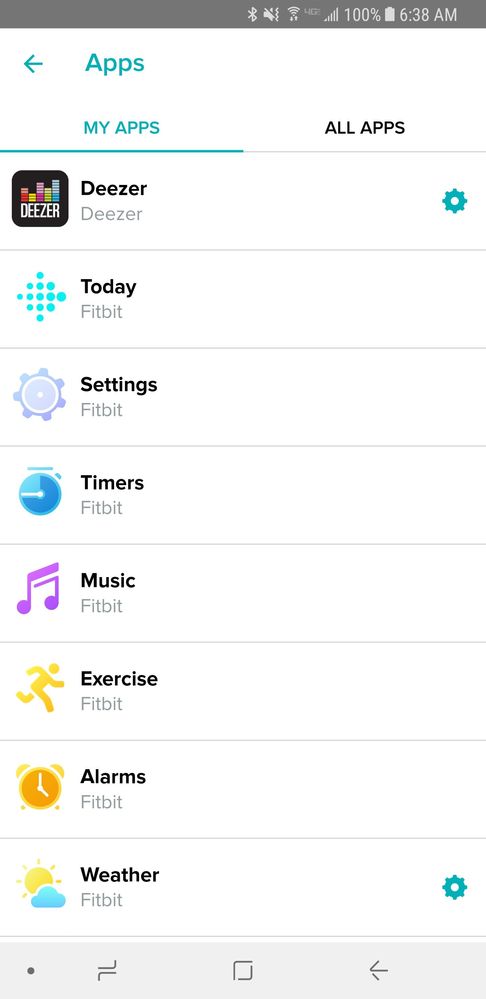

@Leppy In the Fitbit app press on the Ionic icon. This will bring up the menu where you can change watch faces, manage apps, etc. Select apps. This will bring up a list of "My App". You can select any of the apps you don't want (i.e. Pandora and Deezer) and there should be an uninstall option.
There isn't. Only thing I can do is log into those apps which I don't have an account. Seems like fitbit and those 2 companies have a deal (fitbit getting $$$$$) so you can't get rid of them. I've deleted other apps.

I deleted both of them from the app and they have disappeared from the Ionic!
Best Answer




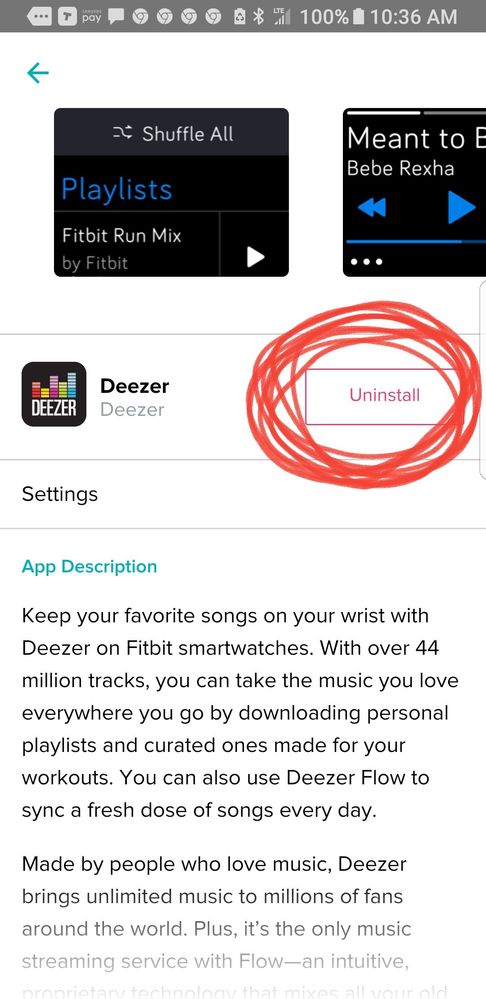
I had to install Deezer to make the below screenshots .It works the same for Pandora and Music. Simply tap where I circled.

Best Answer
@Criscb which way are you doing this.
You can easily remove the app.
You might also want to unsubscribe from the paid membership with Deezer or Pandora.
Best Answer