
Join us on the Community Forums!
-
Community Guidelines
The Fitbit Community is a gathering place for real people who wish to exchange ideas, solutions, tips, techniques, and insight about the Fitbit products and services they love. By joining our Community, you agree to uphold these guidelines, so please take a moment to look them over. -
Learn the Basics
Check out our Frequently Asked Questions page for information on Community features, and tips to make the most of your time here. -
Join the Community!
Join an existing conversation, or start a new thread to ask your question. Creating your account is completely free, and takes about a minute.
Not finding your answer on the Community Forums?
- Community
- Product Help Forums
- Ionic
- Re: Estimated Oxygen Variability is live :D
- Mark Topic as New
- Mark Topic as Read
- Float this Topic for Current User
- Bookmark
- Subscribe
- Mute
- Printer Friendly Page
- Community
- Product Help Forums
- Ionic
- Re: Estimated Oxygen Variability is live :D
Estimated Oxygen Variability is live :D
ANSWERED- Mark Topic as New
- Mark Topic as Read
- Float this Topic for Current User
- Bookmark
- Subscribe
- Mute
- Printer Friendly Page
12-16-2019
21:11
- last edited on
12-17-2019
10:17
by
MattFitbit


12-16-2019
21:11
- last edited on
12-17-2019
10:17
by
MattFitbit
Just review todays sleep stats, and was surprised by this:
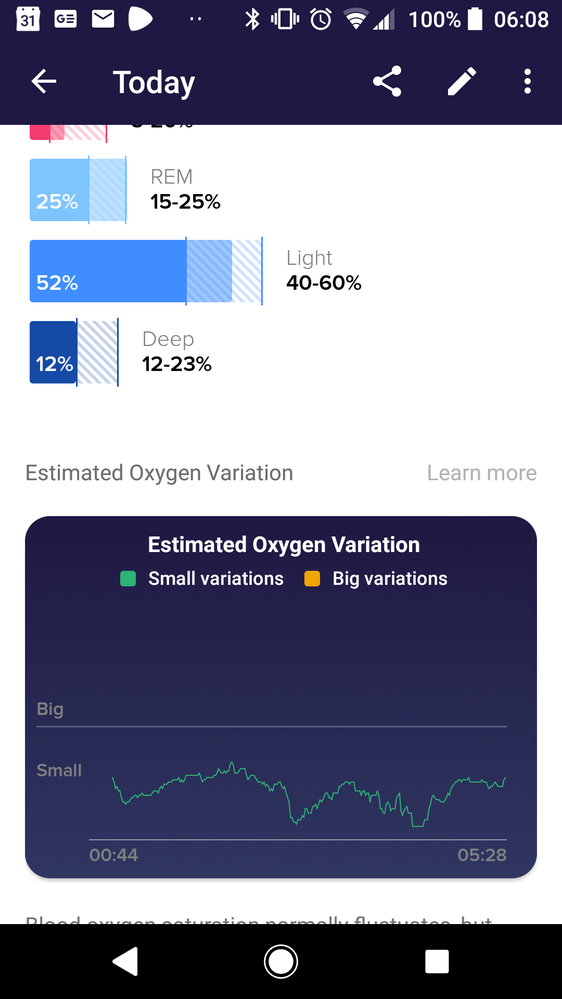
Moderator edit: title for clarity
Answered! Go to the Best Answer.

I have the same issue as of this morning. The app is connected to an Ionic and had displayed the Sp02 graph for several days. This morning it did not appear, and the graph is missing from past days as well.
@shaneinakI have a premium account and the o2 info is displayed the exact same way as with non premium accounts.
I like tracking my nightly oxygent information. Why did it stop? I noticed that all previous weeks had been erased.
 Best Answer
01-23-2020
09:10
- last edited on
08-28-2024
03:46
by
MarreFitbit


 Community Moderators ensure that conversations are friendly, factual, and on-topic. We're here to answer questions, escalate bugs, and make sure your voice is heard by the larger Fitbit team. Learn more
01-23-2020
09:10
- last edited on
08-28-2024
03:46
by
MarreFitbit
Hello everyone!
I have posted the same thing in other threads but I'd like to ensure that everyone is getting this information. As mentioned before, the red and infrared sensors on the back of your Fitbit device capture the data that you see on your estimated oxygen variation (EOV) graph. Although the sensors are components of a relative SpO2 sensor, the graph is not a relative SpO2 estimate.
Your EOV graph is located under sleep stages in the Fitbit app, or, if you’re a premium subscriber, it’s on the Restoration tab under your sleeping heart rate information. If you don’t see your EOV graph, note that:
-You must get sleep stages and wear one of the following Fitbit devices to get the EOV graph: Charge 3, Ionic, and devices in the Versa series.
-Certain customers began seeing the graph in December 2019. The feature will be available to all customers sometime in 2020.
We hope this answers some questions.

 Fitbit Product Experts Alumni are retired members of the Fitbit Product Expert Program. Learn more
Best Answer
Fitbit Product Experts Alumni are retired members of the Fitbit Product Expert Program. Learn more
Best Answer
Hey!
Do you know if the Versa 2 is capable of the Estimated Oxygen Variability feature? If it's now live, why I don't have it yet? I wasn't sure if it's simply because the versa 2 isn't compatible?
Thanks!
Best Answer
The company said it began providing the feature to a small number of users, but that all Fitbit owners with a device that supports blood oxygen monitoring would be able to access these statistics by the end of the month.
Turned to
Certain customers began seeing the graph in December 2019. The feature will be available to all customers sometime in 2020.
Oh dear.
You explained why some people still don’t have the feature. What you didn’t explain is why, for some people that already do have the feature, why it keeps appearing and disappearing. Why is it doing that?
Kind Regards,
Jasmyne

SunsetRunner
Same mind has disappeared. Had the sp02 info available for about 2 weeks then a few days ago all data was wiped and no new sp02 data being recorded.
Has the feature been pulled?
Mine disappeared yesterday and is no longer showing up. Looks like it may have been pulled.
Best Answer
Kind Regards,
Jasmyne
Best Answer
I had it this morning and it disappeared today I bought two Charge 3 Fitbits at Xmas, one had the oxygen saturation graph one didn’t but my Fitbit. Which had it. Now doesn’t... why is that?
Best Answer
01-24-2020
14:31
- last edited on
08-28-2024
03:46
by
MarreFitbit

 Community Moderator Alumni are previous members of the Moderation Team, which ensures conversations are friendly, factual, and on-topic. Moderators are here to answer questions, escalate bugs, and make sure your voice is heard by the larger Fitbit team. Learn more
01-24-2020
14:31
- last edited on
08-28-2024
03:46
by
MarreFitbit
Hi folks! I just thought I would take this opportunity to thank you for the feedback you have been providing since the progressive rollout of EOV started. Glad to see that so many of you are enjoying the feature.
@JasPatto @SunsetRunner @slbert @Stellaf @Jimmy31 Thanks for letting us know that your EOV graph is disappearing. That certainly seems odd. I have forwarded your reports to our engineering team who are looking into this issue. I will be sure to let you know once I have more info.
Want to get more deep sleep? Join the discussion on our Sleep better forum.

Sent from my iPad
Best Answer
Thanks @MattFitbit. Previously if I force quit the app, it would reappear. But, even restarting the phone (iPhone 6) doesn't bring the chart back.
Best Answer