
Join us on the Community Forums!
-
Community Guidelines
The Fitbit Community is a gathering place for real people who wish to exchange ideas, solutions, tips, techniques, and insight about the Fitbit products and services they love. By joining our Community, you agree to uphold these guidelines, so please take a moment to look them over. -
Learn the Basics
Check out our Frequently Asked Questions page for information on Community features, and tips to make the most of your time here. -
Join the Community!
Join an existing conversation, or start a new thread to ask your question. Creating your account is completely free, and takes about a minute.
Not finding your answer on the Community Forums?
- Community
- Product Help Forums
- Ionic
- Re: Ionic Syncing Issues
- Mark Topic as New
- Mark Topic as Read
- Float this Topic for Current User
- Bookmark
- Subscribe
- Mute
- Printer Friendly Page
- Community
- Product Help Forums
- Ionic
- Re: Ionic Syncing Issues
RESOLVED: Ionic Syncing Issues
- Mark Topic as New
- Mark Topic as Read
- Float this Topic for Current User
- Bookmark
- Subscribe
- Mute
- Printer Friendly Page
09-29-2017
11:33
- last edited on
07-10-2018
14:09
by
MattFitbit



09-29-2017
11:33
- last edited on
07-10-2018
14:09
by
MattFitbit
Update: The issue resulting in syncing trouble for Ionic users has been resolved. If you're still having trouble with syncing, please check the steps in this article.
Good morning Fitbit Ionic users! Thanks for flagging the syncing issue with Ionic. Our engineering team became aware of an issue that affects syncing for some Ionic users. We are making progress on a retroactive fix for this and look forward to resolving this as soon as possible.
If you'd rather not wait for the system updates, you can use the following workaround:
- Go to your phone's Bluetooth Settings and remove Ionic from the list of Bluetooth devices
- Open the Fitbit app and remove Ionic from your Fitbit account (Account>Ionic>Remove)
- Next, setup your Ionic watch again
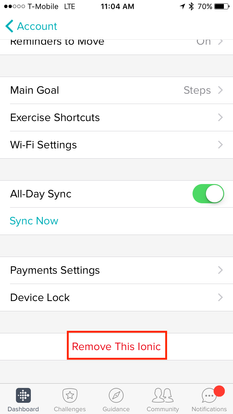
For those of you who don't have time to try the workaround, rest assured that our team will fix this issue.
Don't let this bump in the road get in the way of reaching your health goals for the day! I will keep this thread updated with the latest.
Appreciate your patience, everyone!



So I just bought the new Ionic and I cannot add this device to my app (previous Charge 2 and Blaze user). Every time I try to add the device it gets to the part where I select Ionic, press the " Set up your Fitbit Ionic" and then it just returns to the app where I started the process.
WTF?!?!?
This is a horrible customer experience. Don't release a product if the user cannot use the product.
Fix this ASAP - this was not an inexpensive item.

SunsetRunner
@Little27Bit wrote:So I just bought the new Ionic and I cannot add this device to my app (previous Charge 2 and Blaze user). Every time I try to add the device it gets to the part where I select Ionic, press the " Set up your Fitbit Ionic" and then it just returns to the app where I started the process.
WTF?!?!?
This is a horrible customer experience. Don't release a product if the user cannot use the product.
Fix this ASAP - this was not an inexpensive item.
Uninstall and reinstall the app.
 Best Answer
Sent from my iPhone
SunsetRunner
I have updated to firmware 27.30.3.2 and now synchronisation works fine on my Mate 9.
There is hope!
I'm still having the exact same issues. Mine is on the latest version 27.25.16.7
Sync works for maybe 30 minutes, and after that it gets stuck on "looking for ionic", or "Bluetooth issue reset bluetooth"
I'm constantly restarting ionic, unpairing, repairing, going back to factory settings to get it to sync. I've tried on three different phones with the same issue each time.
After unpairing, when trying to re-pair it is very temperamental as to whether the phone will actually find the ionic or not. I usually have to try set up about 5 - 6 times before it finds the device and prompts me to enter the 4 digits.
Best Answer
firmware 27.30.3.2
Is that the normal firmware or development?
Best Answer
SunsetRunner
@Jorkal wrote:
firmware 27.30.3.2
Is that the normal firmware or development?
That's developement firmware. It looks like Fitbit found out what was wrong and corrected it. So just wait for the next official firmware update and you should be fine.
Best Answer
I have to correct myself. Although the IOS App shows version 25.16.7 the online dashboard shows version 27.25.16.7. Since I am not having any issues I am not sure it matters but figured I would let everyone else know in case they had a different version and were having issues.
Best Answer
Use this link https://help.fitbit.com/articles/en_US/Help_article/1871 to see how to update firmware.

I think it's Android issue first and foremost. I connected my Ionic to iPhone 6s yesterday, and the sync worked perfectly fine. On Android, however, depending on what phone you got (there's a tremendous fragmentation in terms of Bluetooth stack and its behavior) sync either won't work at all, or will be extremely flaky (something I'm observing on Essential PH-1 with Android 7.1.1 and September security patches).
Best Answer
Does the developer firmware address two other issues I noticed (maybe specific to Android or my particular phone):
- No artist info is displayed in music controls regardless of the app that's playing -- tried it with Google Play Music, Pandora, and Apple Music
- Call notification doesn't give accept/reject controls, just buzzes the watch and shows "Number XYZ is calling"?
- No support for non-Latin/emoji characters in notification messages like Cyrillic, Hebrew, Greek, etc?
I'm on Essential PH-1, Android 7.1.1 with September patches. Ionic firmware is 27.25.16.7.
Best Answer
Actually, my understanding is that to get newer/beta firmware, you need to register to become Fitbit OS developer:
Best Answer
My Ionic sync flawless with iPhone, the Macbook connect with the Ionic (after a stopped bluetooth of the iPhone of course) but get an error; unknown error try again.
Best Answer
Yes, Apple's Bluetooth implementation in many respects way ahead of Android, and it's a single vendor. Hence, it's no surprise sync would better on iPhone than Android phones. I haven't tried MacOS or Windows 10 apps at all. So, can't say much about that.
Best Answer
I did try it on my iPhone 6s last night after the trouble with my new android phone (Huawei P10 Plus), and I couldn't even get it past the first step (ie couldn't find my tracker to enter the 4 digits)
I eventually got it connect to the P10, but having constant sync issues.
I have now connected it to my works mobile (galaxy A3 I think), and so far it's working but not holding my breath.
I might try it on the iPhone again when I get home from work.
Best Answer