
Join us on the Community Forums!
-
Community Guidelines
The Fitbit Community is a gathering place for real people who wish to exchange ideas, solutions, tips, techniques, and insight about the Fitbit products and services they love. By joining our Community, you agree to uphold these guidelines, so please take a moment to look them over. -
Learn the Basics
Check out our Frequently Asked Questions page for information on Community features, and tips to make the most of your time here. -
Join the Community!
Join an existing conversation, or start a new thread to ask your question. Creating your account is completely free, and takes about a minute.
Not finding your answer on the Community Forums?
- Community
- Health & Wellness
- Manage Weight
- Re: What do weight tends mean?
- Mark Topic as New
- Mark Topic as Read
- Float this Topic for Current User
- Bookmark
- Subscribe
- Mute
- Printer Friendly Page
- Community
- Health & Wellness
- Manage Weight
- Re: What do weight tends mean?
What do weight tends mean?
- Mark Topic as New
- Mark Topic as Read
- Float this Topic for Current User
- Bookmark
- Subscribe
- Mute
- Printer Friendly Page


 Fitbit Product Experts Alumni are retired members of the Fitbit Product Expert Program. Learn more
@Mgowell: "Weight Trends" in the mobile app means just that, the overall trend where your weight is going, once you smoothen out the ups and downs of daily fluctuations. For instance, this is what my 1-year trend looks like:
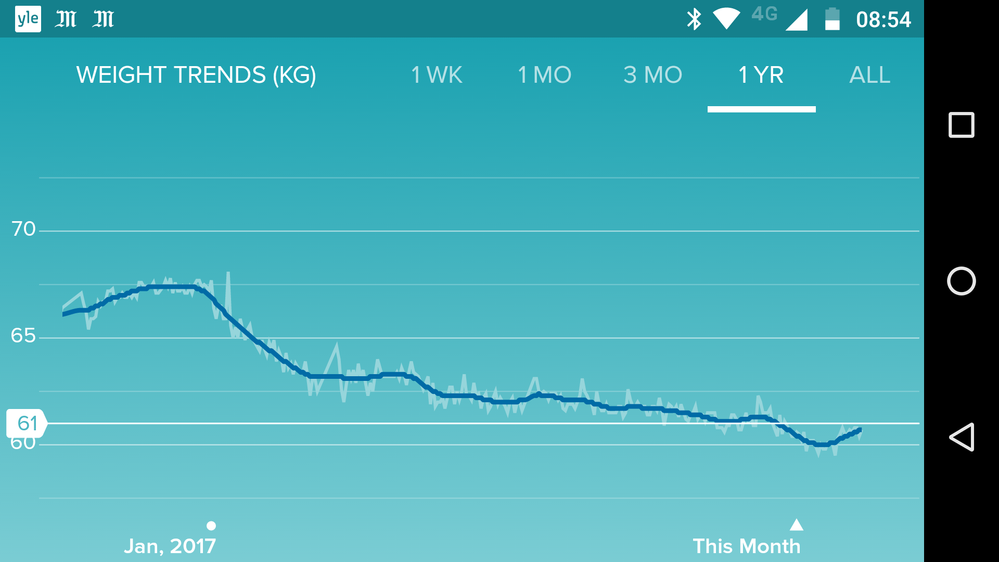
Obviously, you must have enough individual data points before the curve starts to be meaningful. Based on what you are saying, it would appear Fitbit puts the cart before the horse and starts drawing a trend line before you’re even entered anything. Just keep entering your weigh-ins and the trend line will eventually reflect where your weight is going. It’s some kind of moving average, you just need the data points to calculate it.
Dominique | Finland
Ionic, Aria, Flyer, TrendWeight | Windows 7, OS X 10.13.5 | Motorola Moto G6 (Android 9), iPad Air (iOS 12.4.4)
Take a look at the Fitbit help site for further assistance and information.
