
Join us on the Community Forums!
-
Community Guidelines
The Fitbit Community is a gathering place for real people who wish to exchange ideas, solutions, tips, techniques, and insight about the Fitbit products and services they love. By joining our Community, you agree to uphold these guidelines, so please take a moment to look them over. -
Learn the Basics
Check out our Frequently Asked Questions page for information on Community features, and tips to make the most of your time here. -
Join the Community!
Join an existing conversation, or start a new thread to ask your question. Creating your account is completely free, and takes about a minute.
Not finding your answer on the Community Forums?
- Community
- Features
- Menstrual Health Tracking
- Female Health Tracker Freezing on iOS - RESOLVED w...
- Mark Topic as New
- Mark Topic as Read
- Float this Topic for Current User
- Bookmark
- Subscribe
- Mute
- Printer Friendly Page
- Community
- Features
- Menstrual Health Tracking
- Female Health Tracker Freezing on iOS - RESOLVED w...
Female Health Tracker Freezing on iOS - RESOLVED w/2.53
ANSWERED- Mark Topic as New
- Mark Topic as Read
- Float this Topic for Current User
- Bookmark
- Subscribe
- Mute
- Printer Friendly Page
05-28-2018
12:15
- last edited on
08-20-2018
10:16
by
AlessFitbit


 Community Moderator Alumni are previous members of the Moderation Team, which ensures conversations are friendly, factual, and on-topic. Moderators are here to answer questions, escalate bugs, and make sure your voice is heard by the larger Fitbit team. Learn more
05-28-2018
12:15
- last edited on
08-20-2018
10:16
by
AlessFitbit
Update 7/11/2018:
Today we released the Fitbit for iOS app version 2.53, this app version contains the fix for the app freezing you have all been experiencing. Please update the app on your iOS device and let me know how it goes!
We really appreciate everyone's patience while this was being investigated and worked on. 
Update 7/2/2018:
Hey, everyone!
Our team is still working on resolving this app crash on iOS. Thanks so much for your patience! I should have more information available soon, so please stay tuned and follow this thread for updates.
Update 6/18/2018:
Our team is currently investigating why this is still occurring in the Fitbit app for Female health tracking. For the past weeks, we have noticed this is occurring commonly over the weekends mostly. When I receive more information or any updates, I will provide that here.
Thanks for working with us through this.
Update 6/4/2018: Hi, everyone!
Sorry to hear some of you are experiencing this app crash/freezing with the female health tile.
It appears this is still happening and ongoing. Rest assured, our team is aware and investigating this. We appreciate your patience while we work on a fix.
For the meantime, if anyone can post a screenshot of the calendar missing that would be super helpful and I can forward that to our team.
Thanks! 
Update 5/31/2018: Hi Everyone - this issue should be resolved. If you are still having issues, please restart your app. If the calendar still freezes, please let me know.
Update 5/28/2018: Hi Everyone - We're currently investigating issues with Female Health Tracking not loading on iOS 2.51.
I do recommend force quitting the app and restarting your phone as that does appear to resolve the issue for some. Please stay tuned for more details and thank you very much for your reports.
Actively managing your weight? Find accountability buddies on the Manage Weight board
Answered! Go to the Best Answer.
 Best Answer
- Labels:
-
Info: Fitbit app

I’m having the same issue. It began freezing the day my period was scheduled to start and I have to close the app completely to access anything.

I’m having the same issue

I’m having the same problem. Very frustrating.

I’m actually having the same problem. It worked for me 2 days ago and I went to go on the female health part today and it just keeps crashing, I’ve tried resetting my phone and re installing the app. 😫😫😫
Best Answer

SunsetRunner


 Community Moderators ensure that conversations are friendly, factual, and on-topic. We're here to answer questions, escalate bugs, and make sure your voice is heard by the larger Fitbit team. Learn more
Welcome on board @mtjarrett87, it's nice to see a new member here!  Are you using the Fitbit iOS app? If so, this inconvenience with the Fitbit app has been reported from iOS users.
We are aware of the problem and are working to resolve it as quickly as possible. We appreciate your patience and look forward to getting you back on track.
In the meantime, I'd recommend force quitting the app and restarting your phone as that does appear to resolve the issue for some.
Please let me know if there's anything I may do to assist you in the meantime.
Was my post helpful? Give it a thumbs up to show your appreciation! Of course, if this was the answer you were looking for, don't forget to make it the Best Answer! Als...
Community Moderators ensure that conversations are friendly, factual, and on-topic. We're here to answer questions, escalate bugs, and make sure your voice is heard by the larger Fitbit team. Learn more
It's nice to see a new member around, welcome @daniellemarie94! Are you using the Fitbit iOS app? If so, this inconvenience with the Fitbit app has been reported from iOS users.
We are aware of the problem and are working to resolve it as quickly as possible. We appreciate your patience and look forward to getting you back on track.
In the meantime, I'd recommend force quitting the app and restarting your phone as that does appear to resolve the issue for some.
Thanks so much for moving the post to the correct board @SunsetRunner! 
Please let me know if there's anything I may do to assist you in the meantime.
Was my post helpful? Give it a thumbs up to show your appreciation! Of course, if this was the answer you were looking for, don't forget to make it the Best Answer! Als...


Adding my name to the list. Everything else is working on my dashboard except the female health tile. Restarting and reinstalling the app has no effect.
Best Answer
Same. Reqssurong to know that kts not just me, but would love a fix ASAP

I’m having the same problem. It was working ok and now the app freezes when I try to view female health details. I was trying to update my predicted period days as my period has not started on the day it predicted. I have tried uninstalling and reinstalling the app to no avail. Very frustrating 😕
Best Answer
06-04-2018
14:59
- last edited on
03-03-2026
04:15
by
MarreFitbit
 Community Moderator Alumni are previous members of the Moderation Team, which ensures conversations are friendly, factual, and on-topic. Moderators are here to answer questions, escalate bugs, and make sure your voice is heard by the larger Fitbit team. Learn more
06-04-2018
14:59
- last edited on
03-03-2026
04:15
by
MarreFitbit
Hi, everyone!
Sorry to hear some of you are experiencing this app crash/freezing with the female health tile.
It appears this is still happening and ongoing. Rest assured, our team is aware and investigating this. We appreciate your patience while we work on a fix.
For the meantime, if anyone can post a screenshot of the calendar missing that would be super helpful and I can forward that to our team.
Thanks!
Want to get more steps? Visit Get Moving in the Health & Wellness Discussion Forum.

I’ve also been experiencing the app freezing (iOS). I’ve discovered if you go to your account and turn the predictions element off for female health it seems to work absolutely fine. Just thought I’d mention that as a work around till the bug gets fixed
Here's what my screen looks like:
It just freezes on this screen for me. The how to info reappeared after I uninstalled and reinstalled the app.
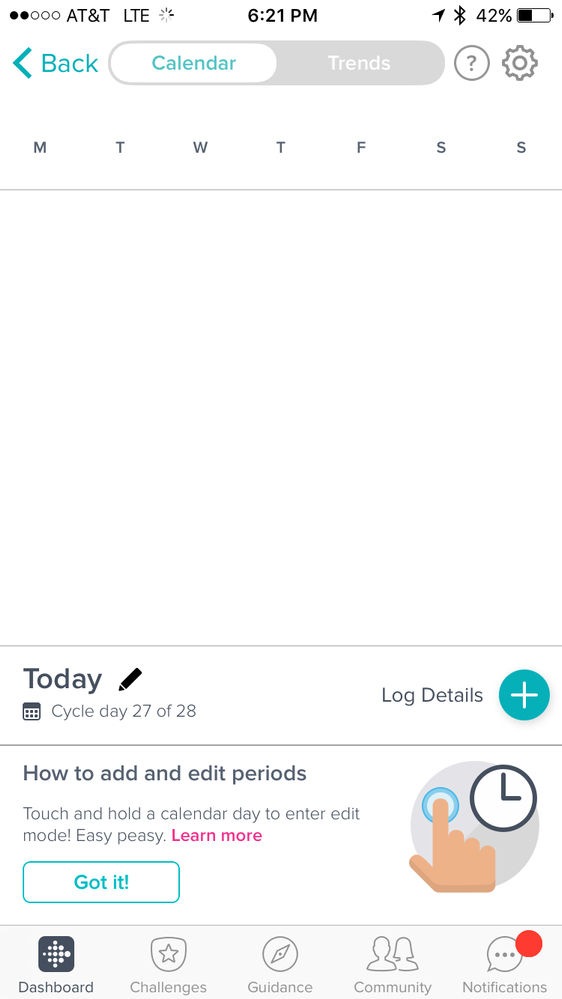
EDIT 6/5/18: The problem has resolved itself on my end. The app no longer freezes on the Female Health tile and the calendar is working fine.
06-06-2018
07:35
- last edited on
03-03-2026
04:14
by
MarreFitbit
Community Moderator Alumni are previous members of the Moderation Team, which ensures conversations are friendly, factual, and on-topic. Moderators are here to answer questions, escalate bugs, and make sure your voice is heard by the larger Fitbit team. Learn more
06-06-2018
07:35
- last edited on
03-03-2026
04:14
by
MarreFitbit
@BikesAndBacon Thanks for providing this workaround! As mentioned this has been reported to our team for investigation. At the same time, seems to be an issue that will resolve itself. If you see this happening again, please let me know.
@adb187 Thanks so much for the screenshot! I will send this along to our team who will look into this crash. I'm glad the issue resolved itself for you. If you see this happening again, please let me know. I am going to keep this thread open for the time being.
@rachelanderson If you're still having trouble logging period dates, try logging out of the app and then logging back in. A phone restart may also help. If you're still having this problem, please let me know.
Want to get more steps? Visit Get Moving in the Health & Wellness Discussion Forum.

still not working
Best Answer
Community Moderator Alumni are previous members of the Moderation Team, which ensures conversations are friendly, factual, and on-topic. Moderators are here to answer questions, escalate bugs, and make sure your voice is heard by the larger Fitbit team. Learn more
@rachelanderson Sorry to hear you're still having trouble logging your periods in the app. At which step in the process are you having trouble? To log your periods, you can tap the pencil icon and then drag across the dates you would like to select. For more instructions, please check out this article.
Want to get more steps? Visit Get Moving in the Health & Wellness Discussion Forum.