
Join us on the Community Forums!
-
Community Guidelines
The Fitbit Community is a gathering place for real people who wish to exchange ideas, solutions, tips, techniques, and insight about the Fitbit products and services they love. By joining our Community, you agree to uphold these guidelines, so please take a moment to look them over. -
Learn the Basics
Check out our Frequently Asked Questions page for information on Community features, and tips to make the most of your time here. -
Join the Community!
Join an existing conversation, or start a new thread to ask your question. Creating your account is completely free, and takes about a minute.
Not finding your answer on the Community Forums?
- Community
- Product Help Forums
- Other Charge Trackers
- Charge 2 tracking gps walk
- Mark Topic as New
- Mark Topic as Read
- Float this Topic for Current User
- Bookmark
- Subscribe
- Mute
- Printer Friendly Page
- Community
- Product Help Forums
- Other Charge Trackers
- Charge 2 tracking gps walk
Charge 2 tracking gps walk
ANSWERED- Mark Topic as New
- Mark Topic as Read
- Float this Topic for Current User
- Bookmark
- Subscribe
- Mute
- Printer Friendly Page
10-03-2016 15:44
- Mark as New
- Bookmark
- Subscribe
- Permalink
- Report this post

10-03-2016 15:44
- Mark as New
- Bookmark
- Subscribe
- Permalink
- Report this post
Answered! Go to the Best Answer.
Accepted Solutions
10-03-2016 15:56
- Mark as New
- Bookmark
- Subscribe
- Permalink
- Report this post


 Community Moderator Alumni are previous members of the Moderation Team, which ensures conversations are friendly, factual, and on-topic. Moderators are here to answer questions, escalate bugs, and make sure your voice is heard by the larger Fitbit team. Learn more
10-03-2016 15:56
- Mark as New
- Bookmark
- Subscribe
- Permalink
- Report this post
@Ashley1599 Welcome to the Fitbit Community, you can totally add "Walk" to your Charge 2's exercise shortcuts. Click here for instructions on how to add exercise shortcuts to your Charge 2.
Let me know if there's anything else that I can do to help!
10-03-2016 15:56
- Mark as New
- Bookmark
- Subscribe
- Permalink
- Report this post
Community Moderator Alumni are previous members of the Moderation Team, which ensures conversations are friendly, factual, and on-topic. Moderators are here to answer questions, escalate bugs, and make sure your voice is heard by the larger Fitbit team. Learn more
10-03-2016 15:56
- Mark as New
- Bookmark
- Subscribe
- Permalink
- Report this post
@Ashley1599 Welcome to the Fitbit Community, you can totally add "Walk" to your Charge 2's exercise shortcuts. Click here for instructions on how to add exercise shortcuts to your Charge 2.
Let me know if there's anything else that I can do to help!
10-03-2016 19:49
- Mark as New
- Bookmark
- Subscribe
- Permalink
- Report this post
10-03-2016 19:49
- Mark as New
- Bookmark
- Subscribe
- Permalink
- Report this post
 Best Answer
10-03-2016 19:57
- Mark as New
- Bookmark
- Subscribe
- Permalink
- Report this post
10-03-2016 19:57
- Mark as New
- Bookmark
- Subscribe
- Permalink
- Report this post
Best Answer04-04-2017 14:41
- Mark as New
- Bookmark
- Subscribe
- Permalink
- Report this post

SunsetRunner
04-04-2017 14:41
- Mark as New
- Bookmark
- Subscribe
- Permalink
- Report this post
I followed the tips from the link you included, I don't have an add icon on my exercise shortcuts screen. Any other suggestions?
04-04-2017 14:54
- Mark as New
- Bookmark
- Subscribe
- Permalink
- Report this post

 Fitbit Product Experts Alumni are retired members of the Fitbit Product Expert Program. Learn more
04-04-2017 14:54
- Mark as New
- Bookmark
- Subscribe
- Permalink
- Report this post
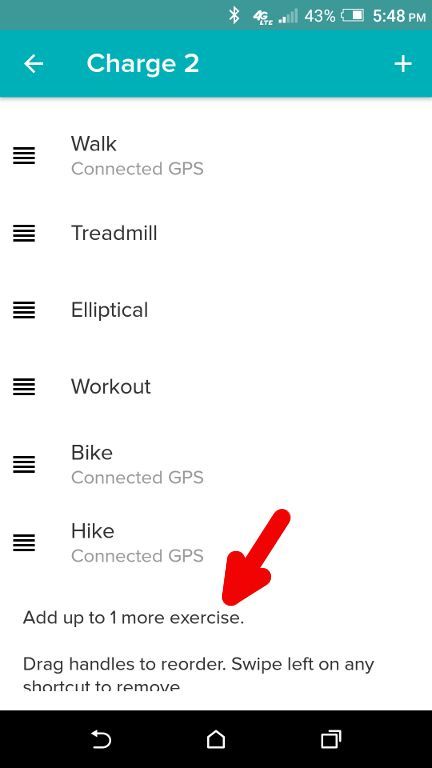
@SunsetRunner, do you already have 7 exercises in the Exercise Shortcuts? If so, you must delete one before you can add another - 7 is the maximum number of shortcuts you can have.
If you do not have 7 shortcuts, you should see a line at the bottom of the Exercise Shortcuts that you can click to add one or more, such as in this screenshot:
04-04-2017 19:56
- Mark as New
- Bookmark
- Subscribe
- Permalink
- Report this post
SunsetRunner
04-04-2017 19:56
- Mark as New
- Bookmark
- Subscribe
- Permalink
- Report this post
Thank you! What an easy fix!
Best Answer05-11-2017 07:03
- Mark as New
- Bookmark
- Subscribe
- Permalink
- Report this post

05-11-2017 07:03
- Mark as New
- Bookmark
- Subscribe
- Permalink
- Report this post
How do I add "Walk" to my fitbit charge 2
05-11-2017 07:06 - edited 05-14-2017 09:20
- Mark as New
- Bookmark
- Subscribe
- Permalink
- Report this post

 Platinum Fitbit Product Experts share support knowledge on the forums and advocate for the betterment of Fitbit products and services. Learn more
05-11-2017 07:06 - edited 05-14-2017 09:20
- Mark as New
- Bookmark
- Subscribe
- Permalink
- Report this post
@tomwlane please scroll up and follow @USAF-Larry's post above, it is two posts above yours. https://community.fitbit.com/t5/Charge-2/Charge-2-tracking-gps-walk/m-p/1918148/highlight/true#M4130...
You may also go to the Fitbit Hrlp doc that @DerrickS points to in the second post.
Best Answer05-14-2017 08:15
- Mark as New
- Bookmark
- Subscribe
- Permalink
- Report this post
05-14-2017 08:15
- Mark as New
- Bookmark
- Subscribe
- Permalink
- Report this post
Walk doesn't appear to be one of the options.
05-14-2017 09:22
- Mark as New
- Bookmark
- Subscribe
- Permalink
- Report this post
Platinum Fitbit Product Experts share support knowledge on the forums and advocate for the betterment of Fitbit products and services. Learn more
05-14-2017 09:22
- Mark as New
- Bookmark
- Subscribe
- Permalink
- Report this post
@Jayabalard please see the accepted solution by @DerrickS above, or @USAF-Larry's post above, It is the post that I linked to in my last post that you responded to.
Best Answer07-01-2017 07:49
- Mark as New
- Bookmark
- Subscribe
- Permalink
- Report this post
07-01-2017 07:49
- Mark as New
- Bookmark
- Subscribe
- Permalink
- Report this post
I don't have a walk option to choose. Can I add it?
Best Answer07-01-2017 07:59
- Mark as New
- Bookmark
- Subscribe
- Permalink
- Report this post
07-01-2017 07:59
- Mark as New
- Bookmark
- Subscribe
- Permalink
- Report this post
Walk is not an option on my Fitbit watch, it does show on the tracker on my phone, also can't figure out how to activate gps.
Best Answer07-01-2017 08:03 - edited 07-01-2017 08:47
- Mark as New
- Bookmark
- Subscribe
- Permalink
- Report this post
07-01-2017 08:03 - edited 07-01-2017 08:47
- Mark as New
- Bookmark
- Subscribe
- Permalink
- Report this post
Walk is not an option on my Fitbit watch, it does show on the tracker on my phone, how do I get it on the actual device? Also, can't figure out how to activate gps. Settings on phone has locator turned on for Fitbit app. Can't find anything in app to turn it on.
Sorry for two comments, got an error saying the first did not post.
Best Answer07-02-2017 01:14
- Mark as New
- Bookmark
- Subscribe
- Permalink
- Report this post
Platinum Fitbit Product Experts share support knowledge on the forums and advocate for the betterment of Fitbit products and services. Learn more
07-02-2017 01:14
- Mark as New
- Bookmark
- Subscribe
- Permalink
- Report this post
Hello @LeeR315 please scrol up the page to the accepted solution where you will find a link to the instructions. Or look at @USAF-Larrry's post with his great screenshots
Best Answer07-27-2017 08:34
- Mark as New
- Bookmark
- Subscribe
- Permalink
- Report this post

07-27-2017 08:34
- Mark as New
- Bookmark
- Subscribe
- Permalink
- Report this post
What about adding walk to the Blaze?
Best Answer09-09-2017 18:12
- Mark as New
- Bookmark
- Subscribe
- Permalink
- Report this post

09-09-2017 18:12
- Mark as New
- Bookmark
- Subscribe
- Permalink
- Report this post
I cannot get that screen. I get one listing a few exercises, each of which I can open. When I do I can set it to "ignore" and that seems to shut it iff, but no bones options appear, and no "add new exercise" line appears at bottom of anywhere.
Best Answer09-09-2017 18:54
- Mark as New
- Bookmark
- Subscribe
- Permalink
- Report this post
Platinum Fitbit Product Experts share support knowledge on the forums and advocate for the betterment of Fitbit products and services. Learn more
09-09-2017 18:54
- Mark as New
- Bookmark
- Subscribe
- Permalink
- Report this post
@EllieJo do you already have 7 exercises selected? If so all your slots are filled. And you will need to swipe one off of the screen before one can be added.
Best Answer09-09-2017 19:20
- Mark as New
- Bookmark
- Subscribe
- Permalink
- Report this post
09-09-2017 19:20
- Mark as New
- Bookmark
- Subscribe
- Permalink
- Report this post
Best Answer09-09-2017 22:34
- Mark as New
- Bookmark
- Subscribe
- Permalink
- Report this post
Platinum Fitbit Product Experts share support knowledge on the forums and advocate for the betterment of Fitbit products and services. Learn more
09-09-2017 22:34
- Mark as New
- Bookmark
- Subscribe
- Permalink
- Report this post
@EllieJo what didn't work?
Holding the finger on an exercise and dragging it off the screen?
Or adding an exercise?
Best Answer