
Join us on the Community Forums!
-
Community Guidelines
The Fitbit Community is a gathering place for real people who wish to exchange ideas, solutions, tips, techniques, and insight about the Fitbit products and services they love. By joining our Community, you agree to uphold these guidelines, so please take a moment to look them over. -
Learn the Basics
Check out our Frequently Asked Questions page for information on Community features, and tips to make the most of your time here. -
Join the Community!
Join an existing conversation, or start a new thread to ask your question. Creating your account is completely free, and takes about a minute.
Not finding your answer on the Community Forums?
- Community
- Product Help Forums
- Other Charge Trackers
- Re: How to get the Fitbit Charge 2 Game
- Mark Topic as New
- Mark Topic as Read
- Float this Topic for Current User
- Bookmark
- Subscribe
- Mute
- Printer Friendly Page
- Community
- Product Help Forums
- Other Charge Trackers
- Re: How to get the Fitbit Charge 2 Game
How to get the Fitbit Charge 2 Game
- Mark Topic as New
- Mark Topic as Read
- Float this Topic for Current User
- Bookmark
- Subscribe
- Mute
- Printer Friendly Page
05-17-2017
15:45
- last edited on
09-09-2020
09:49
by
MatthewFitbit


 Community Moderator Alumni are previous members of the Moderation Team, which ensures conversations are friendly, factual, and on-topic. Moderators are here to answer questions, escalate bugs, and make sure your voice is heard by the larger Fitbit team. Learn more
05-17-2017
15:45
- last edited on
09-09-2020
09:49
by
MatthewFitbit
Hey Charge 2 fam,
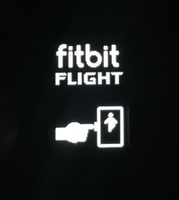
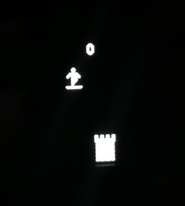
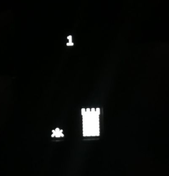
Have you been hitting all your daily goals? If you are racking up more than your share of daily steps and striding through each reminder to move, you might have earned your chance to play Fitbit Flight.
We want to hear how you're rocketing past each level, and any tips you have for getting consistent game play time by conquering your daily goals every day!
Reaching your daily goals is always a win, so go all out and win with Fitbit Flight! Here's how:
- To get the Fitbit Flight app you must achieve all your daily goals including: steps, distance, calories, active minutes, floors, and your daily Reminders to Move goal.
- If Reminders to Move is not currently activated, you will need to achieve 3x your main goal.
- The Fitbit Flight app disappears at midnight and can be achieved again the next day.
- Make sure your Charge 2 is updated to the latest firmware version (22.53.4).
Once you achieve all your daily goals, you can find the game on the final screen of your Charge 2 -- just use the side button to navigate through each screen until you land on Fitbit Flight.
Good luck catching flight! 
Want to get more steps? Visit Get Moving in the Health & Wellness Discussion Forum.

What about other exercises? Fitbit challenges about steps don't take into account my cycling and other workouts
 Best Answer
Hi, @Pdpalmer, your other exercises are taken into account in the "exercise" , the "active minutes" and the "calories burned" goals -- so there is plenty of equal time for all your acitivites.
To get the flight game you need to meet all your goals. Steps is not enough.
Sense, Charge 5, Inspire 2; iOS and Android

This sounds awesome!!! I have COPD, beginning stages of emphysema so I originally purchased the Charge HR. This Mothers Day, my lovely children purchased the Charge 2 for me and it's the best thing I have ever owned!!! Unfortunately, the Saturday before Mother's Day I came down with pneumonia and am still under ground weather, gasping for air!! Hopefully with a couple MES tweeks on Friday, I will be getting back together soon so I can join in the fun!!!
Best Answer


No can do @Olistide my longest and only stairway is 4 steps! So i can't get thr game unless i go someplace like a mall.
@Savatij if your interested in playing the game, please see tyr main thread on this, basically you have to hit your daily goals.
https://community.fitbit.com/t5/Charge-2/How-to-get-the-Fitbit-Charge-2-Game/td-p/1996375


Once you complete all your goals for the day the game is the last screen on your charge 2 device.
Best Answer
I did complete all my goals on Monday. And I made sure the update was correct. Still no good. No matter how many times I toggled through the settings on my fit bit the game screen never showed. I didn't quite meet my goals today but I'll try again for tomorrow after I adjust for sleeping during the day after a night shift.
Best Answer
@Czgints wrote:I don't get a chance to walk 10 floors in a day so I will not compete
You can change your goals. Just click on the account icon on the top right in the app and scroll down.
Best Answer
Tap almost any tile on your web based dashboard the the settings gear.
Tap any of the top tiles in your app dashboard then the settings gear
In both places the goals can be adjusted.
Best Answer
Community Moderator Alumni are previous members of the Moderation Team, which ensures conversations are friendly, factual, and on-topic. Moderators are here to answer questions, escalate bugs, and make sure your voice is heard by the larger Fitbit team. Learn more
@karinagw Great to see you hitting all your daily goals!  If this happens again, try restarting your tracker and then initiate a new sync. If the game still does not appear, please let me know!
@Sivan799 To make sure your Charge 2 has the latest firmware, you can go to your app and select the account icon. After that select Charge 2 and you should see 'Version 22.53.4' at the top if you have the newest firmware.
@JadaBean Nice to hear your excitement about the game! Keep it up! 
@SmallTown2003 Funny that you've already stumbled upon the game unknowingly! Sounds like many users have had a similar experience. Now that you're in the know, give it a try and have some fun.
@Cjay26 @Tebert @SunsetRunner @Gadgetgizzmo Sorry to hear you all haven't seen the game on your Charge 2 yet. I suggest restarting the tracker and then initiating a new sync right after.
@SBCain Thanks for your enthusiasm around the Charge 2 game! Great to hear you're a new user and are ready to play. Wishing you a speedy recovering so you can start hitting those daily goals!
Want to get more steps? Visit Get Moving in the Health & Wellness Discussion Forum.
Best Answer
You need to complete all of your goals AND all of the hours you have set for the "Reminders to Move" thing. You must have that completed and then the game will
show up. I got it finally today after realizing I wasn't hitting my 250 steps every hour (my settings are from 8am-8pm).
Best Answer
Community Moderator Alumni are previous members of the Moderation Team, which ensures conversations are friendly, factual, and on-topic. Moderators are here to answer questions, escalate bugs, and make sure your voice is heard by the larger Fitbit team. Learn more
Hey everyone -- One thing I would like to point out is that you must cycle through all the apps on the tracker once you have hit all your daily goals (including Reminders to move) to find the game. The game will appear at the end of the app carousel.
@aabrand14 So happy to hear you were able to find the game! Hope you had fun and will be playing again soon!
Want to get more steps? Visit Get Moving in the Health & Wellness Discussion Forum.

