
Join us on the Community Forums!
-
Community Guidelines
The Fitbit Community is a gathering place for real people who wish to exchange ideas, solutions, tips, techniques, and insight about the Fitbit products and services they love. By joining our Community, you agree to uphold these guidelines, so please take a moment to look them over. -
Learn the Basics
Check out our Frequently Asked Questions page for information on Community features, and tips to make the most of your time here. -
Join the Community!
Join an existing conversation, or start a new thread to ask your question. Creating your account is completely free, and takes about a minute.
Not finding your answer on the Community Forums?
- Community
- Product Help Forums
- Other Versa Smartwatches
- Re: Finding Versa Classic Bluetooth Connection
- Mark Topic as New
- Mark Topic as Read
- Float this Topic for Current User
- Bookmark
- Subscribe
- Mute
- Printer Friendly Page
- Community
- Product Help Forums
- Other Versa Smartwatches
- Re: Finding Versa Classic Bluetooth Connection
Finding Versa Classic Bluetooth Connection
- Mark Topic as New
- Mark Topic as Read
- Float this Topic for Current User
- Bookmark
- Subscribe
- Mute
- Printer Friendly Page

Hi Guys,
I can't seem to find the versa classic option in my Bluetooth settings of my Samsung s7 phone. The phone's software is updated. I've tried unpairing the versa and restarting/switching on-off the phone. Every time I go back to the Bluetooth settings, it takes ages to find the device, Versa and it's just versa. There isn't a versa classic.
I would really like to control the music on my phone through the versa. I would appreciate any insight or help.

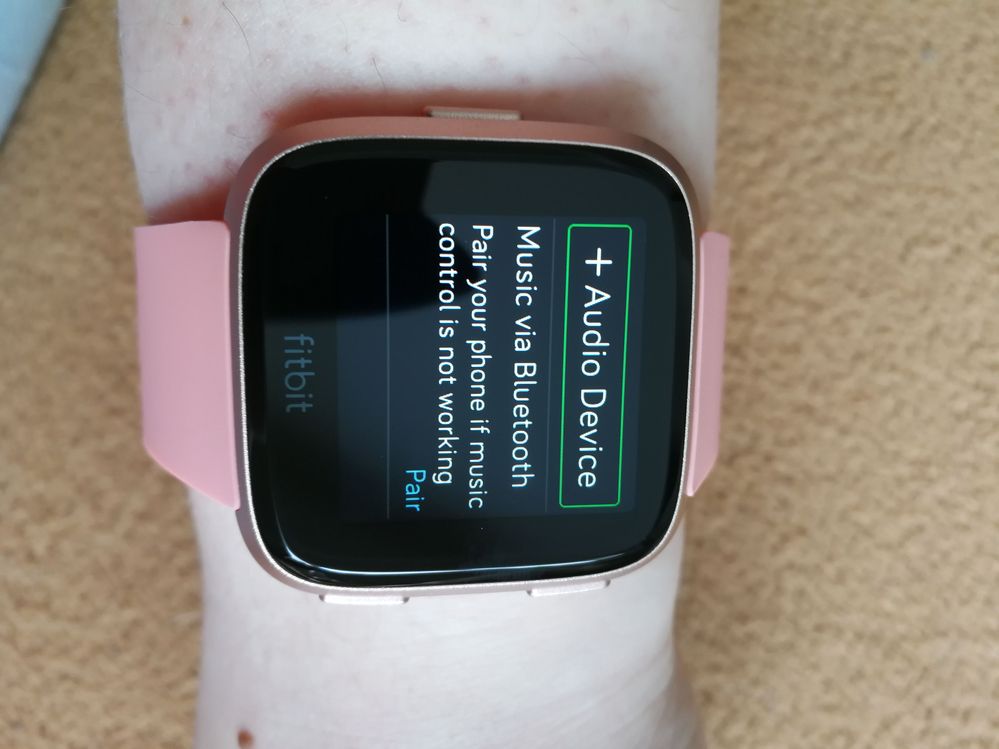

Great...u did it so easily...i m looking for this option from yesterday finally i slept at 1..
And now again i started troubleshooting my this bluetooth connectivity and just saw ur article reply...gr8
Even these agents dont know this solution i guess. . They keep telling to rboot phn dn reboot your watch....any ways thanks a ton
 Best Answer
I did your steps, I found the Versa classic, but for some reason everytime I try to connect it says that connection is denied by versa classic .Any idea what this means?

Thank you! I've been trying for weeks😁
Best Answer
When I click to Bluetooth connectivity. I see +Audio Device, but I don't see Music Via Bluetooth - pair.
Please help.
Best Answer
When you say click do you mean double tap what is it that you click. I doesn’t matter how many times I try I can’t find Bluetooth pairing and I’m getting very cross😡

Once you are on the Bluetooth settings screen, tap the bottom right corner. It will change from "on" to "off" or "pair". Put it on "pair" and then go into your phone's Bluetooth settings. You will now see "Versa (Classic)".
Best Answer
two steps - on the versa screen under controls click Bluetooth connection options, choose swipe/click till pair appears
After that on your galaxy S 7 - go into your bluetooth settings - click scan, Versa (classic) should appear as device to pair with, choose pair
Best Answer
I just bought mine and had the same problem, but got it working. Follow this steps.
1. Unpair bersa from your phone, on Bluetooth connections.
2. Delete versa from fitbit app.
3. In ur versa go to the settings and select bluetooth and tap until u see pair
4. Go to ur phone on Bluetooth settings and u will see versa clasic, pair ir, it took me 3 tries to pair it.
5. Add ur versa again on the fitbit app
needs to be easier to connect and pair devices.
Best Answer
Thanks a million. I was so close to tossing my watch out of the window 😳. Until a few days ago my watch and phone were connecting just fine, and then they stopped. I tried everything to try and reconnect but nothing was working. I saw your post, did what you suggested and now... my heart is happy❤😁
Best Answer
I am really happy that you got it to work, i mean i love my Fitbit, i hope you are not having issues with this new update.
Best Answer
SunsetRunner
Hi @abc139 , see my answer on the post on the Versa Troubles and try it. Regards kuzibri
Best Answer