
Join us on the Community Forums!
-
Community Guidelines
The Fitbit Community is a gathering place for real people who wish to exchange ideas, solutions, tips, techniques, and insight about the Fitbit products and services they love. By joining our Community, you agree to uphold these guidelines, so please take a moment to look them over. -
Learn the Basics
Check out our Frequently Asked Questions page for information on Community features, and tips to make the most of your time here. -
Join the Community!
Join an existing conversation, or start a new thread to ask your question. Creating your account is completely free, and takes about a minute.
Not finding your answer on the Community Forums?
- Community
- Product Help Forums
- Other Versa Smartwatches
- Re: Fitbit Versa needs to reboot
- Mark Topic as New
- Mark Topic as Read
- Float this Topic for Current User
- Bookmark
- Subscribe
- Mute
- Printer Friendly Page
- Community
- Product Help Forums
- Other Versa Smartwatches
- Re: Fitbit Versa needs to reboot
How do I restart my Versa?
- Mark Topic as New
- Mark Topic as Read
- Float this Topic for Current User
- Bookmark
- Subscribe
- Mute
- Printer Friendly Page
10-28-2018
11:02
- last edited on
10-29-2018
07:54
by
AlejandraFitbit


10-28-2018
11:02
- last edited on
10-29-2018
07:54
by
AlejandraFitbit
I think my Fitbit Versa needs to be rebooted.
Moderator edit: subject for clarity
 Best Answer
10-29-2018
07:58
- last edited on
07-01-2025
04:51
by
MarreFitbit


 Community Moderator Alumni are previous members of the Moderation Team, which ensures conversations are friendly, factual, and on-topic. Moderators are here to answer questions, escalate bugs, and make sure your voice is heard by the larger Fitbit team. Learn more
10-29-2018
07:58
- last edited on
07-01-2025
04:51
by
MarreFitbit
Hey @Dukescorrado, welcome to the Community and @SunsetRunner thanks for stopping by.
I would like to know if the instructions provided by our friend worked? If you keep having problems, please be more specific about what you are experiencing so we can better assist you.
Hope to hear from you soon. 

This link does not tell how to restart. It literally says do not put items in the sensor because it can damage the devise. How do we actually restart it? Mine has not tracked my heart rate for 3 days now and I just got it brand new in November.

SunsetRunner
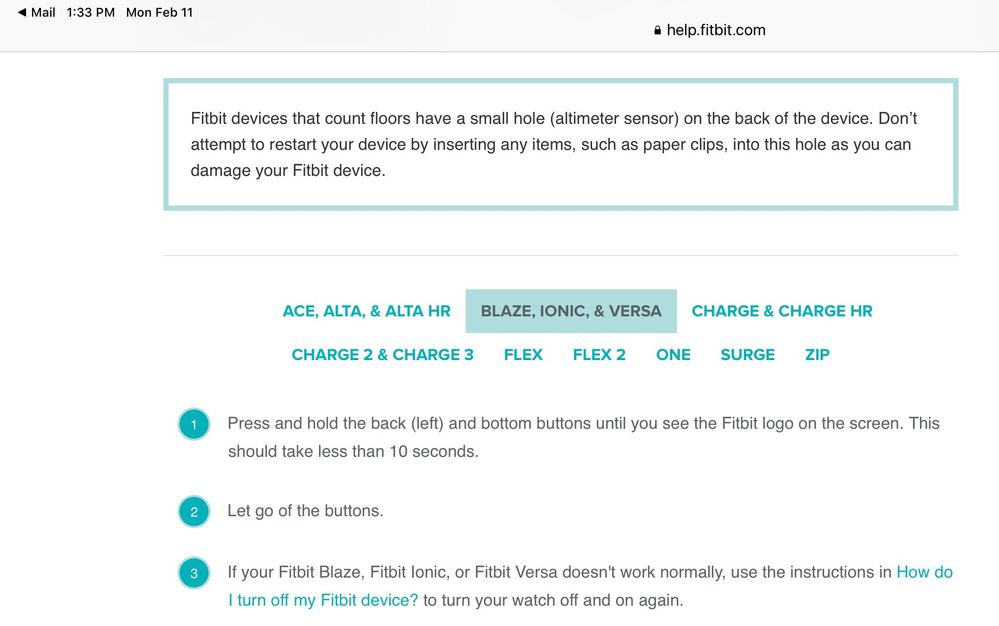
Hi @AprilmaeR. What you read is correct and very important. Do not put items in the sensor. Sorry you had problems with the link. Scrolling down that page, you would have see the photo below. Simply put, to restart the Versa, press the left button and the right bottom button until you see the Fitbit logo on the screen. If you still have problems after a restart, turn your Versa off ... wait 5 minutes ... then turn it back on by pressing any button. Instructions are here. You may have to tap Versa to get its specific instructions.
Please let us know if this helps.
I cannot press any buttons to restart my watch as I do not have any buttons at the back of my fitbit versa.
Best Answer
SunsetRunner
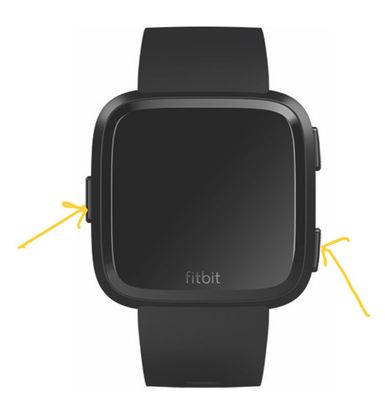
@ClaireSull , the buttons are at the sides of the Versa. To restart the Versa, press the left button and the right bottom button until you see the Fitbit logo on the screen. Hope this helps.
 Best Answer
Hi @ClaireSull, do you have a regular Versa or a Versa Lite? The restart procedure is different for both.
Kristen | USA Cruising through the Lifestyle Forums
one cruise ship at a time!Pixel Watches 1-4 I Charges 3-6 I Versas 1, 2, and Lite I Inspires 1 & 2 I Ionic I Alta HR I Flex 1 I Aria 2 & Air I Senses 1 & 2
Best Answer
SunsetRunner
Good point, @DramaQueenDiva
To restart a Versa Lite, press the button at the left for 10 seconds until the Fitbit icon appears.
Best Answer
My fitbit not work , dont know why, i charge and only show fitbit logo n the behind no signal
Best Answer
the what - i got the symbol but need to know whats next
Best Answer
SunsetRunner