
Join us on the Community Forums!
-
Community Guidelines
The Fitbit Community is a gathering place for real people who wish to exchange ideas, solutions, tips, techniques, and insight about the Fitbit products and services they love. By joining our Community, you agree to uphold these guidelines, so please take a moment to look them over. -
Learn the Basics
Check out our Frequently Asked Questions page for information on Community features, and tips to make the most of your time here. -
Join the Community!
Join an existing conversation, or start a new thread to ask your question. Creating your account is completely free, and takes about a minute.
Not finding your answer on the Community Forums?
- Community
- Product Help Forums
- Other Versa Smartwatches
- I'm getting “Clock error log into app and try anot...
- Mark Topic as New
- Mark Topic as Read
- Float this Topic for Current User
- Bookmark
- Subscribe
- Mute
- Printer Friendly Page
- Community
- Product Help Forums
- Other Versa Smartwatches
- I'm getting “Clock error log into app and try anot...
I'm getting “Clock error log into app and try another clock” when trying to change clock face
ANSWERED- Mark Topic as New
- Mark Topic as Read
- Float this Topic for Current User
- Bookmark
- Subscribe
- Mute
- Printer Friendly Page
07-20-2018
14:35
- last edited on
07-21-2018
12:57
by
HeydyF


07-20-2018
14:35
- last edited on
07-21-2018
12:57
by
HeydyF
I tried to change my clock yesterday and now my Fitbit only says “Clock error log into app and try another clock.” I have done this several times and chosen a Fitbit clock and every time I do the clock will not load and I get the same error message. I have no reset the Fitbit 3 times, including removing the device and then reading it. This is super frustrating, my software is up to date.
Moderator edit: Subject for clarity
Answered! Go to the Best Answer.
Accepted Solutions

 Fitbit Product Experts Alumni are retired members of the Fitbit Product Expert Program. Learn more
Hey @Nikkisni
Here is a copy of the Versa manual, the answers to lots of questions can be found in it.
https://staticcs.fitbit.com/content/assets/help/manuals/manual_versa_en_US.pdf

ALAN | VAN,B.C. Canada Community Council Member
Versa, Charge, Charge HR, Ionic, Ace, Aria 2 scale, Flyer headphones - iOS
Click here Fitbit help for more solutions
>Contact
Fitbit Product Experts Alumni are retired members of the Fitbit Product Expert Program. Learn more
Hey @Nikkisni
Here is a copy of the Versa manual, the answers to lots of questions can be found in it.
https://staticcs.fitbit.com/content/assets/help/manuals/manual_versa_en_US.pdf
ALAN | VAN,B.C. Canada Community Council Member
Versa, Charge, Charge HR, Ionic, Ace, Aria 2 scale, Flyer headphones - iOS
Click here Fitbit help for more solutions
>Contact

Did you get this fixed? I'm having that problem now but I never tried to change the clock. When I try to load a different clock face it just keeps trying to reload. Iphone 5S.
Did you get this fixed? I'm having that problem now but I never tried to change the clock. When I try to load a different clock face it just keeps trying to reload. I'm using an Iphone 5S.
 Best Answer
I am suffering this problem as well. Keep Android Fitbit apps update to date (version 2.79) but this problem starts to surface complaining Clock Error and ask for selecting new clock face. It will keep on reboot.

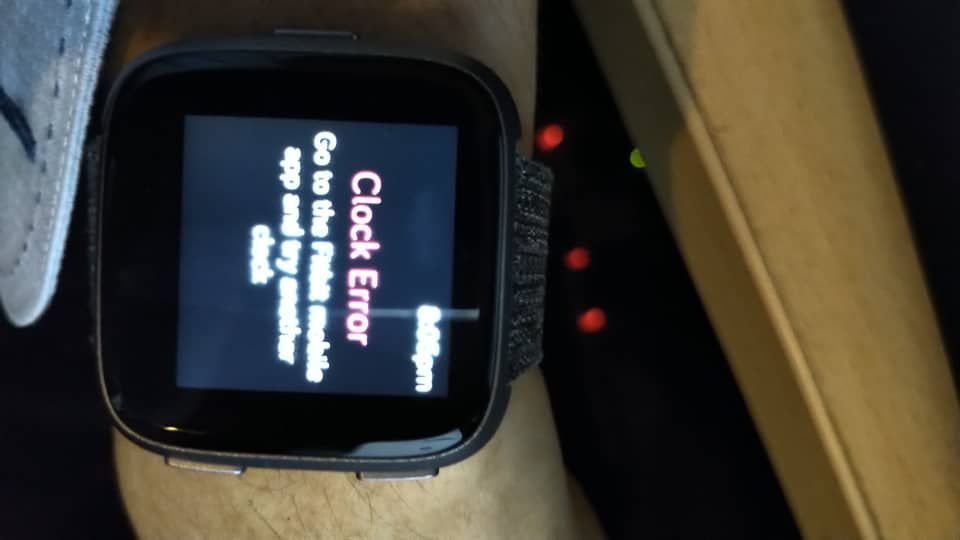


Mine did the same thing tonight. It eventually went off and now it will not reset or turn back on.

hey thanks for the obvious documentation LOL why don't you just tell me a solution or I would have just looked at my book in the first place?! I would have posted it on here or anybody else shouldn't have posted if they could just look at the manual they expect a decent reply
FYI I just fixed it temporary permanent I don't know but it's working I got my watch face to work again 🙂 what you do is you open up the Fitbit app on the phone go to faces go to the permissions toggle off and then on again if you put them on coincidentally for one of the basic watch faces you'll end up draining your watch a little bit because it's something running versus just giving you the time day and date you can get your stats through the app or swiping up at any rate toggling those will refresh the face and make it work again try it 🙂 thanks just another concerned versa user who used the same face from before the update and before it's called basics the watch face. 👍

What do you mean by “ go to the permissions toggle off” I can’t find that on the app.
Best Answer
Received the same "Clock Error" after updating on my Versa last night.
Solution: Replace the clock face. I tried reinstalling the existing clock face (since I really like it), but that failed. So, I replaced it with a random clock face, then reinstalled my favorite clock face.
Best Answer
Cheers from
Cindy's IPad
Best Answer
Sent from my iPhone
Best Answer
Thanks - had tried installing a bunch of different faces, nothing worked. Going into my phone settings/apps/fitbit/advanced on my phone and allowing the fitbit app to install apps seems to have worked (although I also toggled all the other permissions off and on again so it could be that too) .
Best Answer