
Join us on the Community Forums!
-
Community Guidelines
The Fitbit Community is a gathering place for real people who wish to exchange ideas, solutions, tips, techniques, and insight about the Fitbit products and services they love. By joining our Community, you agree to uphold these guidelines, so please take a moment to look them over. -
Learn the Basics
Check out our Frequently Asked Questions page for information on Community features, and tips to make the most of your time here. -
Join the Community!
Join an existing conversation, or start a new thread to ask your question. Creating your account is completely free, and takes about a minute.
Not finding your answer on the Community Forums?
- Community
- Product Help Forums
- Sense 2
- clock faces
- Mark Topic as New
- Mark Topic as Read
- Float this Topic for Current User
- Bookmark
- Subscribe
- Mute
- Printer Friendly Page
- Community
- Product Help Forums
- Sense 2
- clock faces
clock faces
ANSWERED- Mark Topic as New
- Mark Topic as Read
- Float this Topic for Current User
- Bookmark
- Subscribe
- Mute
- Printer Friendly Page

Does any clock face for Sense 2 or Versa 4 show actual MINUTES walked (lightning bolt symbol) - (NOT zone minutes - I don't use the zone minutes)? I just want to know when my set time for walking is up without having to sync my Fitbit on my phone or tablet and then check it on the computer. I'm having trouble seeing some of the info on the small screen on my Charge 5, so I want to go back to a larger screen. Thanks for any help with this.
Answered! Go to the Best Answer.
 Best Answer
Accepted Solutions

 Fitbit Product Experts Alumni are retired members of the Fitbit Product Expert Program. Learn more
Hi @LynneLee - Fitbit switched to Active Zone Minutes but if you just want to see active minutes, try SimpleClockPro which displays AZM by default but tap heart rate to briefly check Active minutes in its place.
Author | ch, passion for improvement.
Fitbit Product Experts Alumni are retired members of the Fitbit Product Expert Program. Learn more
Hi @LynneLee - Fitbit switched to Active Zone Minutes but if you just want to see active minutes, try SimpleClockPro which displays AZM by default but tap heart rate to briefly check Active minutes in its place.
Author | ch, passion for improvement.
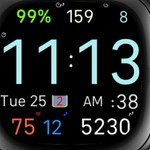
SimpleClockPro is indeed an impressive clock face with lots of extra features (estimated time to charge, charge history, 5 levels of brightness, flashlight...) Is there any chance that Fitbit would buy it in order to keep it available after june 2024?
Fitbit Product Experts Alumni are retired members of the Fitbit Product Expert Program. Learn more
I know. I did not ask the question for me. I believe it is the watch face that should be delivered as the standard one on any Sense 2 sold.
Best Answer