
Join us on the Community Forums!
-
Community Guidelines
The Fitbit Community is a gathering place for real people who wish to exchange ideas, solutions, tips, techniques, and insight about the Fitbit products and services they love. By joining our Community, you agree to uphold these guidelines, so please take a moment to look them over. -
Learn the Basics
Check out our Frequently Asked Questions page for information on Community features, and tips to make the most of your time here. -
Join the Community!
Join an existing conversation, or start a new thread to ask your question. Creating your account is completely free, and takes about a minute.
Not finding your answer on the Community Forums?
- Community
- Product Help Forums
- Sense
- Re: 250 step time frame
- Mark Topic as New
- Mark Topic as Read
- Float this Topic for Current User
- Bookmark
- Subscribe
- Mute
- Printer Friendly Page
- Community
- Product Help Forums
- Sense
- Re: 250 step time frame
250 step time frame
- Mark Topic as New
- Mark Topic as Read
- Float this Topic for Current User
- Bookmark
- Subscribe
- Mute
- Printer Friendly Page

 Fitbit Product Experts Alumni are retired members of the Fitbit Product Expert Program. Learn more
Hi @Chelle-07 - there are some things you can't do with the Fitbit App Move hours but you may find a sophisticated clock face which can, such as SimpleClockPro which caters for night shift working and besides has multiple reminders per hour and an all day steps history by hour. See the clock face description and documentation link.
Author | ch, passion for improvement.
 Best Answer
advice. It's still not let me pick 11 PM till 12 AM to get my last hour of
250 steps. It tells me. I can't pick 12 AM, but won't let me pick 11:59 or
11:55 or 11:45. So frustrating!
Chelle
Best Answer
Fitbit Product Experts Alumni are retired members of the Fitbit Product Expert Program. Learn more
@Chelle-07 - did you change it on the watch settings, on the clock face click heart rate twice and follow the instructions given in the documentation?
Author | ch, passion for improvement.
Best Answer
heart rate. Though this is about getting a time frame set up so I can get
250 steps for the 11 o'clock hour, which would end at 12 AM. It will not
let me choose the end time.
Best Answer
Fitbit Product Experts Alumni are retired members of the Fitbit Product Expert Program. Learn more
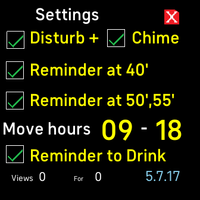
@Chelle-07 - on the clock face, tap on the red heart rate, bottom left, once and again to get to the clock face settings view to change the 250 Move hours (something like image below). There you can change start and end to almost any hours (even more than 14 if you want) by following the instructions in the documentation.
Author | ch, passion for improvement.
Best Answer
Fitbit Product Experts Alumni are retired members of the Fitbit Product Expert Program. Learn more
@Chelle-07 - please follow the instructions for night shift settings.
Author | ch, passion for improvement.
Best Answer
Fitbit Product Experts Alumni are retired members of the Fitbit Product Expert Program. Learn more
@Chelle-07- did you read the description where you installed the clock face and followed the link provided?
Author | ch, passion for improvement.
Best Answer
Fitbit Product Experts Alumni are retired members of the Fitbit Product Expert Program. Learn more
@Chelle-07 - well done, hopefully it will work for you.
If you tap the watch 250 step counter/Active hours you can follow the step history per hour, which will show how well it's working.
You can set the watch 250 steps per hour display, either to show steps done or how many left to do [by default].
Incidentally in the Fitbit app you can only view Move hours by setting Move hours before midnight and then after midnight if you want to continue past midnight.
Author | ch, passion for improvement.
Best Answer