
Join us on the Community Forums!
-
Community Guidelines
The Fitbit Community is a gathering place for real people who wish to exchange ideas, solutions, tips, techniques, and insight about the Fitbit products and services they love. By joining our Community, you agree to uphold these guidelines, so please take a moment to look them over. -
Learn the Basics
Check out our Frequently Asked Questions page for information on Community features, and tips to make the most of your time here. -
Join the Community!
Join an existing conversation, or start a new thread to ask your question. Creating your account is completely free, and takes about a minute.
Not finding your answer on the Community Forums?
- Community
- Product Help Forums
- Sense
- Re: Fullscreen
- Mark Topic as New
- Mark Topic as Read
- Float this Topic for Current User
- Bookmark
- Subscribe
- Mute
- Printer Friendly Page
- Community
- Product Help Forums
- Sense
- Re: Fullscreen
Sense display malfunctioning
- Mark Topic as New
- Mark Topic as Read
- Float this Topic for Current User
- Bookmark
- Subscribe
- Mute
- Printer Friendly Page
03-21-2023
00:48
- last edited on
04-09-2023
12:13
by
WilsonFitbit


03-21-2023
00:48
- last edited on
04-09-2023
12:13
by
WilsonFitbit
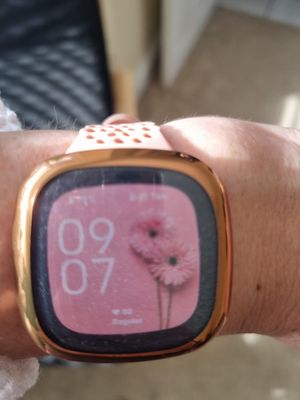
I got a fitbit sense for Mothers day. I set it up and changed my clock face and it was displaying a fullscreen. During charging yesterday something changed and my display is now no longer fullscreen. Please can someone tell me how I can get the fullcreen display back again please?
Moderator edit: clarified subject
 Best Answer
Hi @Wispy17 I am guessing you accidently went to the select a clockface screen. Try pressing the button and hopefully it will go back to the full screen. If it doesn't fix it, try to Restart your Tracker

Helen | Western Australia
Want to discuss ways to increase your activity? Visit Get Moving in the Lifestyle Discussion Forum.
Best Answer
Thank you for your reply, I've tried restarting. I've attached a picture of my screen, I now have a black frame around it instead of fullscreen 🥺🥺
Best Answer
 Fitbit Product Experts Alumni are retired members of the Fitbit Product Expert Program. Learn more

No it was the same clock face. My sons sense is more full screen, it has a black border but much narrower than mine now is. Who knows!
Best Answer
@Wispy17 FWIW, the Gallery shows a border.
Laurie | Maryland
Sense 2, Luxe, Aria 2 | iOS | Mac OS
Take a look at the Fitbit help site for further assistance and information.
Fitbit Product Experts Alumni are retired members of the Fitbit Product Expert Program. Learn more
