
Join us on the Community Forums!
-
Community Guidelines
The Fitbit Community is a gathering place for real people who wish to exchange ideas, solutions, tips, techniques, and insight about the Fitbit products and services they love. By joining our Community, you agree to uphold these guidelines, so please take a moment to look them over. -
Learn the Basics
Check out our Frequently Asked Questions page for information on Community features, and tips to make the most of your time here. -
Join the Community!
Join an existing conversation, or start a new thread to ask your question. Creating your account is completely free, and takes about a minute.
Not finding your answer on the Community Forums?
- Community
- Health & Wellness
- Sleep Well
- What health insurance do you have Pingu?
- Mark Topic as New
- Mark Topic as Read
- Float this Topic for Current User
- Bookmark
- Subscribe
- Mute
- Printer Friendly Page
- Community
- Health & Wellness
- Sleep Well
- What health insurance do you have Pingu?
Sleep depth tracking
ANSWERED- Mark Topic as New
- Mark Topic as Read
- Float this Topic for Current User
- Bookmark
- Subscribe
- Mute
- Printer Friendly Page

I'm on day 2 of fitbit ownership (ChargeHR) and i'm very impressed. I earn points on my health insurance for reaching step goals each day and last night i found myself going out for a little walk just to top up to hit my goal for the day. It's already changing my behaviour!
The only thing i'm not that impressed with is the sleep tracking. I sometimes use an app called Sleep Cycle and it shows periods of deep sleep and light sleep, and it can also wake you up during the light sleep periods to make the transition to daytime easier. I'm surprised that Fitbit can't recognise deep/light sleep based on the accelerometer data like my iPhone can. Does anyone know if this is possible and if fitbit might consider developing this feature?
Answered! Go to the Best Answer.
Accepted Solutions

What Sleep Cycle does is link the non-movement bits and the movement bits with curves. This gives your sleep pattern the appearance of a more gradual transition between light and deep sleep and periods of awakeness. Probably in addition, it uses some algorithm to try and decide whether you're actually awake. This algorithm might be based on the duration between movements and the fact that the "normal" sleep cycle lasts about 90-110 minutes. So what the SC graphs show is based on a lot on assumptions. They often show me in the light sleep phase when I was actually wide awake and going to the loo. They always show me as waking up gradually - due to the curve -, when this is often not the case (noisy neighbors waking me up whether I'm ready or not). The Flex shows me going from being asleep to being suddenly awake - which generally corresponds more to my typical wake-up experience. 😞
Fitbit doesn't use curves and only displays spikes when it detects movement. It doesn't try to read more into the data. This is actually more accurate than the Sleep Cycle curves. Although I sometimes just get "restless" when I was actually awake, it doesn't show me as being asleep.
So due to the curves, which run through light and deep sleep levels, SC might look more precise or detailled, but it is not. Since it is purely based on the detected levels of movement, it cannot be more precise or detailled.
With the HR function, the Charge HR should actually be able to give more reliable info on your deep, light and REM sleep than SC since your HR should be the lowest during deep sleep. You might even be able to identify REM stages, because during REM the heart rate raises again close to your resting HR, but is often more variable than that. Without HR information, trackers might easily incorrectly identify REM sleep, where the brain and other internal functions are more "awake" than during light sleep, as deep sleep because the body is practically paralyzed during REM and no movements would be tracked by the devices.
Without electrodes measuring your brain waves during sleep, there is - at least not yet - no way to reliable distinguish all your sleep phases.
The only thing that Fitbit does not do is to allow you to set a flexible alarm based on your light sleep. But I think a request for that feature has already been added to the suggested features list.
What Sleep Cycle does is link the non-movement bits and the movement bits with curves. This gives your sleep pattern the appearance of a more gradual transition between light and deep sleep and periods of awakeness. Probably in addition, it uses some algorithm to try and decide whether you're actually awake. This algorithm might be based on the duration between movements and the fact that the "normal" sleep cycle lasts about 90-110 minutes. So what the SC graphs show is based on a lot on assumptions. They often show me in the light sleep phase when I was actually wide awake and going to the loo. They always show me as waking up gradually - due to the curve -, when this is often not the case (noisy neighbors waking me up whether I'm ready or not). The Flex shows me going from being asleep to being suddenly awake - which generally corresponds more to my typical wake-up experience. 😞
Fitbit doesn't use curves and only displays spikes when it detects movement. It doesn't try to read more into the data. This is actually more accurate than the Sleep Cycle curves. Although I sometimes just get "restless" when I was actually awake, it doesn't show me as being asleep.
So due to the curves, which run through light and deep sleep levels, SC might look more precise or detailled, but it is not. Since it is purely based on the detected levels of movement, it cannot be more precise or detailled.
With the HR function, the Charge HR should actually be able to give more reliable info on your deep, light and REM sleep than SC since your HR should be the lowest during deep sleep. You might even be able to identify REM stages, because during REM the heart rate raises again close to your resting HR, but is often more variable than that. Without HR information, trackers might easily incorrectly identify REM sleep, where the brain and other internal functions are more "awake" than during light sleep, as deep sleep because the body is practically paralyzed during REM and no movements would be tracked by the devices.
Without electrodes measuring your brain waves during sleep, there is - at least not yet - no way to reliable distinguish all your sleep phases.
The only thing that Fitbit does not do is to allow you to set a flexible alarm based on your light sleep. But I think a request for that feature has already been added to the suggested features list.


I find the sleep tracking on the Fitbit very disappointing. I know for sure, it took me over 1 hour to fall alseep last night and the fitbit tells me I fell asleep right away. It tells me I had 93% efficiency. I am no where near that. I find this very disappointing. I hope Fitbit looks into this. This was one of the main reasons I purchased the Fitbit. I see someone has mentioned Sleep Cycle - I am going to check into that and compare it to Fitbit.

I too am wondering how accurate the HR device is for sleep tracking - didn't take my usual sleeping pill last night and know I was awake for considerable periods during the night and yet according to my HR I only had 4 periods when I was awake totalling 8 minutes.
I have sleep apnea and insomnia and restless leg so my pattern is all over the place.
I find I am happier with the Charge HR.
Tracy
Have you thought of changing between and sensitve and normal? There is a place on the dashboard in the settings under devices that will allow you to change from one to the other. Might feel more accurate to you. It really only does things based on movement so if you lay down and done move it thinks you are asleep.
 Best Answer
It is very easy to see just how good fitbit is at tracking sleep.
Don't look at your sleep pattern and see how you feel during the day.
I always know I have had more than 90 minutes continuous sleep - which you need to get to REM - by the way I feel. Never been wrong in years of fitbit ownership.
I don't take any notice of the percentages as the only key bit of information needed is if you can get to 90 minutes in one go.
Regards
Chris

 Fitbit Product Experts Alumni are retired members of the Fitbit Product Expert Program. Learn more
@G2EWS wrote:It is very easy to see just how good fitbit is at tracking sleep.
Don't look at your sleep pattern and see how you feel during the day.
I always know I have had more than 90 minutes continuous sleep - which you need to get to REM - by the way I feel. Never been wrong in years of fitbit ownership.
I don't take any notice of the percentages as the only key bit of information needed is if you can get to 90 minutes in one go.
Regards
Chris
@G2EWS Are you using an HR Model Fitbit. ?
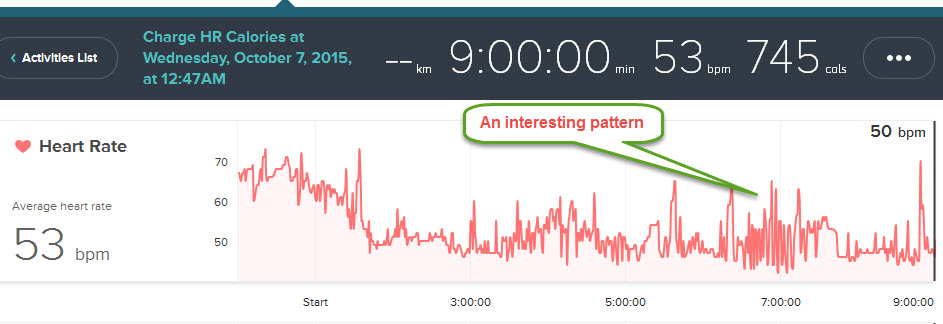
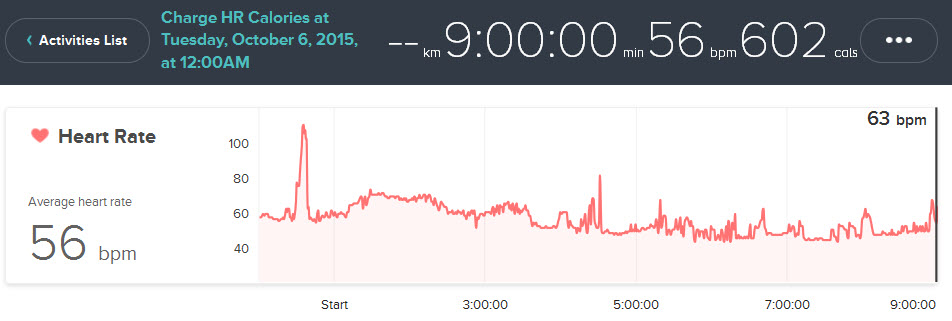
If so, you can create a Custom Activity and get your HR graph for the hours asleep, the Charge HR thinks your are asleep if your use the button, and the activity record finishes up in the sleep area, hence the Custom Activity. The Surge will track sleep in one minute graphs if you use its Workout button
Here is mine from last night and the night from the Charge HR using a Custom activity. Extra blankets on last night. These are one minute graphs.
Ionic (OS 4.2.1, 27.72.1.15), Android App 3.45.1, Premium, Phone Sony Xperia XA2, Android 9.0
Hi Colin,
Not too sure what you are trying to say.
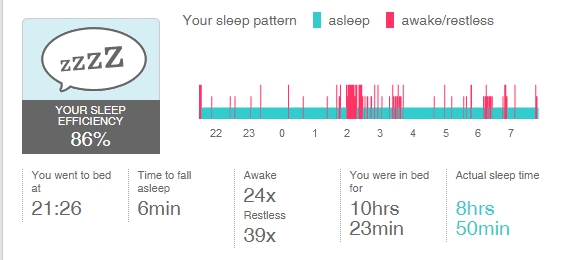
I am more interested in how long one continuous sleep it without interruptions. As I say, the average person needs 90 minutes to get to REM, which is the most important part of sleep.
I generally wake or get restless with 30 - 60 minutes, meaning I don't get a decent nights sleep for many weeks.
See a typical graph of my sleep.
I hasten to add, I am not normally in bed this long!
Regards
Chris
 Best Answer
My screen capture is there.
I found Colin's two jpg's took a while to show up so you may see mine in a while.
Regards
Chris
Best Answer
Fitbit Product Experts Alumni are retired members of the Fitbit Product Expert Program. Learn more
@G2EWS wrote:My screen capture is there.
I found Colin's two jpg's took a while to show up so you may see mine in a while.
Regards
Chris
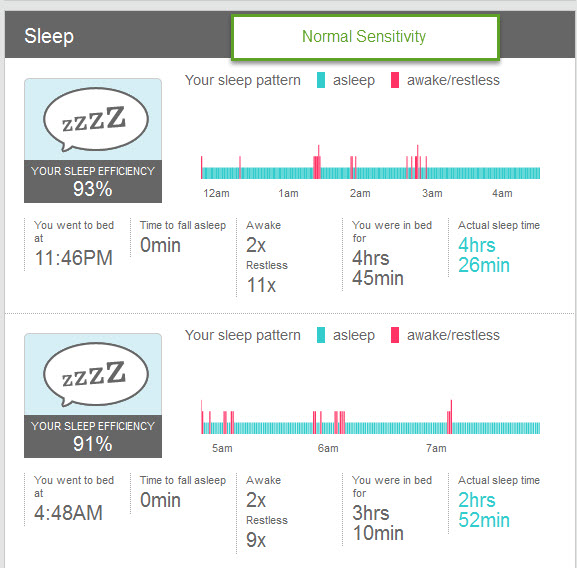
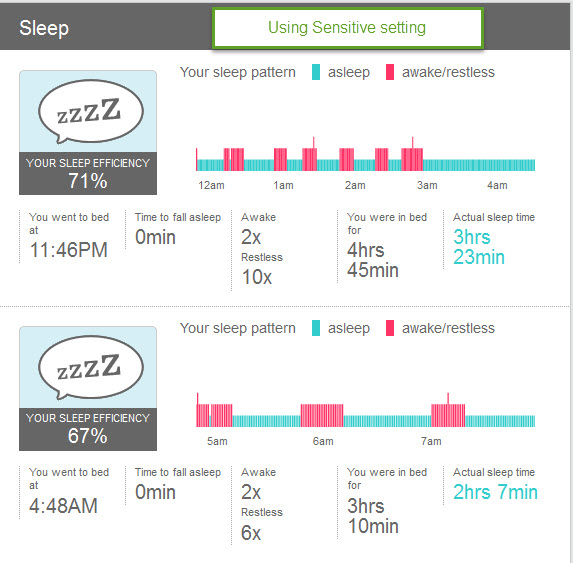
@G2EWS Chris, the images below, the first is normal setting and I have edited to have the second image sleep period as sensitive.. If you hover over the sleep record the edit pencil appears and you can change it to sensitive and back to normal. etc
The record broke up because I went to the bathroom.....
Some Fitbitters say that being restless over 20 times should be investigated, but I'm not sure if that is the Normal or Sensitive setting. Here is a link to Fitbit's FAQ
Ionic (OS 4.2.1, 27.72.1.15), Android App 3.45.1, Premium, Phone Sony Xperia XA2, Android 9.0
Hi Colin,
Not sure how you get the 'pencil' to change to sensitive. Where abouts are you 'hovering'?
Regards
Chris
Best Answer
Fitbit Product Experts Alumni are retired members of the Fitbit Product Expert Program. Learn more
@G2EWS wrote:Hi Colin,
Not sure how you get the 'pencil' to change to sensitive. Where abouts are you 'hovering'?
Regards
Chris
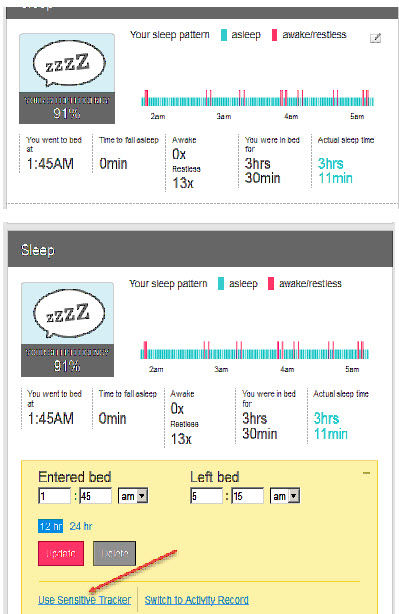
@G2EWS When you click on the edit pencil it should show the second image below and allow you to swap between sensitive settings and back.
See how you go.
Ionic (OS 4.2.1, 27.72.1.15), Android App 3.45.1, Premium, Phone Sony Xperia XA2, Android 9.0
Morning Colin,
Thank you that sorted it.
But, unfortunately I also clicked on "Switch to Activity Record" and it turned my sleep into an activity! Ooops! Don't know how to get it back.
Regards
Chris
Best Answer
Fitbit Product Experts Alumni are retired members of the Fitbit Product Expert Program. Learn more
@G2EWS wrote:Morning Colin,
Thank you that sorted it.
But, unfortunately I also clicked on "Switch to Activity Record" and it turned my sleep into an activity! Ooops! Don't know how to get it back.
Regards
Chris
@G2EWS Good morning Chris. Click into your Log, Activity area and edit the Activity record and change it back to a sleep record.
Fitbit in their wisdom over 4 years ago had this feature implemented because a few of us were have some periods of rest within a timed activity and the action went into a Sleep record. We are to reverse that.
A wonderful way to learn the idiosyncrasies of Fitbit
Colin
Ionic (OS 4.2.1, 27.72.1.15), Android App 3.45.1, Premium, Phone Sony Xperia XA2, Android 9.0
