
Join us on the Community Forums!
-
Community Guidelines
The Fitbit Community is a gathering place for real people who wish to exchange ideas, solutions, tips, techniques, and insight about the Fitbit products and services they love. By joining our Community, you agree to uphold these guidelines, so please take a moment to look them over. -
Learn the Basics
Check out our Frequently Asked Questions page for information on Community features, and tips to make the most of your time here. -
Join the Community!
Join an existing conversation, or start a new thread to ask your question. Creating your account is completely free, and takes about a minute.
Not finding your answer on the Community Forums?
- Community
- Developers
- Web API Development
- Re: 500 error while calling API from local host
- Mark Topic as New
- Mark Topic as Read
- Float this Topic for Current User
- Bookmark
- Subscribe
- Mute
- Printer Friendly Page
- Community
- Developers
- Web API Development
- Re: 500 error while calling API from local host
500 error while calling API from local host
ANSWERED- Mark Topic as New
- Mark Topic as Read
- Float this Topic for Current User
- Bookmark
- Subscribe
- Mute
- Printer Friendly Page

async function fetchData(){
  await fetch(`API`, {
    method: "GET",
    headers:{
      Authorization : `Bearer ${Access Token}`,
    },
  }).then((response) => response.json()).then((data) => console.log(data))
}
The API that calls the following user's profile works fine,
API = https://api.fitbit.com/1/user/-/profile.json
API = https://api.fitbit.com/1/user/-/badges.json
      https://api.fitbit.com/1/user/-/activities/date/2021-05-12.json
      .....

-------------------------------------------------------------------
response:

GET https://api.fitbit.com/1/user/-/badges.json 500

{errors: Array(1), success: false}
  errors: [{errorType: "request", fieldName: "n/a", message: null}]
  success: false
  __proto__: Object
what should I do? help me please FITBIT dev 😢
Answered! Go to the Best Answer.
 Best Answer
- Labels:
-
JavaScript
Accepted Solutions


 Fitbit Developers oversee the SDK and API forums. We're here to answer questions about Fitbit developer tools, assist with projects, and make sure your voice is heard by the development team.
** This is only needed if you recently reset your client secretand all of the endpoints are failing except for the Get Profile endpoint **
Hi everyone. We pushed the fix this morning. I've tested it and it worked. To have the fix applied to your application, you will need to reset your client secret by pressing the "Reset Client Secret" button on the summary page of your registered application.
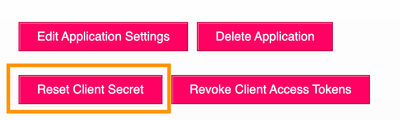
Once you reset your client secret, you will need to change the client secret value in your code where you build the basic token. Your existing connected users will not need to re-consent with your application.
If you have any problems, please let us know.
Senior Technical Solutions Consultant
Fitbit Partner Engineering & Web API Support | Google
Fitbit Developers oversee the SDK and API forums. We're here to answer questions about Fitbit developer tools, assist with projects, and make sure your voice is heard by the development team.
I would like to try to reproduce this problem for our engineering team. Would you please provide me with the detailed steps, including the endpoints and headers, you followed to get this error? I've tried on my own and do not see the same behavior.
Thanks!
Gordon
Senior Technical Solutions Consultant
Fitbit Partner Engineering & Web API Support | Google

I get the 500 error as well, whether through Python (on my local machine), Postman (postman.co), or fitbit's Swagger Site (https://dev.fitbit.com/build/reference/web-api/explore/#/Activity%20Intraday%20Time%20Series/getActi...) Just like Leeseonghwan wrote, the profile endpoint works fine (https://api.fitbit.com/1/user/-/profile.json). All others return a 500 response with
{
"errors": [
{
"errorType": "request",
"fieldName": "n/a",
"message": null
}
],
"success": false
}
Fitbit Developers oversee the SDK and API forums. We're here to answer questions about Fitbit developer tools, assist with projects, and make sure your voice is heard by the development team.
Thank you for providing the additional information. Would you please private message me the user id which is generating the 500 error? I'm trying to find a pattern that is causing this problem.
Senior Technical Solutions Consultant
Fitbit Partner Engineering & Web API Support | Google
Fitbit Developers oversee the SDK and API forums. We're here to answer questions about Fitbit developer tools, assist with projects, and make sure your voice is heard by the development team.
Did either of you happen to press the "Reset Client Secret" button prior to the 500 errors occurring? I'm curious if this is part of the steps to reproduce the problem.
Senior Technical Solutions Consultant
Fitbit Partner Engineering & Web API Support | Google

I encountered the same 500 error and then I pushed Reset Client Secret in an attempt to 'start over', but I received the same error.
Best Answer
Yes, I'm almost certain I did. I clicked it accidentally. I didn't think it was a big deal. Sounds like maybe it was!
Best Answer
Fitbit Developers oversee the SDK and API forums. We're here to answer questions about Fitbit developer tools, assist with projects, and make sure your voice is heard by the development team.
Yes...resetting the client secret seems related to the problem. I'm working with the engineering team to provide a fix. Right now, the only workaround I see is to re-register your application again.
Senior Technical Solutions Consultant
Fitbit Partner Engineering & Web API Support | Google
Fitbit Developers oversee the SDK and API forums. We're here to answer questions about Fitbit developer tools, assist with projects, and make sure your voice is heard by the development team.
UPDATE: I mentioned a workaround of registering your application. Keep in mind, if you do this all of your users will need to re-consent to share their data with your application. I recommend only doing this for test applications.
We have found the problem and working on the fix. If everything goes as planned, the problem should be resolved on Monday, May 24th. I'll post an update here once the fix has been posted.
Thank you for your patience.
Senior Technical Solutions Consultant
Fitbit Partner Engineering & Web API Support | Google
Your workaround did indeed work. I am able to pull heart rate to local host now. Thank you for the quick solution and fix!
The method using the "Reset Client Secret" button doesn't work 😢
In the case of me, it is a situation where the procedure for the experiment plan and method has been completed in order to acquire intraday data for several people.
It takes 3-4 days to repeat the process of creating a new application and registering it again, which is a rather complicated process.
How to wait for the update until May 24th, or register and use a new application. The time required for the two methods seems to be similar...
If I create a new application, can I skip the existing Intraday data acquisition process?
Thank you so much for your kind and quick response @Gordon-C 😊
Best Answer
Sounds like @angrybeard had success with this method. I'll give this a try when I get a chance. I'm the only user of my app, so I don't expect any issues. I just use this to programmatically download my data and gain some API experience. Thank you for your help @Gordon-C !
Fitbit Developers oversee the SDK and API forums. We're here to answer questions about Fitbit developer tools, assist with projects, and make sure your voice is heard by the development team.
Based on your use case, I would recommend waiting until the fix comes outs next week. Thank you for your patience.
Senior Technical Solutions Consultant
Fitbit Partner Engineering & Web API Support | Google
Best Answer
I couldn't figure out how to re-register my app (which isn't a real app/website - it's just set up so I can access the API), so I simply created a second one. I got a new client ID and used that in my API call to https://www.fitbit.com/oauth2/authorize. I got my new access token and passed it in an API activity endpoint call in a manner similar to Leeseonghwan's fetchData() function in the initial post above, and everything works fine now. Thank you all for your help!
Best Answer
Fitbit Developers oversee the SDK and API forums. We're here to answer questions about Fitbit developer tools, assist with projects, and make sure your voice is heard by the development team.
** This is only needed if you recently reset your client secretand all of the endpoints are failing except for the Get Profile endpoint **
Hi everyone. We pushed the fix this morning. I've tested it and it worked. To have the fix applied to your application, you will need to reset your client secret by pressing the "Reset Client Secret" button on the summary page of your registered application.
Once you reset your client secret, you will need to change the client secret value in your code where you build the basic token. Your existing connected users will not need to re-consent with your application.
If you have any problems, please let us know.
Senior Technical Solutions Consultant
Fitbit Partner Engineering & Web API Support | Google
I tested this fix on both my original app (which was still failing) and my "workaround" app, which was working fine. I changed the Client Secret on both, and now I have two apps which are working fine. Thank you @Gordon-C and team!
Best Answer