
Join us on the Community Forums!
-
Community Guidelines
The Fitbit Community is a gathering place for real people who wish to exchange ideas, solutions, tips, techniques, and insight about the Fitbit products and services they love. By joining our Community, you agree to uphold these guidelines, so please take a moment to look them over. -
Learn the Basics
Check out our Frequently Asked Questions page for information on Community features, and tips to make the most of your time here. -
Join the Community!
Join an existing conversation, or start a new thread to ask your question. Creating your account is completely free, and takes about a minute.
Not finding your answer on the Community Forums?
- Mark Topic as New
- Mark Topic as Read
- Float this Topic for Current User
- Bookmark
- Subscribe
- Mute
- Printer Friendly Page
App isn't connecting to my tracker.
- Mark Topic as New
- Mark Topic as Read
- Float this Topic for Current User
- Bookmark
- Subscribe
- Mute
- Printer Friendly Page


SunsetRunner
Welcome to the Community @jeri_bean! This sounds like if your tracker is unpaired. You should check out if your iPhone is listed here. If it's listed try restarting your tracker one more time. After that, follow the instructions here.
I hope this helps. Let me know the outcome.
 Best Answer
04-08-2017
20:18
- last edited on
05-20-2017
07:35
by
MarcoGFitbit


04-08-2017
20:18
- last edited on
05-20-2017
07:35
by
MarcoGFitbit
I have tried for a whole day and the darn thing still won't connect! I am tired and just about to give up. I mean come on! a whole entire day!
Moderator Edit: Format.


 Community Moderator Alumni are previous members of the Moderation Team, which ensures conversations are friendly, factual, and on-topic. Moderators are here to answer questions, escalate bugs, and make sure your voice is heard by the larger Fitbit team. Learn more
Hello @Appppp, have a warm welcome to the Fitbit Community, it's nice to have you on board! 
First of all, I would like to apologize for the delay in my response. Second, if your tracker is still not setting up correctly in the Fitbit app, please try the following:
- Restart your tracker, then leave it plugged in and charging
- Restart your phone.
- Turn off the Bluetooth on your phone for 15 seconds, then turn it back on.
- Make sure there are no other Bluetooth devices around that might interfere with the syncing process.
- Try to set up your tracker once again:
- Open the Fitbit app and tap on the Account symbol at the top right corner of the screen, then tap on "Set up a New Device"
- Choose your tracker and follow the onscreen instructions to continue
- If the app asks you to replace your current tracker, please replace it and continue with the process.
I hope this can be helpful, give it a try and keep me posted in case you need anything else! 


 Community Moderator Alumni are previous members of the Moderation Team, which ensures conversations are friendly, factual, and on-topic. Moderators are here to answer questions, escalate bugs, and make sure your voice is heard by the larger Fitbit team. Learn more
Hello @Tomyom, thanks for joining us, it's great to see new faces around.
Did you set up your Flex on your mother's account or did you simply logged in with your account and sync your tracker? If your tracker is not setting up on your iPad, please try the following:
- Restart your tracker and leave it plugged in and charging
- Restart your iPad
- Make sure there are no other Bluetooth devices that might interfere with the set up process.
- Make sure you have a strong Wi-Fi signal (or cellular data)
- Open the Fitbit app and tap on the Account symbol at the top right corner of the screen, then tap on "Set up a New Device"
- Choose your tracker and follow the onscreen instructions to continue
- When (or if) the app asks you to replace your current tracker, please replace it and continue with the process.
I hope this can be helpful. give it a try and keep me posted in case you need anything else.
Best Answer
Community Moderator Alumni are previous members of the Moderation Team, which ensures conversations are friendly, factual, and on-topic. Moderators are here to answer questions, escalate bugs, and make sure your voice is heard by the larger Fitbit team. Learn more
Hello @Hojo1369, have a warm welcome to the Fitbit Community, it's great to have you on board.
Thanks for trying the troubleshooting steps described above. I would like to know if you have already tried to restart your Fitbit One by plugging your tracker into its charging cable, making sure that the gold contacts on your tracker align with the gold contacts in the inside of the charger then holding down the button for 10-12 seconds until the screen turns off, then pressing the button until it turns back on.
After restarting your tracker a couple of times, please leave it plugged in and make sure it's charging, then proceed by trying to set it up as a new device once again as described above.
I hope this can be helpful, let me know the outcome; if you're still need assistance, don't hesitate to reply.
Best Answer
thing so the fitbit one is defective and won't pair or sync to the app.
Best Answer
Community Moderator Alumni are previous members of the Moderation Team, which ensures conversations are friendly, factual, and on-topic. Moderators are here to answer questions, escalate bugs, and make sure your voice is heard by the larger Fitbit team. Learn more
Hello @Hojo1369, I hope you're having a great day, thanks for replying
Going by my records, I was able to check that you have already contacted our Support Team and that they have given you a resolution by now. I appreciate you have taken the time to reply.
In case you have some spare time, I would like to invite you to visit our Discussions board where you will find great tips and encouragement from other members and if there's anything else I can do for you, please keep me posted!
Best Answer
I had the same problem i kept resetting over and over then i decided to just play around myself so what i did was: whilst it was trying to connect i held the button again on the watch for 3 seconds and all of a sudden it jumped to the next screen and completed my setup. I also made sure i was not wearing the fitbit whilst i did this. It then told me to put it on and voila!! it synced. try this and i hopw it helps

Nothing about these instructions works. I'm frustrated beyond comprehension with Fitbit products. They flat out don't work. I'm just trying to get this thing working for my daughter. And it won't work. Period
least I tried it. Wasn't out anything lol.
Best Answer
For the last two weeks, my fitbit charge 2 will not connect for my runs. It's extremely frustrating. I've tried all the above suggestions and nothing helps. The thing that is the most baffling is that it's been working great since i got it in May and now, just out of the blue, it doesn't work. How can that even happen? My phone says it's connected, and all my stats for the day show up in the app. But it won't connect to my phone's GPS!
Best Answer
Community Moderator Alumni are previous members of the Moderation Team, which ensures conversations are friendly, factual, and on-topic. Moderators are here to answer questions, escalate bugs, and make sure your voice is heard by the larger Fitbit team. Learn more
Hello @Puglvr, I hope you're doing well, it's nice to see you around.
Your Charge 2 has connected GPS, what this means is that in order for the tracker to trace a map when you select a GPS exercise such as walk, run or hike. Please keep in mind that all GPS devices, whether your phone or your tracker connected to your phone, require a direct path to these satellites in order to receive their radio transmissions. If the signal is being blocked—either because you're underground, near many tall buildings, or as a result of atmospheric effects—GPS will not work.
Once you select an exercise on your Charge 2, it will need to find the GPS signal first before it can start tracing a path. Check the following screens to know when your tracker has connected well:
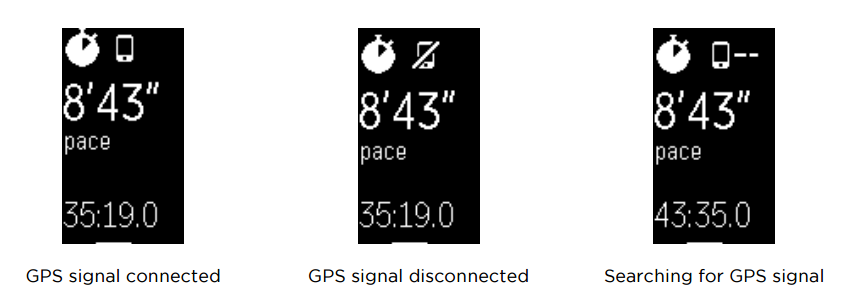
Now, when you use only your phone and MobileRun to record your exercise, your phone is the one using its integrated GPS which means the path will be more accurate and it's harder for a phone to lose a GPS signal.
Finally, I do not recommend starting a GPS activity on your tracker and your phone at the same time because they will rewrite themselves causing data to be lost during the syncing process as 2 different devices are tracking the same activity at the same time.
I hope this resolves your inquiry, if there's anything else I can do for you, please let me know, I'll be happy to help. 
Best Answer
Exactly the same for me since iOS updates. I think there’s something wrong with the app because my Fitbit has always been fine now it won’t sync at all no matter what I do!