
Join us on the Community Forums!
-
Community Guidelines
The Fitbit Community is a gathering place for real people who wish to exchange ideas, solutions, tips, techniques, and insight about the Fitbit products and services they love. By joining our Community, you agree to uphold these guidelines, so please take a moment to look them over. -
Learn the Basics
Check out our Frequently Asked Questions page for information on Community features, and tips to make the most of your time here. -
Join the Community!
Join an existing conversation, or start a new thread to ask your question. Creating your account is completely free, and takes about a minute.
Not finding your answer on the Community Forums?
- Mark Topic as New
- Mark Topic as Read
- Float this Topic for Current User
- Bookmark
- Subscribe
- Mute
- Printer Friendly Page
Average steps overall
ANSWERED- Mark Topic as New
- Mark Topic as Read
- Float this Topic for Current User
- Bookmark
- Subscribe
- Mute
- Printer Friendly Page
- « Previous
-
- 1
- 2
- Next »

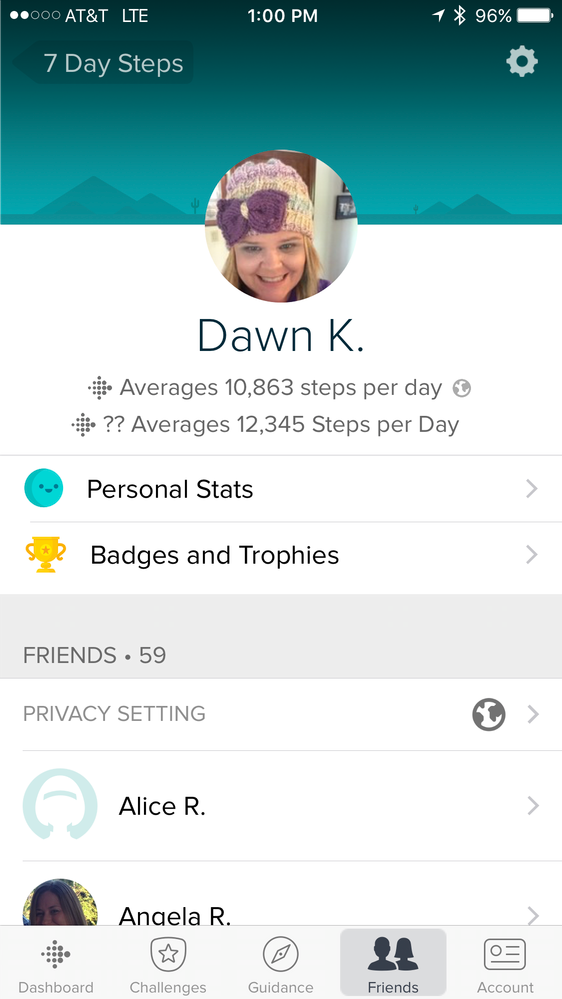
Why are there now two numbers for the average number of steps? What is the difference?
Answered! Go to the Best Answer.

 Fitbit Product Experts Alumni are retired members of the Fitbit Product Expert Program. Learn more
@DerrickSAgreed Derrick.. I have posted in the Android link and came up with the same issue and solution.... Great memories of a very, very retired computer programmer.. The joys of buffers etc....
@DerrickFitbit wrote:Hi everybody,
I've seen a number of instances where the following steps resolve this problem, I'd recommend giving them a try.
- Open the Fitbit App > tap the Account button > and tap the tile with your profile at the top.
- Tap the gear icon in the top right-hand corner.
- Tap Location.
- Tap country and add your country.
You also can choose to set your location to private if you don't want others to see your location, but adding a location seems to resolve this issue.
Hope this helps!
Ionic (OS 4.2.1, 27.72.1.15), Android App 3.45.1, Premium, Phone Sony Xperia XA2, Android 9.0
 Best Answer


SunsetRunner
I also had the extra number-12345. I added my location and that took care of it! Thanks!
Best Answer
SunsetRunner
I already had my location set, even tried to change to another country and back. Still shows the two question marks then average 12345 etc... 😞
Best Answer
- « Previous
-
- 1
- 2
- Next »