
Join us on the Community Forums!
-
Community Guidelines
The Fitbit Community is a gathering place for real people who wish to exchange ideas, solutions, tips, techniques, and insight about the Fitbit products and services they love. By joining our Community, you agree to uphold these guidelines, so please take a moment to look them over. -
Learn the Basics
Check out our Frequently Asked Questions page for information on Community features, and tips to make the most of your time here. -
Join the Community!
Join an existing conversation, or start a new thread to ask your question. Creating your account is completely free, and takes about a minute.
Not finding your answer on the Community Forums?
- Mark Topic as New
- Mark Topic as Read
- Float this Topic for Current User
- Bookmark
- Subscribe
- Mute
- Printer Friendly Page
FBBluetoothErrorDomain error 18
ANSWERED- Mark Topic as New
- Mark Topic as Read
- Float this Topic for Current User
- Bookmark
- Subscribe
- Mute
- Printer Friendly Page


 Community Moderator Alumni are previous members of the Moderation Team, which ensures conversations are friendly, factual, and on-topic. Moderators are here to answer questions, escalate bugs, and make sure your voice is heard by the larger Fitbit team. Learn more
Update 1/23/2018: Thanks again everyone for your reports on this error message when updating firmware or setting up your tracker. To resolve this issue, please forget your device in Bluetooth settings. For complete instructions, please check out @Dawn126's post here. We are currently working with our team to update the error message to include the solution.
Update 10/31/2017: For those seeing this message while updating your tracker firmware, check out @Dawn126's post here on having Bluetooth forget your device. In addition, please check out this help article on troubleshooting firmware updates if you haven't already.
Hi Everyone- We're currently investigating user reports of receiving the following error: FBBluetoothErrorDomain error 18 which prevents them from updating their firmware.
Actively managing your weight? Find accountability buddies on the Manage Weight board
Answered! Go to the Best Answer.

Fitbit Charge HR is stuck on update keep getting bluetooth error 18. Please help it has been 24 hours
I first got the FBBluetoothErrorDomain error 18 yesterday.
i am using the Fitbit Charge HR
I have an iPhone with iOS version 11.0.2
my carrier is Sprint
i tried to update my Charge HR, got the error and now my Fitbit won't do anything.
 Best Answer
Maybe gat’ll help them
Dave
Best Answer
I attempted to process update from Fitbit prompt approx 5 times last night. The first attempt started and looked like it was working. After several minutes, it bombed, and then i continually got the error 18 message.
I awoke this morning, and my Fitbit was dead/unresponsive. So, I started over with no luck. I started googling around community. Here's what I ended up doing:
I reset my device. A couple times.
I attempted to synch through Fitbit dashboard on my laptop. No luck, I think.
And, i hit try again on my iPhone. Probably about 30 times. The update finally launched.
What's confusing to me is: i don't know if reset did anything as the "Try Agains" afterward failed. And, I don't know if my attempt to synch through laptop did anything, as i was also hitting "Try Again" while it was attempting to synch. To be clear, that laptop synch showed failure by being unable to find my Fitbit.
I'm sorry I can't be more help. Good luck. Real frustrating.

1. This morning at 7:30 am
2. Charge HR
3. IOS 11.0.3
4. AT&T
I got a message that I needed to do a Fitbit software update. I followed the directions. I was told it would take 5-10 minutes. After an hour there was no sign it had completed. The indicator on the screen of my Fitbit appeared to be frozen at the halfway point. I pressed the button my Fitbit and an exclamation point (!) appeared on my screen. It's still there. Now my Fitbit will not connect with my phone by Bluetooth.
Fix this! I just did 5800 steps that did not record.
Sent from my iPhone
I received this error when I was trying to update my FitBit Charge on 10/18/2017. I am currently using an iPhone 6s with iOS 11.0.2. I’m currently overseas in Japan and use docomo as my mobile phone plan.
Best Answer
1. This morning at 7:30 am
2. Charge HR
3. IOS 11.0.3
4. AT&T
I got a message that I needed to do a Fitbit software update. I followed the directions. I was told it would take 5-10 minutes. After an hour there was no sign it had completed. The indicator on the screen of my Fitbit appeared to be frozen at the halfway point. I pressed the button my Fitbit and an exclamation point (!) appeared on my screen. It's still there. Now my Fitbit will not connect with my phone by Bluetooth.
Fix this! I just did 5800 steps that did not record.
Now I've tried to post this comment a dozen times but keeping an error message! This does not inspire confidence.
Best Answer


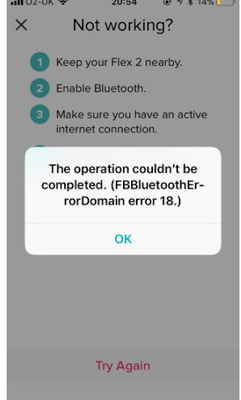
1. I am seeing the message,the operation could not be completed. (FBBluetoothErrorDomain error 18.), just as in the image below. My Charge showed a progress bar about half way across the display and then showed an exclamation mark, while the phone showed error 18.
2. I am using iPhone 6S Plus. And the fitbit is a Charge Version 110.
3. IOS 11.0.3
4. ATT
I have restarted my phone, restarted the fitbit, turned bluetooth off and back on.
Fitbit displays a progress bar and now it is unusable. 😞



Hi Fitbit team,
- When did you first see this error message? When I tried to install update 16th oct 2017
- What device model do you have? Charge HR
- What iOS version are you currently running? iOS 11.0.3
- What phone provider do you have (Verizon, T-Mobile, Sprint, etc) Iphone 7 on three
Hope you can help?
Best Answer
1. I am not sure if mine is exactly that message same issue. I get a message when trying to sync notifications. They were not showing on my Fitbit (text messages, phone calls etc.) despite everything being set. Went into Fitbit app under Notifications and it said I had to pair it. When I tried it said that it Failed to Sync and to cancel or retry. Would not work.
This happened this morning- Oct. 18.
2. I have the Charge 2.
3. IOS 11.0.3, IPhone 5S
4. Telus
Best Answer