
Join us on the Community Forums!
-
Community Guidelines
The Fitbit Community is a gathering place for real people who wish to exchange ideas, solutions, tips, techniques, and insight about the Fitbit products and services they love. By joining our Community, you agree to uphold these guidelines, so please take a moment to look them over. -
Learn the Basics
Check out our Frequently Asked Questions page for information on Community features, and tips to make the most of your time here. -
Join the Community!
Join an existing conversation, or start a new thread to ask your question. Creating your account is completely free, and takes about a minute.
Not finding your answer on the Community Forums?
- Mark Topic as New
- Mark Topic as Read
- Float this Topic for Current User
- Bookmark
- Subscribe
- Mute
- Printer Friendly Page
New Dashboard
- Mark Topic as New
- Mark Topic as Read
- Float this Topic for Current User
- Bookmark
- Subscribe
- Mute
- Printer Friendly Page
05-25-2016
08:34
- last edited on
05-25-2017
14:37
by
KateFitbit


 Community Moderator Alumni are previous members of the Moderation Team, which ensures conversations are friendly, factual, and on-topic. Moderators are here to answer questions, escalate bugs, and make sure your voice is heard by the larger Fitbit team. Learn more
05-25-2016
08:34
- last edited on
05-25-2017
14:37
by
KateFitbit
Fitbit Update 5/25/2017
Thank you for taking the time to share feedback. I can assure you the comments have been and continued to be reviewed and shared with our iOS team.
As a reminder, I'm including our help article on the Fitbit app here.
Overwhelmingly, recent posts share the sentiment of no longer being able to revert back to the original dashboard and not having the option to choose. At this time there are no plans to revert access to the old Dashboard, but we always appreciate feedback on how to improve our app.
As a reminder, Please remember to keep your posts respectful and on-topic, per our Community Guidelines. This thread will be better for everyone as a constructive conversation.
Fitbit Update 8/17/2016
Beginning with version 2.26 of the Fitbit app for iOS, the new Fitbit app dashboard with an updated look is now fully implemented. You can no longer return to the old design. We're constantly striving to improve Fitbit products and services, and we appreciate all of the feedback we receive from our customers.
You can find information about the new app dashboard and how to start using it by clicking here.
Fitbit Update 5/25/2016
I'm very pleased to announce that iOS users who have updated to version 2.23 of the Fitbit iOS App are now able to opt-in to use a preview of a new design of the Fitbit iOS dashboard!
One of my favorite features for this new dashboard preview is the quick log button in the bottom-center of the iOS App. This feature allows users to quickly: track an exercise, log food, log sleep, log water, send a friend request, scan a food barcode (if you are using the US food database), log their weight, or set an alarm.
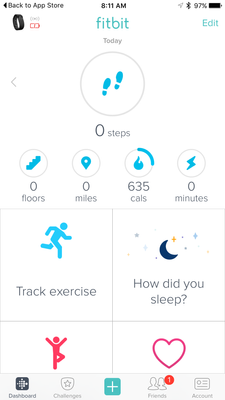
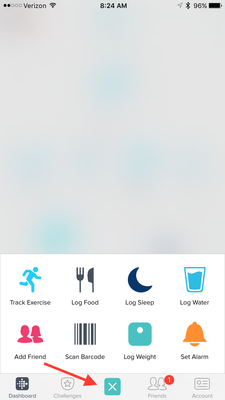
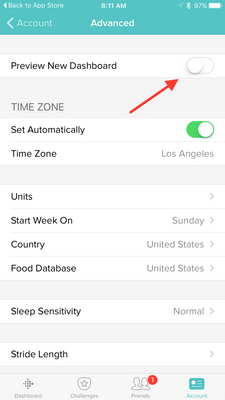
Users can opt-in to use the new iOS dashboard design by:
1. Updating to version 2.23 of the Fitbit iOS App, click here to be redirected to the iOS App Store.
2. Click the Account button in the bottom right-hand corner.
3. Scroll down and click the Advanced Settings button.
4. Toggle the Preview New Dashboard button at the top of the page on.
Click here for more details and let me know if you have any questions!
Moderator Edit: Edited thread title.

Sent from my iPhone
 Best Answer
 Fitbit Product Experts Alumni are retired members of the Fitbit Product Expert Program. Learn more
Yes, in restrospect, it was bad form to call you out like that. My point was the best way to affect change is to vote for the feature. It allows Fitbit to evaluate which features will benefit the most people and prioritize them.
Even if you are leaving the platform, you may still consider voting on the appropriate feature requests for the benefit of the other folks on the thread who'd like to see the changes.
Frank | Washington, USA
Fitbit One, Ionic, Charge 2, Alta HR, Blaze, Surge, Flex, Flex 2, Zip, Ultra, Flyer, Aria, Aria 2 - Windows 10, Windows Phone
Take a look at the Fitbit help site for further assistance and information.
Best Answer
 Best Answer
I certainly can relate to what you are going through with the new
dashboard. I had no problems with my "one" until I went to preview the site. I
only had the bottom half of the dashboard (there were no steps, miles, cals
burned, etc.) and with the top half missing, I didn't have an edit. Did you
try to go back to the original dashboard? Many have gone back with no
problem or when the "solution was found" When I went back to the original with
my "one" there were no Steps & it wasn't in sync with my phone. I'm sorry
you are having problems and I hope you will find an answer very soon. Have
you tried any of the suggestions posted?


Patricia
Sent from my iPhone

Yes, I still can turn off New dashboard under Advanced settings on the updated version.
However that ugly pink bar isnt yet removed and you cant still put any tile anywhere.
Sent from my iPhone
Fitbit Product Experts Alumni are retired members of the Fitbit Product Expert Program. Learn more
I thought your post on 07/10 was your last post:
"This will be my lady list ever on this thread."
Frank | Washington, USA
Fitbit One, Ionic, Charge 2, Alta HR, Blaze, Surge, Flex, Flex 2, Zip, Ultra, Flyer, Aria, Aria 2 - Windows 10, Windows Phone
Take a look at the Fitbit help site for further assistance and information.
Best Answer
The tiles below the daily stats tile show your most recent information, even if you're looking at your stats for another day. To view your stats for a previous day, tap the individual tiles to see your history."
Who decided to set it up this way??? So I can no longer scroll back to a date and look at the comprehensive data for that day? It now takes an extra step to tap the tiles and scroll some more to get past information and you see that statistic in isolation instead of alongside the other data for that day. This is annoying and doesn't make sense--if I scroll back to previous dates on the dashboard, I want to see ALL the historical data from each of those dates (comprehensively), not the current day's information below.... 😕 It's not useful and it's confusing. Please don't make this new dashboard mandatory--many people don't like it or find it useful.

@wellsmc wrote:
I am so tired of Fitbit's attitude toward its customers. I have graduated as of a week ago to an Apple Watch. Love it. Easy and intuitive to use. And Apple cares about its users. Why continue to beat your head against the wall with Fitbit's use of the Apple iOS when you can enjoy the real thing! Bye bye Fitbit...when you were listening to your users you were a breath of fresh air. To bad success has bred arrogance toward its users!
Sent from my iPhone
I'm in the process of arranging the same thing. The fact that I had and liked my Fitbit was the only thing stopping me, previously, since I didn't want to wear both at the same time.

You're not crazy. The preview dashboard did correctly update ALL tiles to match the selected day as you scrolled back and forth. That is until some "genius" thought he had a better idea and changed the design. I came here to report it based on a suggestion from customer support reps and I didn't know that Fitbit essentially sent me to a black hole for feedback.

Whew, glad to find out I can go back to the original dashboard. The new one is terrible. Way too cluttered. The original one is simple and clean. The bar lines are much easier to read and process information from rather than the multiple circles and dials.
PLEASE dont ever force us use the new one!

SunsetRunner
