
Join us on the Community Forums!
-
Community Guidelines
The Fitbit Community is a gathering place for real people who wish to exchange ideas, solutions, tips, techniques, and insight about the Fitbit products and services they love. By joining our Community, you agree to uphold these guidelines, so please take a moment to look them over. -
Learn the Basics
Check out our Frequently Asked Questions page for information on Community features, and tips to make the most of your time here. -
Join the Community!
Join an existing conversation, or start a new thread to ask your question. Creating your account is completely free, and takes about a minute.
Not finding your answer on the Community Forums?
- Mark Topic as New
- Mark Topic as Read
- Float this Topic for Current User
- Bookmark
- Subscribe
- Mute
- Printer Friendly Page
No notifications after iOS 12 update
ANSWERED- Mark Topic as New
- Mark Topic as Read
- Float this Topic for Current User
- Bookmark
- Subscribe
- Mute
- Printer Friendly Page
10-17-2018
14:57
- last edited on
12-05-2018
14:39
by
KateFitbit


 Community Moderator Alumni are previous members of the Moderation Team, which ensures conversations are friendly, factual, and on-topic. Moderators are here to answer questions, escalate bugs, and make sure your voice is heard by the larger Fitbit team. Learn more
10-17-2018
14:57
- last edited on
12-05-2018
14:39
by
KateFitbit
Update 12/5/2018: I'm sorry to hear some users are still not receiving notifications on iOS 12. We continue to monitor this issue and are working on a resolution. If you haven't already, please try toggling bluetooth on/off and ensure your Apple device is up to date.
Fitbit Update: 10/17/18
Hey, iOS fam!
Our team is aware of some issues receiving notifications, but more specifically text messages after the iOS 12 update. To all of you having trouble after completing the iOS 12 update, rest assured we are investigating. Thanks for all your reports and troubleshooting efforts.
Please stay tuned for updates.
Want to get more steps? Visit Get Moving in the Health & Wellness Discussion Forum.
Answered! Go to the Best Answer.

 Community Moderator Alumni are previous members of the Moderation Team, which ensures conversations are friendly, factual, and on-topic. Moderators are here to answer questions, escalate bugs, and make sure your voice is heard by the larger Fitbit team. Learn more
Hello everyone, I hope you're doing well. 
I appreciate you have taken the time to provide your feedback. Please keep in mind that some issues are more difficult to resolve than others and they might take a bit longer than expected to be resolved. Be sure that our team is actively working towards resolving them but it will be irresponsible on my part to provide a specific timeframe for when the issue will be resolved. Once we have more information to share, we'll do it through the official Forums.
Once again, I appreciate your patience and understanding, I hope you have a great day.

 Best Answer
How long does Fitbit consider to be a reasonable amount of time for us to patiently wait fo the product they sold us to work?
Days? Weeks? Months?
Please let us know how to set our expectations.

I did call Fitbit. I was told that some people didn’t like the notifications so they were turned off. Any messages would be sent and then immediately deleted once viewed. So if you open your screen before reviewing any messages you just miss the notifications. I think it’s really sad. We should at least have the option to turn them on or off.
Best Answer
Do you mean text message and Caller ID notifications as well?
Thats crazy, people buy these FOR those purposes.
Best Answer
I have also followed all of the suggestions receiving notifications for the Ionic. This is quite frustrating. Please find a solution quickly. Text notifications are essential as I am not allowed to have my phone during meetings, yet still need to be connected to texts from family members due to my mother having health issues.
Best Answer
Community Moderator Alumni are previous members of the Moderation Team, which ensures conversations are friendly, factual, and on-topic. Moderators are here to answer questions, escalate bugs, and make sure your voice is heard by the larger Fitbit team. Learn more
Hello everyone, I hope you're doing well.
I appreciate you have taken the time to share your insight and your feedback about this situation. @lweinlan, I appreciate you have taken the time to share the troubleshooting steps you've took in order to resolve this issue on this side, I'm sure they will be very helpful for many members of the Community.
@MJWright, judging by the information you've shared, it seems you're referring to Notifications coming to the app about your step goal. These notifications were removed in June as it was a heavily requested feature, now step goal based notifications only come through as push Notifications to your phone and will no longer show in the Notifications tab.
Now, if you're still having trouble receiving text or call Notifications on your Fitbit device I would like to suggest you the following, in case you haven't tried yet:
- Go to the Bluetooth settings on your phone and tap on tracker. Then tap on Forget this Device.
- Force-close the Fitbit app by double tapping the home button on your phone and swiping up the app.
- Open the app again and tap on Account > Your Tracker > Notifications. You will receive the following Pop-up:
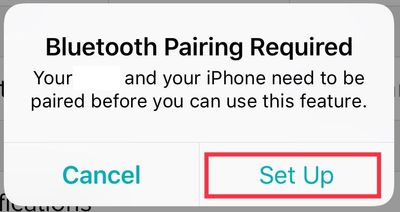
- Then, once you tap on Set Up, the app will begin setting up your tracker with the Bluetooth on your phone, which will prompt the next pop-up:
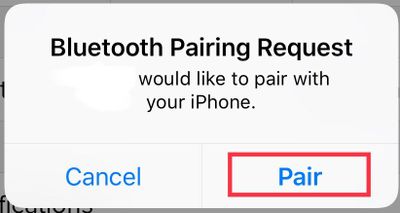
- Tap Pair
- Once you get back to the tracker options, tap on Notifications an enable the ones you'd like to receive.
Additionally, please go to your phone Settings > Notifications > Fitbit and Settings > Notifications > Messages and check that the following is enabled:
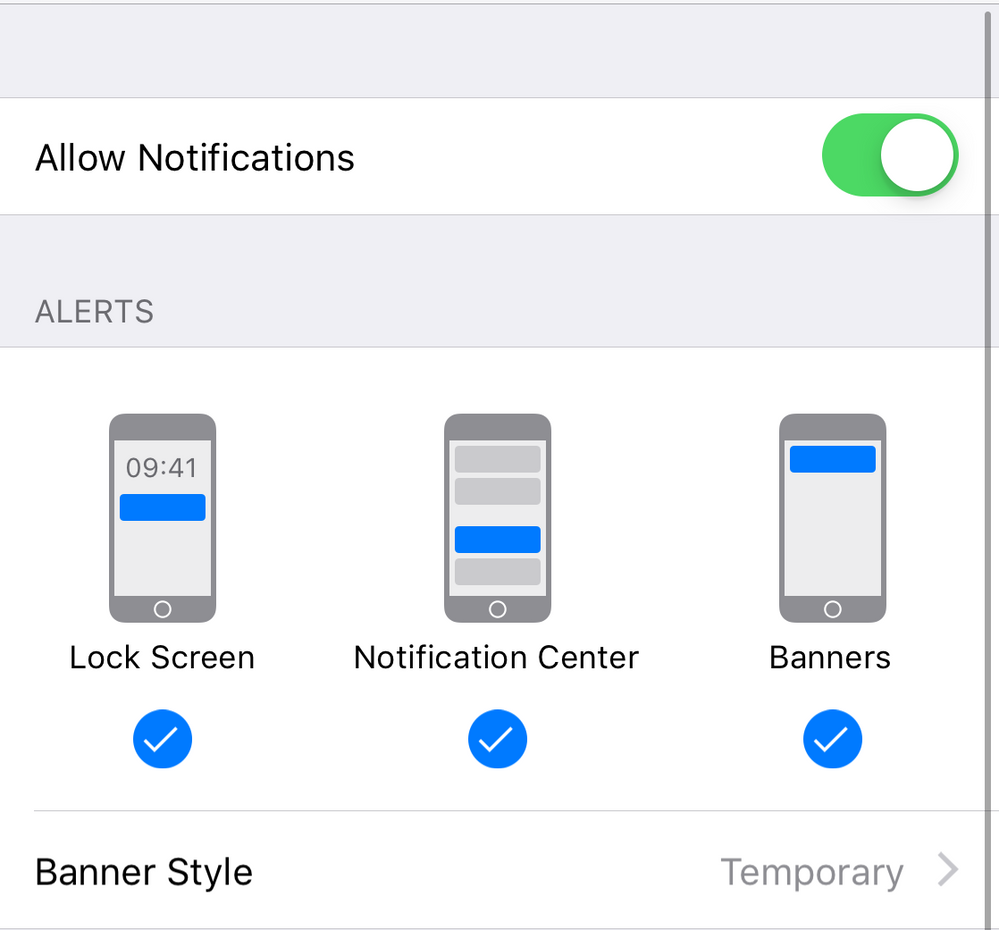
Thanks for your patience and understanding, I hope you have a great day.
Best Answer
Thanks, but I don’t have a Smart phone and the All day sinc doesn’t seem to work. I select the Bluetooth and nothing happens.
Best Answer
Hi everyone, I have an iPhone 8+ and I am not receiving texts on my Alta anymore as well as the notification to walk 250 steps each hour. This has been happening for a few days. I’m receiving phone call notifications, though. I’ve tried every single fix multiple times and nothing. Hope there’s a fix soon.
Best Answer

After literally trying everything, mine magically worked after I first turned off the Bluetooth on my phone, then did a power down (reset) of the phone, then turning Bluetooth back on after I powered back up. I’ve had to do it twice now, once with each recent “upgrade.”
Best Answer
10-30-2018 07:08 - last edited on 09-29-2019 12:51 by LiliyaFitbit

10-30-2018 07:08 - last edited on 09-29-2019 12:51 by LiliyaFitbit
Let us know when it is fixed . In mean time my flex does not work??
Moderator edit: personal info removed
Best Answer
