
Join us on the Community Forums!
-
Community Guidelines
The Fitbit Community is a gathering place for real people who wish to exchange ideas, solutions, tips, techniques, and insight about the Fitbit products and services they love. By joining our Community, you agree to uphold these guidelines, so please take a moment to look them over. -
Learn the Basics
Check out our Frequently Asked Questions page for information on Community features, and tips to make the most of your time here. -
Join the Community!
Join an existing conversation, or start a new thread to ask your question. Creating your account is completely free, and takes about a minute.
Not finding your answer on the Community Forums?
- Mark Topic as New
- Mark Topic as Read
- Float this Topic for Current User
- Bookmark
- Subscribe
- Mute
- Printer Friendly Page
Resolved 4/18/2018: Sleep Time Shows 0 minutes asleep
ANSWERED- Mark Topic as New
- Mark Topic as Read
- Float this Topic for Current User
- Bookmark
- Subscribe
- Mute
- Printer Friendly Page

 Community Moderator Alumni are previous members of the Moderation Team, which ensures conversations are friendly, factual, and on-topic. Moderators are here to answer questions, escalate bugs, and make sure your voice is heard by the larger Fitbit team. Learn more
Fitbit Update 04/18/2018: Hey everyone -- Our team has resolved this issue, which means you should be able to sync your sleep logs from last night and the app will display your actual hours slept as opposed to 0 time asleep. Thanks for your patience as we worked to the get this resolved as quickly as possible. I will be closing this thread as the issue is resolved.
Fitbit Update 04/17/2018: We're aware of an issue where users who logged sleep may see their time asleep as 0 minutes.
We're working on getting this resolved as quickly as possible. In the meantime, we have a workaround:
Workaround:
- Manually edit your sleep log (hit the "edit" button at the top right of the app and change your start OR end time by 1 minute.
- Save the change
- This will recalculate your sleep and should resolve the issue.
Please note I have merged several threads with this issue. I will have more information for you once this has been fully resolved. Thanks for your reports and continued patience as we work on a fix.
Actively managing your weight? Find accountability buddies on the Manage Weight board
Answered! Go to the Best Answer.

I have iPhone 6 with ios 11 (not the latest version). I have the exact same issue as everyone. Started since yesterday. Any resolution?

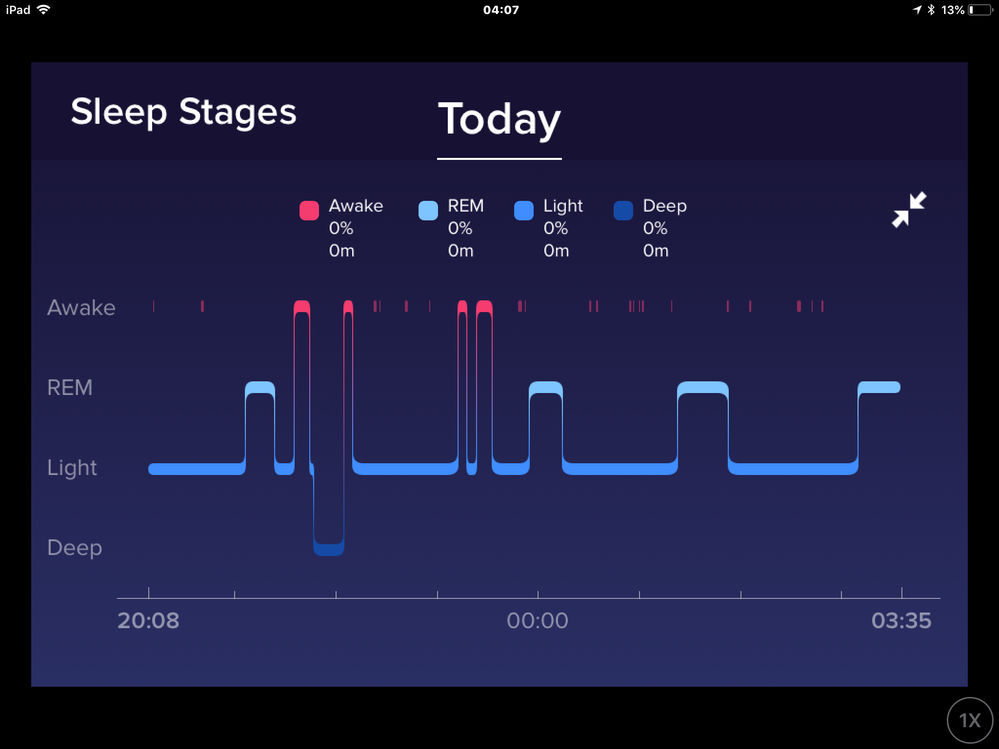


Good morning from Finland! I have the same problem. I use iPhone 6s, iOS 11.3 and the newest version of the Fitbit app (2.48). The version of my Fitbit Charge 2 is 22.55.2.
Since the charge/app recognizes the sleep stages — it just doesn’t calculate the sums for sleep — my guess is that this is a server side problem.
I would go immediately check out any changes made to server side scripts and settings in the past 48 hours.

Someone in another thread said that if you change the sleep start time by one minute that it recalculated for them and worked. This also worked for me so with a try but I’d imagine it’s a server issue.
So so just change the sleep start time by a minute in the log. See if that works
Yes, I just figured out the same by accident — deleting the sleep and adding the time manually didn’t do the trick. Changing the start/end time of the sleep forced the app/server calculate the amount of sleep I got.
04-16-2018
22:16
- last edited on
04-17-2018
12:17
by
MarcoGFitbit


04-16-2018
22:16
- last edited on
04-17-2018
12:17
by
MarcoGFitbit
My Fitbit has stopped giving details on sleep. I get start and wake up times and the graph but no numbers or breakdown.
This has happened the last three nights
Moderator Edit: Clarified Subject.
 Best Answer
I'm having exactly the same issue. I have a Charge 2 and android phone. Though i don't really need to check my yimings to know I didn't sleep well! Lol. Hope you can sort it soon 😊


Im having the same issues with a one-week old Charge HR2. I logged out, restarted phone, logged back in; no change.
Best Answer


Same here as well. Got on live chat twice and sent and email but no response. My Fitbit is only 3 days old btw
Best Answer
Last night my charge 2 said zero sleep yet recorded sleep stages. So the graph is as usual but all sleep stages say zero. Usually works perfectly. Anyone got any ideas please?

This morning my tracking was the same way - diagram but no numbers.

