
Join us on the Community Forums!
-
Community Guidelines
The Fitbit Community is a gathering place for real people who wish to exchange ideas, solutions, tips, techniques, and insight about the Fitbit products and services they love. By joining our Community, you agree to uphold these guidelines, so please take a moment to look them over. -
Learn the Basics
Check out our Frequently Asked Questions page for information on Community features, and tips to make the most of your time here. -
Join the Community!
Join an existing conversation, or start a new thread to ask your question. Creating your account is completely free, and takes about a minute.
Not finding your answer on the Community Forums?
- Mark Topic as New
- Mark Topic as Read
- Float this Topic for Current User
- Bookmark
- Subscribe
- Mute
- Printer Friendly Page
The redesigned iOS Fitbit app is rolling out!
- Mark Topic as New
- Mark Topic as Read
- Float this Topic for Current User
- Bookmark
- Subscribe
- Mute
- Printer Friendly Page



 Community Moderators ensure that conversations are friendly, factual, and on-topic. We're here to answer questions, escalate bugs, and make sure your voice is heard by the larger Fitbit team. Learn more
Hello everyone!
I would like to announce that the redesigned Fitbit app starts rolling out today! This new app will help you reach your goals, and bring the health and wellness information right on hand.
Check out our latest blog for how to get the most out of the new app.
Note: Please be patient if you don't see the update right away, as it will take some time to roll out completely.
Happy stepping!
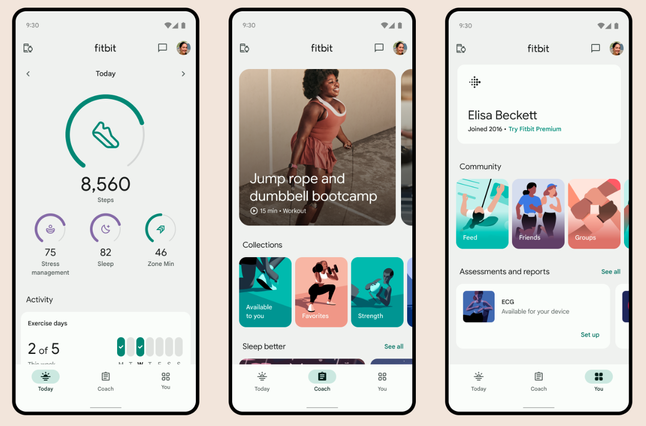

Yeah, I was losing some functionality with my Fitbit, so I unknowingly clicked on the “update” button…….sure wish that I had not done that! The new App has not only lost functions that I used…….but the overall “look and feel” of this update is horrible! Nothing good about it……..but hey it is now Google…….so we shouldn’t be surprised. They don’t give the customer what “we” want……..just what “ they” want.

What have you done with the Dashboard on the app? The new version arrived on my phone this morning. It’s absolutely appalling in appearance and the overly large display is ott. The awful green with the almost 90’s display. Guys you need to do better it’s absolutely awful. Honestly I’m considering a Garmin now. It’s far superior re Dashboard and layout. 🙈 Disaster!

I HATE the new user interface!! I have been a loyal Fitbit user for over 10 years. I was just in the process of looking at the recently released new products. Then you updated the UI and now I’m looking at Apple Watches!
Here is a list of what I don’t like:
I cannot order the items in the order *I* want them because Fitbit has created these ridiculous artificial groupings.
I LOATHE the color! If you are going to change the standard color, let each of us choose the color we like personally and individually.
The app no longer shows battery strength.
The sleep syncing has lost its mind! Sometimes it syncs sometimes it doesn’t. It’s completely screwed up.
There is no option to retain the old look of the app.
Google’s privacy policy regarding their use of personal health information seems more murky than under the old version.
Whai I like about the new update:
NOT ONE SINGLE THING!!!!!!!!
Please roll back the update until you can put out a better product. With SO many wearable trackables, and the competition already pushing out anti Fitbit ads (saw one for Oura just this morning) like sharks sensing blood in the water, this could be a major blow to Fitbit right before the Christmas/Holiday/New Year Resolution season. Please fix it SOON!!!!
Regards,
a Formerly Highly Satisfied Customer who is now Shopping Apple Watches


Yess!!! I said the same thing. I hate hate hate it. I have to scroll ALL the way down to find my steps I’ve taken because I mistakenly put heart rate as my focus group lol we did not ask for this!!

My Fitbit wouldn’t sync to my iPhone app, and I had tried everything, except making sure I had the latest update. I didn’t know that when I updated it would give me the new app. I didn’t expect it for a few more days. Well, I’m SO sorry I updated it. The new app is trash!

Feedback on Fitbit app 4.0 for IPhones.
1) I no longer see the charge status for my Fitbit Sense. It used to appear when I synced.
2) I monitor my pulse rate regularly, I used to see that on the initial Page for Today. I now have to scroll down to find my pulse.
3) the pulse chart shown on the active minutes screen does not match that shown from the Today screen.
4) the calculation for # of floors appears to be higher than from the previous version. I get added floors for walking on level ground on windy days and on stormy days.
5) I can no longer adjust which measurement appear on the Today page, or the order in which they appear.
The measurement that are important to me are: pulse, steps, floor, active minutes, and distance.

SunsetRunner
Several functions in the new Fitbit app do not work properly. No respiratory rate score, heart rate variability, skin temperature, stress management score, recovery score etc etc. Another bad turn from Fitbit. Fitbit must first test thoroughly before releasing a new version.

This is a terrible update. Far too much white on white. The icons are less engaging too.
I’ve lost -
1. The battery power percentage icon
2. Syncing bar
3. Unable to move my stats the why I want them. Can only be done by category
Also
4. Why have a huge plus button on the bottom left of screen which doesn’t really add value
5. There should be a quick feedback button or icon available. I’ve got to go through about 5 pages/clicks to be able to prove feedback.
im less than impressed and would prefer the old style and functionality. Get with the programme Fitbit/google. Who are you paying to design and test this. I’ll work for you if meant getting paid to do an appalling job. 😳🙄
Ever hears of the saying ‘If it ain’t broke don’t fix it’? It’s like a brand new app that has just been released on the market. I’m fuming as use my app daily and now it’s lost half the features.
I hope you take on all the feedback and there are clear and common themes.

Apparently, Fitbit/Google don’t believe in if it ain’t broke don’t fix it! It would’ve been nice if they tested it out to consumer before forcing it on all of us.
it reminds me, when I was working, the company would totally change the computer every few years which was a nightmare.
I get my Fitbit for free thru Medicare…otherwise if I had to pay, I’d probably get rid of it!!



Not a fan of the new update -- updated 2 days ago -- Version 4.0 on iOS 16.7 iPhone 13 Pro.
As others have mentioned, I want the charge status and step streak back. Give me the actual percentage of my Versa 2 charge -- not just low, medium, and full.
Also:
- It now takes 2 clicks to enter my weight. Previously when I pressed the "+" button, it took me directly to the screen where I updated my weight.
- Why do I care about an hourly view of my steps and why is it displayed first? And the Weekly and Monthly views are useless as they reset at the start of a new week or month. Just show me my steps for the past 7 days and let me scroll sideways to view previous days.
- The skinny bars in the step graphs are just too small for these tired old eyes. The ones on the old step graph or the 4.0 Sleep graph are OK. Don't change the sleep graph please.
- It's a bit jarring to go from the main screen to the older, non-updated screens. This tells me that the other screens will get the update treatment in the future which frankly has me scared.
- As long as a dark mode can be turned OFF, it doesn't matter to me but a lot of folks want it.
That's about it for now. I wish we had the option to go back to the previous version. Thanks!
I must have had auto updates turned on - I woke up to the new dashboard and think it’s horrible.
it’s blah and uninspiring, no colour, no way that I can see to ch age back to the old dashboard/change settings.
PLEASE go back to the old version!
😞
I uninstalled & re-installed the Fitbit app and was able to roll back the update. Here's how to turn off auto update so you don't wake up to find your Fitbit app horribly useless and anger invoking.
Here’s how to turn off Auto Update for the Fitbit app for Android:
- Open Play Store.
- Tap your profile icon top right corner of the screen.
- Tap Manage Apps & Devices.
- Tap Manage.
- Scroll to find Fitbit App.
- Tap Fitbit App to expand the menu.
- Tap the 3 Dots top right corner of the screen.
- Tap the checkbox next to Enable Auto Update.
- Tap the 3 Dots top right corner of the screen to verify Enable Auto Update is not selected.
That’s it. I hope this helps.
Sorry Apple people, I’ve no idea.
I don't care for the steps being displayed first. I much preferred the number of zone minutes being on the top. At least with the old interface, you could move around the positions of the metrics. Now you're stuck with them and if you don't like the positions, too bad.
Really not happy with this. At least it would have been nice to be able to go back to the previous interface.



@Curly8327 if you are asking me this question, I was referring to the five metrics that used to be at the top of the screen. On my phone, I could also see one or two additional metrics below that. I had mine arranged so that steps were the big circle. Under that in a row were zone minutes, floors, miles and flights of stairs. My heart rate was directly under that row. It showed the beats per minute, pulsed when it was connected, and, if I remember correctly, changed colors when the BPM changed zones so you could easily see when your exertion put you into the cardio zone. Under that, I believe I had my reminders to move. And under that was the water log. The image you posted shows four visible metrics plus one that's blocked by the annoying plus sign. The old app had seven or eight metrics that you could monitor without scrolling.
 Best Answer