Join us on the Community Forums!
-
Community Guidelines
The Fitbit Community is a gathering place for real people who wish to exchange ideas, solutions, tips, techniques, and insight about the Fitbit products and services they love. By joining our Community, you agree to uphold these guidelines, so please take a moment to look them over. -
Learn the Basics
Check out our Frequently Asked Questions page for information on Community features, and tips to make the most of your time here. -
Join the Community!
Join an existing conversation, or start a new thread to ask your question. Creating your account is completely free, and takes about a minute.
Not finding your answer on the Community Forums?
- Mark Topic as New
- Mark Topic as Read
- Float this Topic for Current User
- Bookmark
- Subscribe
- Mute
- Printer Friendly Page
The redesigned iOS Fitbit app is rolling out!
- Mark Topic as New
- Mark Topic as Read
- Float this Topic for Current User
- Bookmark
- Subscribe
- Mute
- Printer Friendly Page


 Community Moderators ensure that conversations are friendly, factual, and on-topic. We're here to answer questions, escalate bugs, and make sure your voice is heard by the larger Fitbit team. Learn more
Hello everyone!
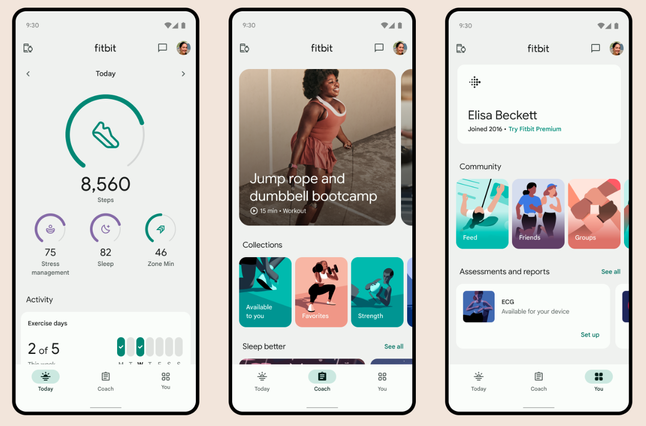
I would like to announce that the redesigned Fitbit app starts rolling out today! This new app will help you reach your goals, and bring the health and wellness information right on hand.
Check out our latest blog for how to get the most out of the new app.
Note: Please be patient if you don't see the update right away, as it will take some time to roll out completely.
Happy stepping!

Agreed! I was tracking my blood pressure as it was elevated and now I can't. I now have to put everything in Google fit, where I can't even add notes. And none of that will of course make it to fitbit for my health stats. They need to go back to the old version as of yesterday. I do not want this update and they should change the app look to what it was before. The Design is trash with its huge font. It literally hurts my eyes.

So awful! The steps counter! Who dreamed that up? Like a slot machine. I imagine the ding ding ding. And the size of the tiles! They literally couldn’t make them any larger. This is irritating. And the lingering salt in the wounds is that you can’t play Spotify on the Sense 2. With this dashboard though, Fitbit has ´jumped the shark’.

Sign me up
09-28-2023
03:04
- last edited on
10-15-2023
09:25
by
RodrigoMFitbit


 Fitbit Product Experts Alumni are retired members of the Fitbit Product Expert Program. Learn more
09-28-2023
03:04
- last edited on
10-15-2023
09:25
by
RodrigoMFitbit
Welcome back to the Fitbit community, @Norilou!
Sad to hear about your initial impressions of the new Fitbit app. Clearly such massive changes in design need time to get settled in. To get you accustomed to the new design as comfortably as possible, please have a look here:
Fitbit - The Pulse - Fitbit Community Blog - The redesigned Fitbit app is rolling out
Welcome to the Fitbit community, @FitbitUser0929!
Sad to hear about your initial impressions of the new Fitbit app. Such massive changes in design indeed need time to get settled in. To get you accustomed to the new design as comfortably as possible, please have a look here:
Fitbit - The Pulse - Fitbit Community Blog - The redesigned Fitbit app is rolling out
Charge, Charge HR, Blaze, Versa, Versa 2, Charge 5, Versa 4, Charge 6, Aria, Aria 2

The new dashboard totally sucks! The new dashboard shows very little information on one screen requiring that I scroll to see the information I want. The new tiles are too big poorly utilizing the space on the screen. There should be an option to keep the old dashboard. I have worn a Fitbit for many years, but this last change is enough to cause me to want to find another device.
I gather you work for Fitbit. Can you tell me how I can go back to the old dashboard?
09-28-2023
03:27
- last edited on
10-15-2023
09:25
by
RodrigoMFitbit
09-28-2023
03:27
- last edited on
10-15-2023
09:25
by
RodrigoMFitbit
I have a charge 3. I dud not get a choice about the update. I woke up this morning and a totally new and awful dashboard was there. The only option if I don’t like the new dashboard is to stop using Fitbit.
The new app makes it more difficult to see the data I am interested seeing.
Fitbit Product Experts Alumni are retired members of the Fitbit Product Expert Program. Learn more
There's no way to downgrade to the previous Fitbit app version, @FitbitUser0929.
Charge, Charge HR, Blaze, Versa, Versa 2, Charge 5, Versa 4, Charge 6, Aria, Aria 2
 Best Answer
Why? I can’t understand why Fitbit would want to annoy their customers in this way.

The new app is terrible. Main focus area is wat too large, can hardly see any other stats without scrolling. “Way to Go” step streak pop up is gone which I lived and was incredibly motivating to see. Also, there is no battery status on the main page when syncing. Please bring back the old app features.
Fitbit Product Experts Alumni are retired members of the Fitbit Product Expert Program. Learn more
Like so many things in life it's all a matter of taste, @FitbitUser0929.
I for instance belong to those who do like the cleaner, modernized look quite a lot.
Charge, Charge HR, Blaze, Versa, Versa 2, Charge 5, Versa 4, Charge 6, Aria, Aria 2

@Cadburychops I'm sorry, but you can't go back once you update to the current version of the app.
Laurie | Maryland
Sense 2, Luxe, Aria 2 | iOS | Mac OS
Take a look at the Fitbit help site for further assistance and information.
 Fitbit Product Experts Alumni are retired members of the Fitbit Product Expert Program. Learn more
Hi @Salbi4 - unfortunately you can't go back either. You are probably correct about the origin of the design, a huge step backwards, doesn't show floors goal anymore and requires a whole [unnecessary ] learning curve in order to even operate it.
Incidentally Garmin released 2 app updates recently which also were retrograde steps too for the Sleep tile and it's 3 tabs, but not to the extent the Fitbit App has changed which barely fits the screen.

Author | ch, passion for improvement.

There’s so many different reasons I dislike the new app/redesign/dashboard. It’s to the point that I want to switch to another brand after 10 years of FitBit. Looks like Google bought the company just to ruin our user experience. Anyone else feeling this way?

The new app failed to impress. It asked me to select focus without explaining what that does to you app display. I now have BPM as the dial graphic on the screen instead of the steps at the top.
I have tried to find a simple, intuitive solution to return the display to put steps at the top without luck. This “update” is not helpful to me!
I have an older device and have been planning to upgrade. I have been loyal to Fitbit but now I think I will be considering other brands. That is how much I hate the new “improved” app.