Join us on the Community Forums!
-
Community Guidelines
The Fitbit Community is a gathering place for real people who wish to exchange ideas, solutions, tips, techniques, and insight about the Fitbit products and services they love. By joining our Community, you agree to uphold these guidelines, so please take a moment to look them over. -
Learn the Basics
Check out our Frequently Asked Questions page for information on Community features, and tips to make the most of your time here. -
Join the Community!
Join an existing conversation, or start a new thread to ask your question. Creating your account is completely free, and takes about a minute.
Not finding your answer on the Community Forums?
- Community
- Product Help Forums
- Alta & Alta HR
- Alta Notifications
- Mark Topic as New
- Mark Topic as Read
- Float this Topic for Current User
- Bookmark
- Subscribe
- Mute
- Printer Friendly Page
- Community
- Product Help Forums
- Alta & Alta HR
- Alta Notifications
Alta Notifications
ANSWERED- Mark Topic as New
- Mark Topic as Read
- Float this Topic for Current User
- Bookmark
- Subscribe
- Mute
- Printer Friendly Page
03-10-2016
10:22
- last edited on
08-20-2020
18:43
by
MatthewFitbit


 Community Moderator Alumni are previous members of the Moderation Team, which ensures conversations are friendly, factual, and on-topic. Moderators are here to answer questions, escalate bugs, and make sure your voice is heard by the larger Fitbit team. Learn more
03-10-2016
10:22
- last edited on
08-20-2020
18:43
by
MatthewFitbit
Alta comes with the ability to set up and receive call, text, and calendar notifications on iOS and Android.
This post will provide instructions on how to setup your alerts so that you can see who's texting you, the 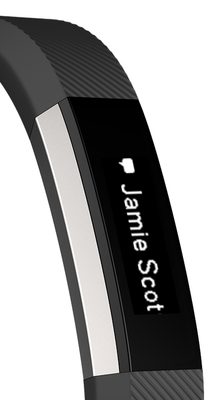
- How do I set up call/text/calendar notifications on Alta?
- Make sure that your mobile device is compatible with our notifications feature by visiting http://www.fitbit.com/devices.
- On your mobile device, make sure Bluetooth is enabled, and make sure your device is nearby!
- Open the Fitbit app on your mobile device and tap your tracker tile at the top of your mobile Dashboard.
- Tap your tracker tile a second time, tap "Notifications" (iOS) or "Call and Text Notifications (Android) and then turn on call/text/calendar notifications.
- To verify that set up was successful, check out the list of Bluetooth connected devices on your mobile device. Your Alta should appear.
- How do I view call/text/calendar notifications on Alta?
You can view your notifications when they come in by using Quick View or by double-tapping the Alta where the band and tracker meet.
Notes:
- For Android users, please ensure that you've turned notification access on in your settings and enabled each notification in the Fitbit App.
- Calendar notifications use the native calendar app in iOS, and the native or selected 3rd party app on Android.
- Windows Phones do not support alerts at this time.
Answered! Go to the Best Answer.


SunsetRunner
 Best Answer
Community Moderator Alumni are previous members of the Moderation Team, which ensures conversations are friendly, factual, and on-topic. Moderators are here to answer questions, escalate bugs, and make sure your voice is heard by the larger Fitbit team. Learn more
Best Answer
Community Moderator Alumni are previous members of the Moderation Team, which ensures conversations are friendly, factual, and on-topic. Moderators are here to answer questions, escalate bugs, and make sure your voice is heard by the larger Fitbit team. Learn more
@debiojesse Thank you for the update, glad to hear its now working for you.
@SunsetRunner Let's try switching to a different default text messaging app such as Google Hangouts to test if it's happening because of the app or if it's an issue with the Alta tracker. I know you may not want to use Hangouts as your messaging app but let's try it for testing purposes. Also, don't forget to change it to the default text messaging app in your phone and also in the Fitbit apps notifications settings. Keep me posted.
Best Answer
SunsetRunner
Messages plus has always worked.
Best Answer Community Moderator Alumni are previous members of the Moderation Team, which ensures conversations are friendly, factual, and on-topic. Moderators are here to answer questions, escalate bugs, and make sure your voice is heard by the larger Fitbit team. Learn more
@SunsetRunner In that case, I suggest getting in contact with our Support Team who can further assist you once they've had an opportunity to look into your account/phone details with you.
@Aegis No, it is expected behavior to only be allowed to choose 1 messaging app within the Fitbit app to receive notifications from. If you'd like to see the option to choose more than 1 app to receive notifications from, I suggest voting for this existing idea in our Feature Request board. The more votes this gets, the more likely to be considered for implementation in the future.
Best Answer
I would like the orientation of the message to be the other way because I feel like a bit of a contortionist trying to read the messages. Have only had my Alta 2 days and am liking it but wish I had done a bit mor research first!
Best Answer
Community Moderator Alumni are previous members of the Moderation Team, which ensures conversations are friendly, factual, and on-topic. Moderators are here to answer questions, escalate bugs, and make sure your voice is heard by the larger Fitbit team. Learn more
@Ferao Currently, there is no option to change the direction of the notification displayed on the Alta. If you'd like to see an option for that, I suggest creating an idea within our Feature Request board and also voting for it. The more votes there are, the more steam I can push with to present this to our Product Development Team as something that our userbase wants.
Best Answer
 Community Moderator Alumni are previous members of the Moderation Team, which ensures conversations are friendly, factual, and on-topic. Moderators are here to answer questions, escalate bugs, and make sure your voice is heard by the larger Fitbit team. Learn more
SunsetRunner
You may want to try this if you haven't already. It worked for me.
Open your app, click on devices, click on Alta, scroll down to "always connected" and turn it on. It's the last in the list. This is different than "all day sync".

I can't get texts and incoming phone calls either. Has been working and then stopped. Help appreciated!
Best Answer
SunsetRunner
Sent from a seriously ginormous phone.
I did get a new phone after a close encounter with water:(
Your response makes sense. I just have to find the settings now!
Thanks!
Best Answer