
Join us on the Community Forums!
-
Community Guidelines
The Fitbit Community is a gathering place for real people who wish to exchange ideas, solutions, tips, techniques, and insight about the Fitbit products and services they love. By joining our Community, you agree to uphold these guidelines, so please take a moment to look them over. -
Learn the Basics
Check out our Frequently Asked Questions page for information on Community features, and tips to make the most of your time here. -
Join the Community!
Join an existing conversation, or start a new thread to ask your question. Creating your account is completely free, and takes about a minute.
Not finding your answer on the Community Forums?
- Community
- Product Help Forums
- Alta & Alta HR
- Alta Notifications
- Mark Topic as New
- Mark Topic as Read
- Float this Topic for Current User
- Bookmark
- Subscribe
- Mute
- Printer Friendly Page
- Community
- Product Help Forums
- Alta & Alta HR
- Alta Notifications
Alta Notifications
ANSWERED- Mark Topic as New
- Mark Topic as Read
- Float this Topic for Current User
- Bookmark
- Subscribe
- Mute
- Printer Friendly Page
03-10-2016
10:22
- last edited on
08-20-2020
18:43
by
MatthewFitbit

- Mark as New
- Bookmark
- Subscribe
- Permalink
- Report this post

 Community Moderator Alumni are previous members of the Moderation Team, which ensures conversations are friendly, factual, and on-topic. Moderators are here to answer questions, escalate bugs, and make sure your voice is heard by the larger Fitbit team. Learn more
03-10-2016
10:22
- last edited on
08-20-2020
18:43
by
MatthewFitbit
- Mark as New
- Bookmark
- Subscribe
- Permalink
- Report this post
Alta comes with the ability to set up and receive call, text, and calendar notifications on iOS and Android.
This post will provide instructions on how to setup your alerts so that you can see who's texting you, the 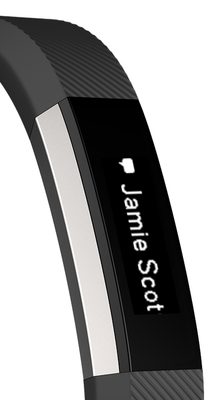
- How do I set up call/text/calendar notifications on Alta?
- Make sure that your mobile device is compatible with our notifications feature by visiting http://www.fitbit.com/devices.
- On your mobile device, make sure Bluetooth is enabled, and make sure your device is nearby!
- Open the Fitbit app on your mobile device and tap your tracker tile at the top of your mobile Dashboard.
- Tap your tracker tile a second time, tap "Notifications" (iOS) or "Call and Text Notifications (Android) and then turn on call/text/calendar notifications.
- To verify that set up was successful, check out the list of Bluetooth connected devices on your mobile device. Your Alta should appear.
- How do I view call/text/calendar notifications on Alta?
You can view your notifications when they come in by using Quick View or by double-tapping the Alta where the band and tracker meet.
Notes:
- For Android users, please ensure that you've turned notification access on in your settings and enabled each notification in the Fitbit App.
- Calendar notifications use the native calendar app in iOS, and the native or selected 3rd party app on Android.
- Windows Phones do not support alerts at this time.
Answered! Go to the Best Answer.
03-16-2016 18:17
- Mark as New
- Bookmark
- Subscribe
- Permalink
- Report this post

SunsetRunner
03-16-2016 18:17
- Mark as New
- Bookmark
- Subscribe
- Permalink
- Report this post
03-16-2016 18:32
- Mark as New
- Bookmark
- Subscribe
- Permalink
- Report this post

03-16-2016 18:32
- Mark as New
- Bookmark
- Subscribe
- Permalink
- Report this post
03-16-2016 19:10
- Mark as New
- Bookmark
- Subscribe
- Permalink
- Report this post
SunsetRunner
03-16-2016 19:10
- Mark as New
- Bookmark
- Subscribe
- Permalink
- Report this post
I got my Atla today and I'm really excited about it! Unfortunately, I'm not getting any call/text notifications, which is a huge bummer because it's one of the reasons I got this model. I have a Nexus 5 running Android 6.0, notification access is on, encryption is off, and I have the notification widget enabled. I've tried switching it from Hangouts to Messenger, turning the Fitbit notifications off and on again, as well as resyncing the Alta with my phone. No luck with any of it. Any help would be appreciated!
 Best Answer
03-16-2016 19:20
- Mark as New
- Bookmark
- Subscribe
- Permalink
- Report this post

03-16-2016 19:20
- Mark as New
- Bookmark
- Subscribe
- Permalink
- Report this post
@ErickFitbit I reset my Alta multiple times, and it is still not syncing (even though it says it sync'd) and I don't get any call or txt notifications. Bluetooth is on.
Best Answer03-16-2016 20:40
- Mark as New
- Bookmark
- Subscribe
- Permalink
- Report this post

03-16-2016 20:40
- Mark as New
- Bookmark
- Subscribe
- Permalink
- Report this post
Where did you set up Messages....... Message+ ?
Best Answer03-16-2016 20:49
- Mark as New
- Bookmark
- Subscribe
- Permalink
- Report this post

03-16-2016 20:49
- Mark as New
- Bookmark
- Subscribe
- Permalink
- Report this post
Hello,
Is there any way to see a text notification more than once/ for more than one minute?
Best Answer03-17-2016 04:52
- Mark as New
- Bookmark
- Subscribe
- Permalink
- Report this post
SunsetRunner
03-17-2016 04:52
- Mark as New
- Bookmark
- Subscribe
- Permalink
- Report this post
Update: I erased my phone and restored it to factory settings. That seems to have done the trick!
03-17-2016 05:47
- Mark as New
- Bookmark
- Subscribe
- Permalink
- Report this post

03-17-2016 05:47
- Mark as New
- Bookmark
- Subscribe
- Permalink
- Report this post
HI,
I am having the same problem as most...not getting the text messages or notifications for calls. Every now and then I get a vibration that I have a text message and it says "message" but it will not tell me who it is from or the message. I get no notifications for calls. I have looked on this site and restarted by Alta and done all that has been asked, but still nothing. I have a Samsung Galaxy Note 3. Can you help?
TCanales
03-17-2016 06:31
- Mark as New
- Bookmark
- Subscribe
- Permalink
- Report this post

03-17-2016 06:31
- Mark as New
- Bookmark
- Subscribe
- Permalink
- Report this post
Hi Erick...I just received my Alta last night and I think the notifications are working too well! I have a calendar reminder set up and the event was an hour ago and I am still receiving the notification of the event. How do I turn that particular notification off short of deleting the calendar entry?
Thanks!
Best Answer03-17-2016 08:55
- Mark as New
- Bookmark
- Subscribe
- Permalink
- Report this post
SunsetRunner
03-17-2016 08:55
- Mark as New
- Bookmark
- Subscribe
- Permalink
- Report this post
03-17-2016 09:09
- Mark as New
- Bookmark
- Subscribe
- Permalink
- Report this post

03-17-2016 09:09
- Mark as New
- Bookmark
- Subscribe
- Permalink
- Report this post
Best Answer03-17-2016 09:23
- Mark as New
- Bookmark
- Subscribe
- Permalink
- Report this post

03-17-2016 09:23
- Mark as New
- Bookmark
- Subscribe
- Permalink
- Report this post
I am extremely disappointed in the Alta notifications. I would like to see all phone notifications come through. I would also like to go back and see all notifications on the Alta before they have been cleared from the phone. If I didnt see the messages come through initially on the Alta I wasnt able to see them again. Until this is resolved I am returning the Alta.
The Garmin Vivosmart is far superior in this field. I was so excited to see the Alta released because I love Fitbit and the app/community but this is junk.
Best Answer03-17-2016 09:29
- Mark as New
- Bookmark
- Subscribe
- Permalink
- Report this post

 Fitbit Product Experts Alumni are retired members of the Fitbit Product Expert Program. Learn more
03-17-2016 09:29
- Mark as New
- Bookmark
- Subscribe
- Permalink
- Report this post
Sorry fitbit didn't work out for you.
03-17-2016 09:33
- Mark as New
- Bookmark
- Subscribe
- Permalink
- Report this post

03-17-2016 09:33
- Mark as New
- Bookmark
- Subscribe
- Permalink
- Report this post
03-17-2016 09:44
- Mark as New
- Bookmark
- Subscribe
- Permalink
- Report this post
03-17-2016 09:44
- Mark as New
- Bookmark
- Subscribe
- Permalink
- Report this post
another Alta. Until then I will stick with my Garmin and my fitbit One. It
would just be nice to only wear one tracker 😉
Best Answer03-17-2016 10:21 - edited 03-17-2016 10:22
- Mark as New
- Bookmark
- Subscribe
- Permalink
- Report this post
Community Moderator Alumni are previous members of the Moderation Team, which ensures conversations are friendly, factual, and on-topic. Moderators are here to answer questions, escalate bugs, and make sure your voice is heard by the larger Fitbit team. Learn more
03-17-2016 10:21 - edited 03-17-2016 10:22
- Mark as New
- Bookmark
- Subscribe
- Permalink
- Report this post
@SunsetRunner Thanks for confirming that toggling the "Notification Access" setting OFF and then back ON resolved the issue you were experiencing. Thanks for sharing your troubleshoot as well, hoping that this helps others experiencing the same issue.
@Susien56 I recommend trying what worked for @SunsetRunner here. The instructions for getting to this setting are listed here. NOTE: The location may differ between Android devices.
@cybercheles I recommend checking out your online Dashboard to see if it's actually syncing data over. If it is syncing over to your online Dashboard you may need to confirm you're on an internet connection to get that data synced over to your phone app.
@vreeke You must open the default messages app in your Android device and make it your default app for text messages. Then follow the steps listed here.
@aeofieldhockey At this time, there is no way to scroll through the past text/call/calendar notifications if you miss them. Unlike some other Fitbit trackers, notifications are not saved on Alta. You can't see them after the minute has passed. That would be a good idea to post in the Feature Request board!
@SunsetRunner Thanks for sharing your update! Glad to hear that it's now working for you!
@tcanales Sounds like you just need to interact with your Alta as described here. That should help with viewing your notifications.
@JennCav@Blfishxx Try restarting the Alta.
@JennCav That should subside the notifications, unless your calendar event has multiple reminders.
03-17-2016 11:50
- Mark as New
- Bookmark
- Subscribe
- Permalink
- Report this post

03-17-2016 11:50
- Mark as New
- Bookmark
- Subscribe
- Permalink
- Report this post
sending me a replacement.
Best Answer03-17-2016 12:11
- Mark as New
- Bookmark
- Subscribe
- Permalink
- Report this post
SunsetRunner
03-17-2016 12:11
- Mark as New
- Bookmark
- Subscribe
- Permalink
- Report this post
Best Answer03-17-2016 15:47
- Mark as New
- Bookmark
- Subscribe
- Permalink
- Report this post

03-17-2016 15:47
- Mark as New
- Bookmark
- Subscribe
- Permalink
- Report this post
Best Answer03-17-2016 15:49
- Mark as New
- Bookmark
- Subscribe
- Permalink
- Report this post
03-17-2016 15:49
- Mark as New
- Bookmark
- Subscribe
- Permalink
- Report this post
Best Answer