
Join us on the Community Forums!
-
Community Guidelines
The Fitbit Community is a gathering place for real people who wish to exchange ideas, solutions, tips, techniques, and insight about the Fitbit products and services they love. By joining our Community, you agree to uphold these guidelines, so please take a moment to look them over. -
Learn the Basics
Check out our Frequently Asked Questions page for information on Community features, and tips to make the most of your time here. -
Join the Community!
Join an existing conversation, or start a new thread to ask your question. Creating your account is completely free, and takes about a minute.
Not finding your answer on the Community Forums?
- Community
- Platform
- Android App
- Re: Android 5 wont charge
- Mark Topic as New
- Mark Topic as Read
- Float this Topic for Current User
- Bookmark
- Subscribe
- Mute
- Printer Friendly Page
- Community
- Platform
- Android App
- Re: Android 5 wont charge
Android 5 wont charge
- Mark Topic as New
- Mark Topic as Read
- Float this Topic for Current User
- Bookmark
- Subscribe
- Mute
- Printer Friendly Page

- Ok guys my husband tried talking with support and they are of no help as they go by a script. I cannot reboot my charge 5 as it has lost the charge. They tell you to press the buttons on the side there ate no buttons on the charge 5. Like so many others have commented ever since this last update the battery drains and drains quickly. I should had suspected something from the beginning after the update when I lost my vibrations for my notifications. He told then to basically go fly a kite as they are no help and we will go with something other than a fitbit. This was a Christmas present and was working fine until this last update. Very very disappointed.
 Best Answer
SunsetRunner
Hello @Mamaspoon
The restart of a Charge 5 was not explained properly to you. Here is how it’s properly done:
Place your Charge 5 in its charger. While it’s plugged in press the button located on the flat end of the charger 3 times, pausing for 1 second between presses. Then wait 10 seconds or until the Fitbit logo appears. Look at the image below to see where the button is located on your charger:
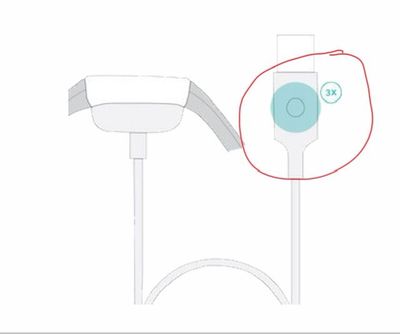
I know in another post you mentioned having difficulty charging your Charge 5 and even said you even tried charging them on different chargers but it still wasn’t charging. Have you looked at the charging pins closely? Are any bent in any way? Wearing a Fitbit exercising and sweating can cause the Fitbit to get dirty and can cause the contact between the Charge 5 and it’s charging pins to lose contact. Does the pins look a bit dusty or have debris on them? Is the back contacts of the Charge 5 dirty? I’d try cleaning the charger and the Charge 5 to see if that helps: https://help.fitbit.com/articles/en_US/Help_article/2005.htm
Hopefully a restart and cleaning the Charge 5 & it’s charger helps.
Best Answer
SunsetRunner
Hello again @Mamaspoon
The button is not on the watch. It’s button is located near the end of the charging cable. Look at this picture closely. I circled the button you should look for in red:
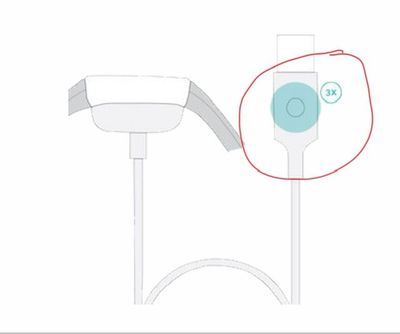
‘Here is a YouTube video of how it’s done. The first half of the video is how to reboot…wait till about half way through the YouTube video to see how to restart your Charge 5 while it’s on the charger: tap this link here: https://m.youtube.com/watch?v=qI3xWjCjWcU
😃 Hopefully that explains things better
Best Answer
Everyone keeps saying press the buttons there are no buttons on the charge 5 they took that feature away.
Best Answer
SunsetRunner
Your to press the button “3” times. You need to pause for 1 second between presses. Then wait 10 seconds or until the Fitbit logo appears.
Best Answer