
Join us on the Community Forums!
-
Community Guidelines
The Fitbit Community is a gathering place for real people who wish to exchange ideas, solutions, tips, techniques, and insight about the Fitbit products and services they love. By joining our Community, you agree to uphold these guidelines, so please take a moment to look them over. -
Learn the Basics
Check out our Frequently Asked Questions page for information on Community features, and tips to make the most of your time here. -
Join the Community!
Join an existing conversation, or start a new thread to ask your question. Creating your account is completely free, and takes about a minute.
Not finding your answer on the Community Forums?
- Community
- Platform
- Android App
- Android Dashboard Redesign Feedback
- Mark Topic as New
- Mark Topic as Read
- Float this Topic for Current User
- Bookmark
- Subscribe
- Mute
- Printer Friendly Page
- Community
- Platform
- Android App
- Android Dashboard Redesign Feedback
Android Dashboard Redesign Feedback
- Mark Topic as New
- Mark Topic as Read
- Float this Topic for Current User
- Bookmark
- Subscribe
- Mute
- Printer Friendly Page


 Community Moderator Alumni are previous members of the Moderation Team, which ensures conversations are friendly, factual, and on-topic. Moderators are here to answer questions, escalate bugs, and make sure your voice is heard by the larger Fitbit team. Learn more
Fitbit Update 04/24/2017: Hi everyone -- Our Android team appreciates everyone's feedback in this thread and are working to fully implement the new Android Dashboard in the upcoming 2.48 release.
I am closing this thread as all feedback has been captured and reviewed by our team. Thanks again for all of your constructive feedback as we continue to improve Fitbit products and services.
Fitbit Update 10/04/2016: Hello Android Community! Some of you may have took notice that your Fitbit app has updated and you now have the option to view the new Android Dashboard (see screenshot below).
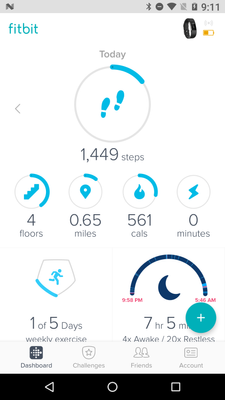
For those of you in the beta, feel free to share your feedback so I can pass it along. I will have a more concrete timeline of official release to share with everyone when I get a confirmed date. We're taking our time to make sure the features are all working up-to-par. Thank you in advance for the feedback!

to keep their customers satisfied. It's fine to change the LOOK of the
dashboard, but it's not fine to lose functionality and the features we rely
on to track our workouts, calorie burn, and heart rate zones. I'm currently
using the old dashboard, but when it goes, I expect the Fitbid designers to
have listened to their customers and to have made the appropriate
modifications. As my grandfather used to say, "If it ain't broke, don't fit
it."
--
*Justine O'Keefe*
* **Justine O'Keefe at Longmeadow
*
or on facebook

 Fitbit Product Experts Alumni are retired members of the Fitbit Product Expert Program. Learn more
Technology is in constant change. As new users get devices and start using the app, they will default to the new dashboard and will see no reason to move from it. Most smartphone & tablet apps are graphical icon based, and not text based. As a computer systems developer since the 60's, I have seen lots of changes to the human interfaces and almost all of them have been met with some people loving it and some people hating it. But, change they have, and change they will.
 Best Answer
I have no problem with change until it renders a gadget useless to me. Design and appearance are bound to change, not a problem.
Lose or complicate features which many customers value (and ask for feedback then ignore it) and you can expect some dissent.
Also occ posting as Blokeypoo

Sent from my Samsung Galaxy smartphone.
Best Answer
Fitbit Product Experts Alumni are retired members of the Fitbit Product Expert Program. Learn more
Interesting question, @Kjærlighet2017, since the Dashboard has nothing to do with logging exercises - that is done in the tracker itself. The Dashboard simply displays the data which has been uploaded to the Fitbit server. By "not logging" exercise, are you referring to exercises being automatically recorded via the charger SmartTrack, or manually tracked exercises via the Exercise Mode?
Best Answer
Best Answer
Best Answer
@Kjærlighet2017 Which tracker do you have? The restart proceedure is a bit different for each.

Helen | Western Australia
Want to discuss ways to increase your activity? Visit Get Moving in the Lifestyle Discussion Forum.
Best Answer
@Kjærlighet2017 wrote:
Oh, great. How do I reboot the fitbit, please.
How you reboot depends on the fitbit you have. They are all different.
Best Answer
into the charger, hold down the button until it flashes a code/word at you.
I found the directions on line. I rebooted mine twice in quick succession
-leaving it on the charger the entire time. Most of the features returned
immediately. (I did this late afternoon) The sleep tracker & exercize
recognizer features returned when the clock passed midnight. Good luck.
Best Answer
Put device in the charger. On the bottom of the charger you will notice a small hole. Take the end of a paperclip & put into the hole & hold for 3-5 seconds. Then let recharge. That should do it.
Best Answer

tracked about 1/4 of it, looking like I was flying between points. I sent
a question to the official fitbit support site. It said to use the
original charger and push something through the pin hole on the back to
reset it. It worked! Back to tracking my walks correctly.


I am able to use new dashboard, however, my minutes of activity is not being recorded unless I manually input. Once inputted, it adds steps to my current number. I went in and added my activity with calories burned and it took away steps.
Using new dashboard on Android 2.44 latest version. The stats stays the same when I swipe from day to day. I want to compare calories , water etc and have to go into each day to see the stats. Would like the dashboard to reflect the daily counts.
