Join us on the Community Forums!
-
Community Guidelines
The Fitbit Community is a gathering place for real people who wish to exchange ideas, solutions, tips, techniques, and insight about the Fitbit products and services they love. By joining our Community, you agree to uphold these guidelines, so please take a moment to look them over. -
Learn the Basics
Check out our Frequently Asked Questions page for information on Community features, and tips to make the most of your time here. -
Join the Community!
Join an existing conversation, or start a new thread to ask your question. Creating your account is completely free, and takes about a minute.
Not finding your answer on the Community Forums?
- Community
- Platform
- Android App
- Re: food and calories not showing
- Mark Topic as New
- Mark Topic as Read
- Float this Topic for Current User
- Bookmark
- Subscribe
- Mute
- Printer Friendly Page
- Community
- Platform
- Android App
- Re: food and calories not showing
Android Fitbit app not tracking food and calories intake
ANSWERED- Mark Topic as New
- Mark Topic as Read
- Float this Topic for Current User
- Bookmark
- Subscribe
- Mute
- Printer Friendly Page
04-27-2022
03:30
- last edited on
06-23-2022
14:01
by
LizzyFitbit


04-27-2022
03:30
- last edited on
06-23-2022
14:01
by
LizzyFitbit
I've had an issue for a few months now where my logged food doesnt accurately show up on the main screen icon, and instead have to open the full food log to view my calories.
Starting yesterday, the food log is not displaying my calories at all after adding them. Hours later, they might show up, along with all my other attempts to log my food. It's been a mess, and I've had to resort to just writing it all down.
Customer Support told me to log out, restart my phone, log back in, and try logging. That didn't work. Then they said to uninstall the app and reinstall the app. That didn't work either. I'm still having this issue today, and it's quite frustrating because it's like the main thing I use this app for.
Is this some bug that just needs addressed in an update? My app is up to date, having an update done two days ago. Anyone else having this issue?
Edit: I would like to add that this only seems to affect the quick calories input. Any specific measured food I add seems to show right up, but since I use quick calories throughout most of the day, I cant accurately track my food anymore.
Moderator Edit: Clarified subject
Answered! Go to the Best Answer.

In the last week or so, food entries are not be registered in the App. I enter the appropriate food but nothing shows up in the daily display. Thus I can no longer keep track of food intake nor calories. Exercise is registering appropriately. Without the food intake, the device is not particularly useful. Help
 Best Answer
Charge 4 app on tablet is losing logged information in food and calories. Calories not showing in graph at top of food log. Online support chat was a waste of time. Told me to uninstall app and reinstall. Asked about losing information, I was told it is stored on their site and I would not lose anything. Uninstalled and reinstalled, lost last 3 days of logged food, is now blank. Does that mean Fitbit has a computer issue on their end? Reentered breakfast today, graph showed up. Will watch to see if it is now fixed, may need to pick up phone and call is it is not resolved.
Best Answer
Mine is still broken... it seems to log/sync random items at random times of things I've been trying to track over the past few days. But it's very spotty, nothing consistent, and lot's of stuff missing when viewed from the web site. None of the suggested fixes are working and no app update yet since this all started. Very annoyed and frustrated that I can't accurately track my calories right now.
Oh yeah, for the first time today mine is completely broken and not eventually updating. At least that makes me think they're actively working on it. I'm not TOO mad since I don't pay for it or really NEED it, but I can understand why some people would be. This IS pretty crappy. 😕
Best Answer
I created my own Custom food called QCal and assigned it one calorie per serving. Now I add my Quick Calories this way.

SunsetRunner
Hello @Intothesun
I think you will find that this is a currently known issue that is being worked on. It seems the Food tile contents…logging food, calories in, calories out, etc) seem to be having an issue. I’d follow this thread here: https://community.fitbit.com/t5/Android-App/Fitbit-app-not-tracking-food-and-calories-intake/m-p/514... If any new updates or fixes arrive it should be noted in that thread.
😉 I hope pointing you in the right direction helps
06-01-2022
19:06
- last edited on
06-05-2022
17:23
by
LizzyFitbit
06-01-2022
19:06
- last edited on
06-05-2022
17:23
by
LizzyFitbit
This is happening on my Android as well.
Version 3.9.51 (20263715)
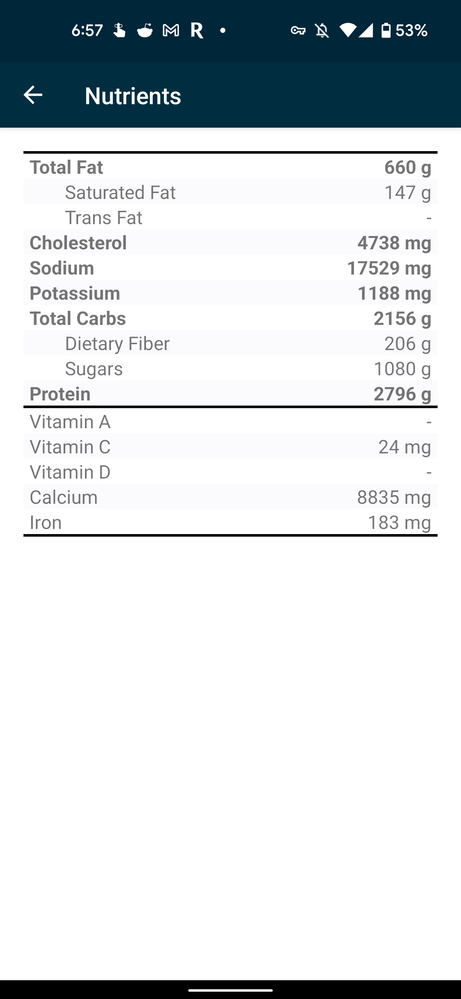
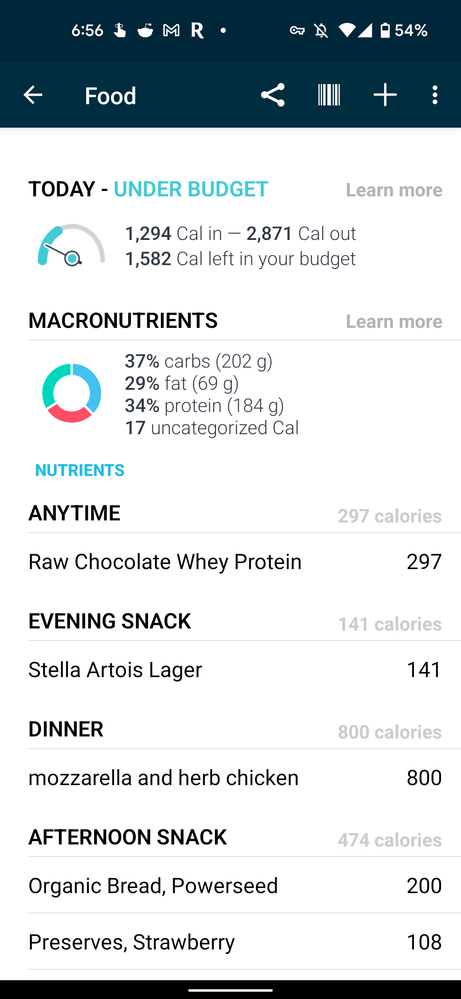
It seems to be isolated to just my calories logged for dinner. Removing and the re-adding the food does nothing. I noticed that this meal does not appear on the web dashboard. Oddly it does count the macros correctly. I've also noticed that the nutrients aggregation is completely broken. It shows incredibly high numbers
I opened a case with Fitbit support:
I was told my device is ineligible for warranty making it clear your support staff did not bother reading my issue.
Broken nutrients page https://drive.google.com/file/d/1fcnDGva4rQJdEX7-9kpiwqL0HyGGuZLL/view?usp=drivesdk
Calories in page (notice my dinner meal)
https://drive.google.com/file/d/1f_su908ftr-fG2JUklVfjk21XfF3cozt/view?usp=drivesdk
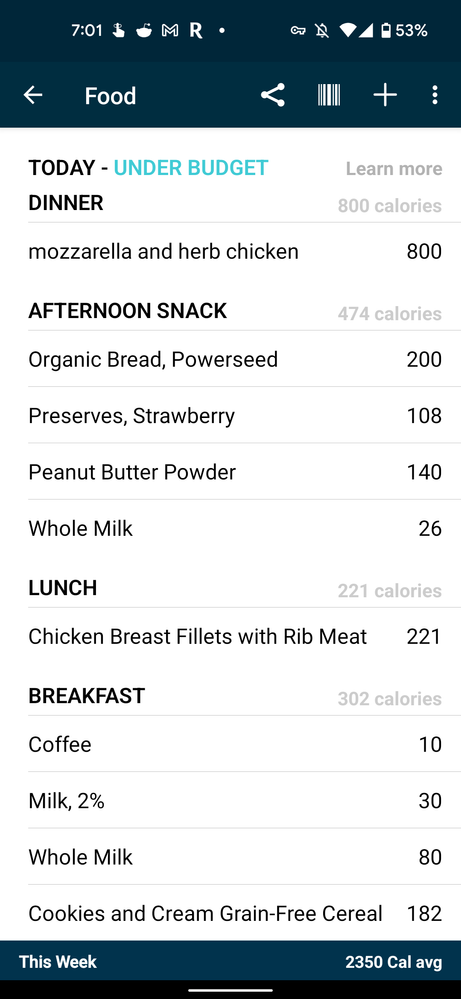
Rest of the calories in page with remaining meal totally over what is recorded as calories in.
https://drive.google.com/file/d/1feqmA6PDPvKyaN8v19ncnyd8Pb4jbQ-9/view?usp=drivesdk
Moderator Edit: Personal info removed
Best Answer

Am creating lots of Custom Calories and adding them using the Anytime
option which sounds similar to your work around.
Any news on a proper fix?
Best Answer
No fix yet!! Everything was working till mid-April when for no apparent reason it stopped. When I called support I was told there is no fix expected in the near future and to just keep looking for an update.
SunsetRunner
Hello @jacksol422
I think you will find that this is a currently known issue that is being worked on. It seems the Food tile contents…logging food, calories in, calories out, etc) seem to be having an issue. I’d follow this thread here: https://community.fitbit.com/t5/Android-App/Fitbit-app-not-tracking-food-and-calories-intake/m-p/514...If any new updates or fixes arrive it should be noted in that thread.
😉 I hope you get it sorted out quickly
SunsetRunner
Hello @McCoySue
I think you will find that this is a currently known issue that is being worked on. It seems the Food tile contents…logging food, calories in, calories out, etc) seem to be having an issue. I’d follow this thread here: https://community.fitbit.com/t5/Android-App/Fitbit-app-not-tracking-food-and-calories-intake/m-p/514...If any new updates or fixes arrive it should be noted in that thread.
😉 I hope this helps
Best Answer

 Community Moderators ensure that conversations are friendly, factual, and on-topic. We're here to answer questions, escalate bugs, and make sure your voice is heard by the larger Fitbit team. Learn more
Hi everyone.
Thanks for your continued reports and feedback. I've moved some of your posts to this thread so we can keep the forums organized. I understand how important it's to track accurate data on the Fitbit app and I'm sorry you're having this inconvenience with the food tile. As mentioned in my previous post, our team is aware of this situation and they're working to release a solution in the next Fitbit app version. Once you see an update available in the Play Store, please make sure to install it.
I truly appreciate your patience and rest assured your feedback will be passed along to keep our team informed of your experience.