
Join us on the Community Forums!
-
Community Guidelines
The Fitbit Community is a gathering place for real people who wish to exchange ideas, solutions, tips, techniques, and insight about the Fitbit products and services they love. By joining our Community, you agree to uphold these guidelines, so please take a moment to look them over. -
Learn the Basics
Check out our Frequently Asked Questions page for information on Community features, and tips to make the most of your time here. -
Join the Community!
Join an existing conversation, or start a new thread to ask your question. Creating your account is completely free, and takes about a minute.
Not finding your answer on the Community Forums?
- Community
- Platform
- Android App
- Ionic wrong step count
- Mark Topic as New
- Mark Topic as Read
- Float this Topic for Current User
- Bookmark
- Subscribe
- Mute
- Printer Friendly Page
- Community
- Platform
- Android App
- Ionic wrong step count
Ionic wrong step count
- Mark Topic as New
- Mark Topic as Read
- Float this Topic for Current User
- Bookmark
- Subscribe
- Mute
- Printer Friendly Page



 Community Moderators ensure that conversations are friendly, factual, and on-topic. We're here to answer questions, escalate bugs, and make sure your voice is heard by the larger Fitbit team. Learn more
Welcome to the Forums @Pampa96.
Thanks for bringing this to our attention. It is possible that it happened because the Fitbit didn't reset at midnight. Thanks for letting us know that you tried to restart and resetting to no avail.
It could've been a one time thing so I'd like to ask if it has continued like that since then. Please let me know if this has been the case.
You can negate steps by manually logging a driving activity. It is possible that it could help your steps show the correct number.
If you have any further questions, feel free to reach out to me.

Get Outlook for Android
 Best Answer
Community Moderators ensure that conversations are friendly, factual, and on-topic. We're here to answer questions, escalate bugs, and make sure your voice is heard by the larger Fitbit team. Learn more
Best Answer
Community Moderators ensure that conversations are friendly, factual, and on-topic. We're here to answer questions, escalate bugs, and make sure your voice is heard by the larger Fitbit team. Learn more
Thanks for reaching out and letting me know it hasn't happened since @Pampa96.
Have you tried manually logging a driving activity? It is possible that it could negate the steps showing on your account so that they go back to normal for that day.
Please let me know if you have any further questions.
It happened again overnight. I woke up this morning with roughly 3100 steps, which I know that I didn't do. I tried adding driving during my sleep time, but the extra steps still show on my tracker.
Best Answer
Community Moderators ensure that conversations are friendly, factual, and on-topic. We're here to answer questions, escalate bugs, and make sure your voice is heard by the larger Fitbit team. Learn more
Hello @Pampa96.
Thanks for letting me know.
Could you take a screen shot of the activity graph for the full day so that I can see where the steps are coming from? Also, were those 3100 steps what you had at the end of the previous day? Are the steps showing on your Fitbit or only on your account?
Let me know if you have any further questions.
Best Answer
Best Answer
Community Moderators ensure that conversations are friendly, factual, and on-topic. We're here to answer questions, escalate bugs, and make sure your voice is heard by the larger Fitbit team. Learn more
Hey @Pampa96.
Thanks for letting me know that it happened again. I will definitely need to get the screen shot I mentioned above. That way I will be able to get a full understanding of what is going on.
Look forward to your reply.
Best Answer
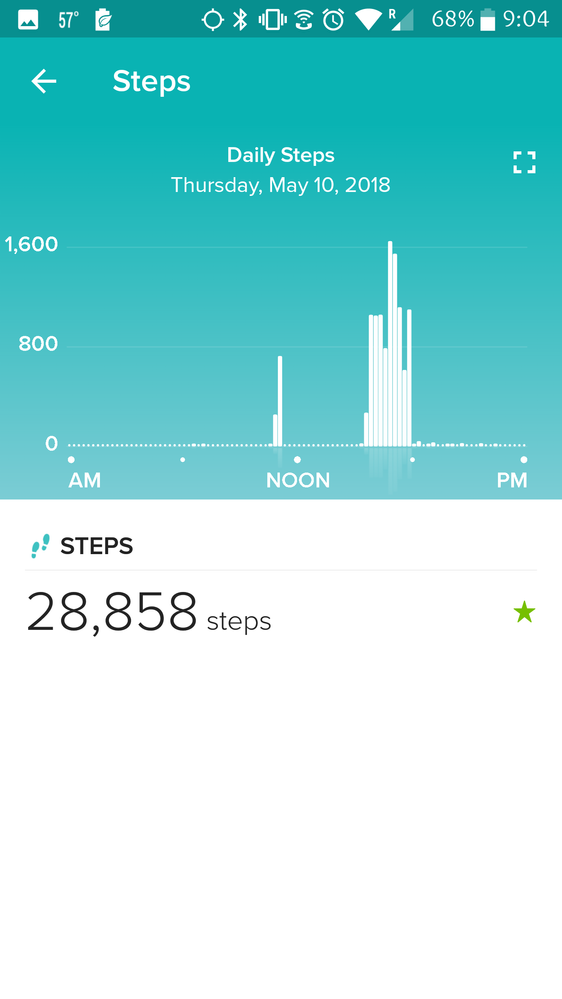
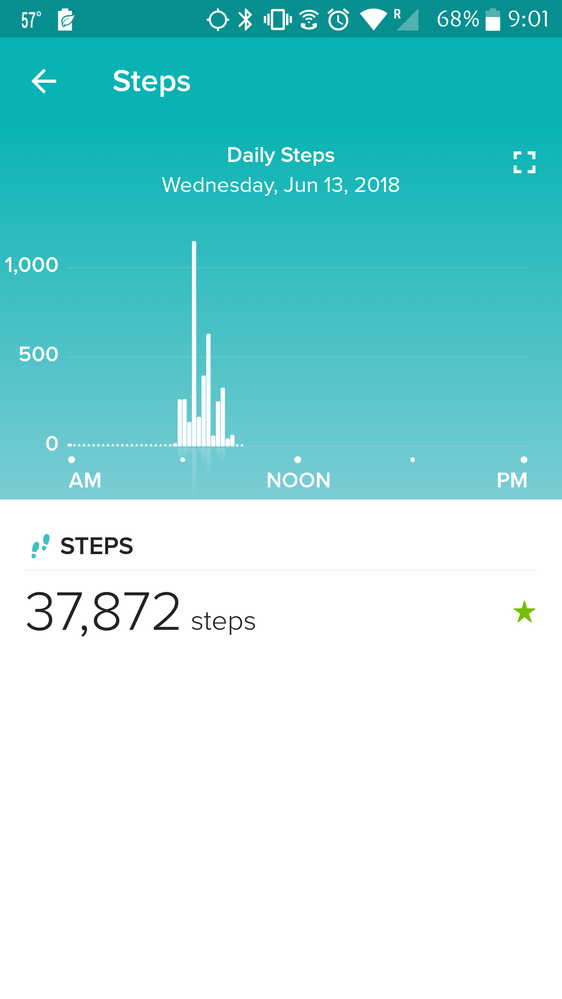
And again this morning with 35000 steps. I finished yesterday with roughly 11K steps. I will figure out a way to get the screen shots to you.
Best Answer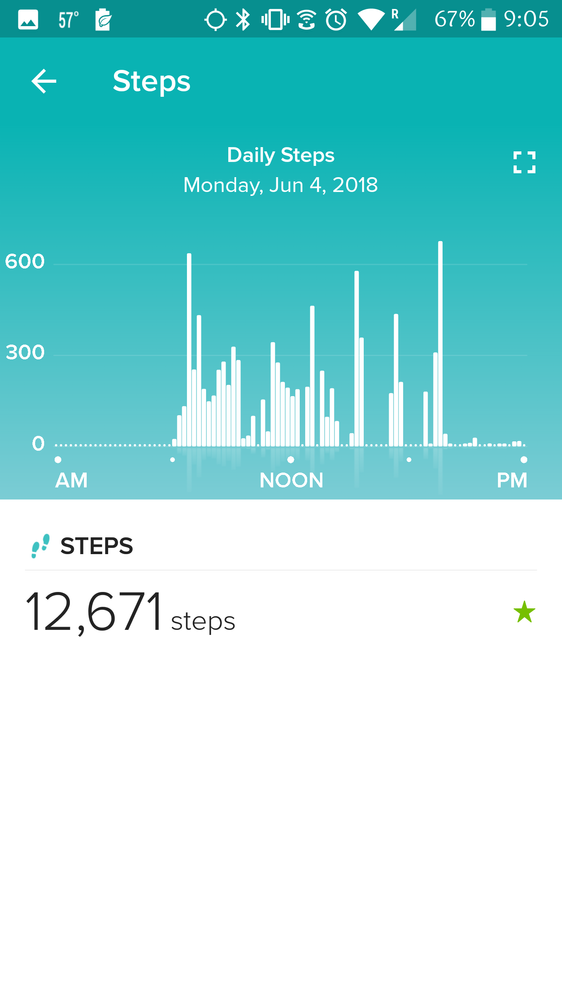
 Community Moderators ensure that conversations are friendly, factual, and on-topic. We're here to answer questions, escalate bugs, and make sure your voice is heard by the larger Fitbit team. Learn more
Hello @Pampa96.
Thanks for those screen shots.
There doesn't seem to be any steps tracked until about 6 am, is that the time you regularly wake up?
If you could get a screen shot in the morning, when you see the increased step count after you wake up, it should be useful.
Let me know if you have any further questions.
Best Answer
Best Answer
Community Moderators ensure that conversations are friendly, factual, and on-topic. We're here to answer questions, escalate bugs, and make sure your voice is heard by the larger Fitbit team. Learn more
Hey @Pampa96.
Thanks for that confirmation.
It seems very bothersome. I do have a few questions:
- Where do you leave the Ionic charging overnight? On a computer, laptop or on the wall?
- Do you have any fans or open windows that could be sending air to the Fitbit? That could cause it to think that you were walking.
- Is there anyone that could be moving the tracker around overnight? A pet that could walk by, perhaps?
Please let me know about this. I'll help me get a better understanding of the situation.
Let me know if there are any questions.
Best Answer
Best Answer
Community Moderators ensure that conversations are friendly, factual, and on-topic. We're here to answer questions, escalate bugs, and make sure your voice is heard by the larger Fitbit team. Learn more
Thanks for answering my questions @Pampa96.
In this case I'd like for you to take a picture the of the tracker's display the moment you wake up and see that there are steps already on it. I'd like to see the number of steps on the Fitbit itself.
Let me know if you have any further questions.
Best Answer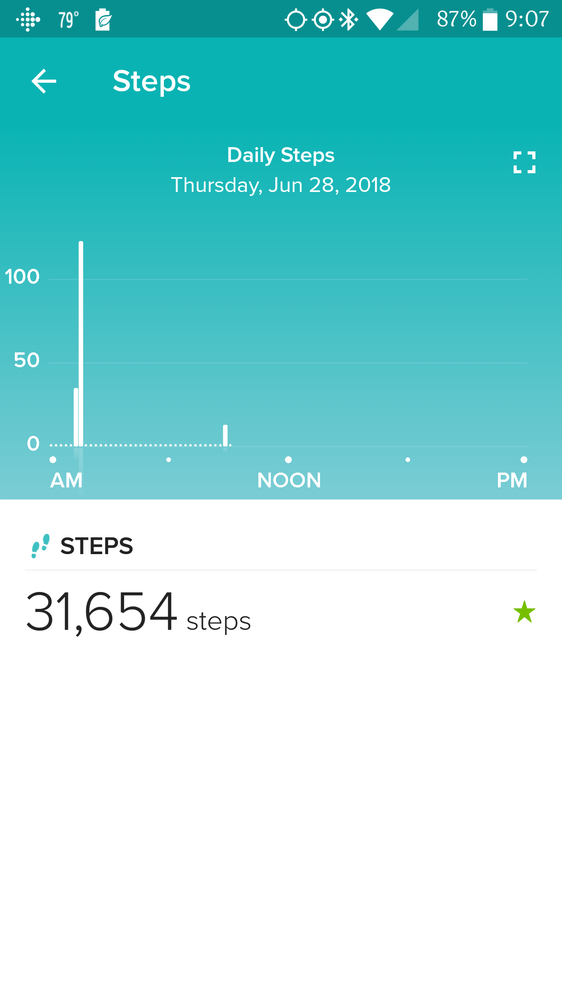
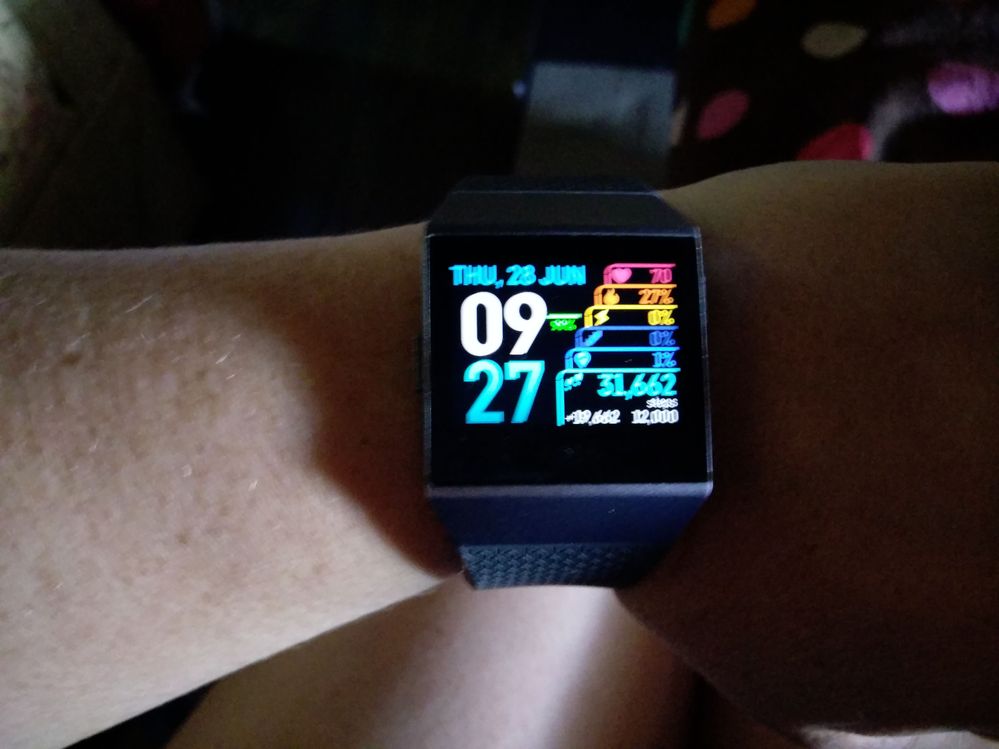 Community Moderators ensure that conversations are friendly, factual, and on-topic. We're here to answer questions, escalate bugs, and make sure your voice is heard by the larger Fitbit team. Learn more
Hey @Pampa96.
Thanks for sharing those screen shots with me.
Our support team should be getting in touch with you in regards to this situation. Please keep a close eye on your email's inbox.
Let me know if you have any further questions.
Best Answer