
Join us on the Community Forums!
-
Community Guidelines
The Fitbit Community is a gathering place for real people who wish to exchange ideas, solutions, tips, techniques, and insight about the Fitbit products and services they love. By joining our Community, you agree to uphold these guidelines, so please take a moment to look them over. -
Learn the Basics
Check out our Frequently Asked Questions page for information on Community features, and tips to make the most of your time here. -
Join the Community!
Join an existing conversation, or start a new thread to ask your question. Creating your account is completely free, and takes about a minute.
Not finding your answer on the Community Forums?
- Community
- Platform
- Android App
- Re: New MobileTrack notification for their pedomet...
- Mark Topic as New
- Mark Topic as Read
- Float this Topic for Current User
- Bookmark
- Subscribe
- Mute
- Printer Friendly Page
- Community
- Platform
- Android App
- Re: New MobileTrack notification for their pedomet...
MobileTrack: Fitbit pedometer service is running notification
ANSWERED- Mark Topic as New
- Mark Topic as Read
- Float this Topic for Current User
- Bookmark
- Subscribe
- Mute
- Printer Friendly Page
- « Previous
- Next »
11-19-2018
20:59
- last edited on
08-05-2020
20:29
by
RicardoFitbit


11-19-2018
20:59
- last edited on
08-05-2020
20:29
by
RicardoFitbit
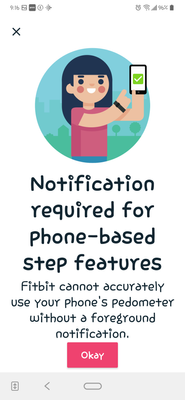
 Today I'm seeing a new MobileTrack notification from the FitBit app.
I don't understand why their pedometer service would be running in the first place: My Fitbit charge 2 should already be connected, so they shouldn't need to use the pedometer service on my phone.
Anybody know what's going on?
Moderator Edit: Clarified subject
Answered! Go to the Best Answer.

I am.suddenly having this issue after 2 years, but can't locate MobileTrack anywhere to disable it. It is not locates when I click my user icon in the app, or anywhere else. Help!

Hi! I just started getting this problem (pedometer notifications all the time), but didn't see "Mobile Track" in my app at all.
I found it by going to the account settings and clicking on "+ Set up a device" option and clicking on the Mobile Tracker option. After setting it up, I was then able to "unpair" it.
Not sure why Mobile Tracker was running when I'd never set it up... nevertheless, I think this will fix it. Hope that helps!
 Best Answer
This just started again on my phone, a week after my solution above fixed it. Oh well.
I went through the process of unpairing the Mobile Tracker, but I still get these notifications every few minutes. Not sure why the service would be running if I explicitly told it not to run! Notably, I'm running Android 9, which I guess is no longer compatible. Getting pretty tired of Fitbit's poor Android implementation.
Best Answer
07-21-2022
05:57
- last edited on
10-27-2022
11:41
by
DavideFitbit

07-21-2022
05:57
- last edited on
10-27-2022
11:41
by
DavideFitbit
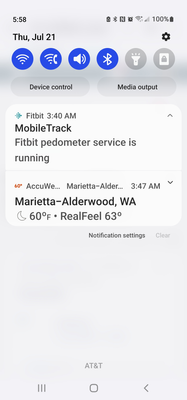
Same here.
I've updated my app.
I've checked my permissions.
Best Answer


This is not really a problem, and has nothing to do with the Fitbit model.
In the fitbit app you will find an option to use the fitbit app to count your steps. The phone needs to be on the waist, in the pocket or hand.
If this opt in is enabled, the pedometer service will be running.
Best Answer
Opt-in is disabled and I still get the notification. I have unpaired. I cleared data and cache. I reinstalled. But I get the notification even when MobileTrack is not set up. I set up MobileTrack JUST TO UNPAIR IT, and I STILL get the notification!
The notification slows down my phone when I am doing other things (playing games, etc.). More importantly, I want confirmation that Fitbit is not tracking my phone if I've explicitly turned that feature off. IT IS A PRIVACY PROBLEM and I don't appreciate you gaslighting us in this thread.
Best Answer
This is a question support might have to answer, or go into your phone settinge and check how often fitbit is tracking your location.
However, this feature only tracks steps, not location.
Best Answer
@veritas27 are you asking about, how to add Mobile Trac? If so tap Add Device under settings.
Best Answer


 Community Moderators ensure that conversations are friendly, factual, and on-topic. We're here to answer questions, escalate bugs, and make sure your voice is heard by the larger Fitbit team. Learn more
@itzelcruz Nice to see you again on the forums. To deactivate MobileTrack, go to the app and tap on your profile picture. The devices set up will be listed there. You should be able to see MobileTrack and your Aria scale. Tap on MobileTrack. There you will see a trash icon on the righ top corner. Tap on it and confirm. You can also press and hold the notification shown on your device and deactivate them.
Best Answer
- « Previous
- Next »