
Join us on the Community Forums!
-
Community Guidelines
The Fitbit Community is a gathering place for real people who wish to exchange ideas, solutions, tips, techniques, and insight about the Fitbit products and services they love. By joining our Community, you agree to uphold these guidelines, so please take a moment to look them over. -
Learn the Basics
Check out our Frequently Asked Questions page for information on Community features, and tips to make the most of your time here. -
Join the Community!
Join an existing conversation, or start a new thread to ask your question. Creating your account is completely free, and takes about a minute.
Not finding your answer on the Community Forums?
- Community
- Platform
- Android App
- Re: Straight line on GPS map - Heart zone and pace
- Mark Topic as New
- Mark Topic as Read
- Float this Topic for Current User
- Bookmark
- Subscribe
- Mute
- Printer Friendly Page
- Community
- Platform
- Android App
- Re: Straight line on GPS map - Heart zone and pace
Straight line on GPS map - Heart zone and pace
ANSWERED- Mark Topic as New
- Mark Topic as Read
- Float this Topic for Current User
- Bookmark
- Subscribe
- Mute
- Printer Friendly Page
12-12-2020
01:17
- last edited on
12-22-2020
16:37
by
RicardoFitbit


12-12-2020
01:17
- last edited on
12-22-2020
16:37
by
RicardoFitbit
When doing a walk on the excercise mode on my charge 4 the map distance is correct but when I select heart zone or pace a straight line shows between my start and finish which adds to my my distance which makes my numbers wrong this is only a recent problem.
Can anyone help

Moderator Edit: Clarified subject
Answered! Go to the Best Answer.
 Best Answer
Accepted Solutions

@Johnsim66 yes, it does happen. It happens when there are gaps between start/end or pause/resume waypoints. Somehow Fitbit assumes that routes are loops starting and ending at the very same point. See the example:
The picture below shows my two recent activities. The left column shows Run, the right column shows Bike. Both start and end at different locations, none of them was paused. The first row shows the route and the two last rows show HR and Pace:
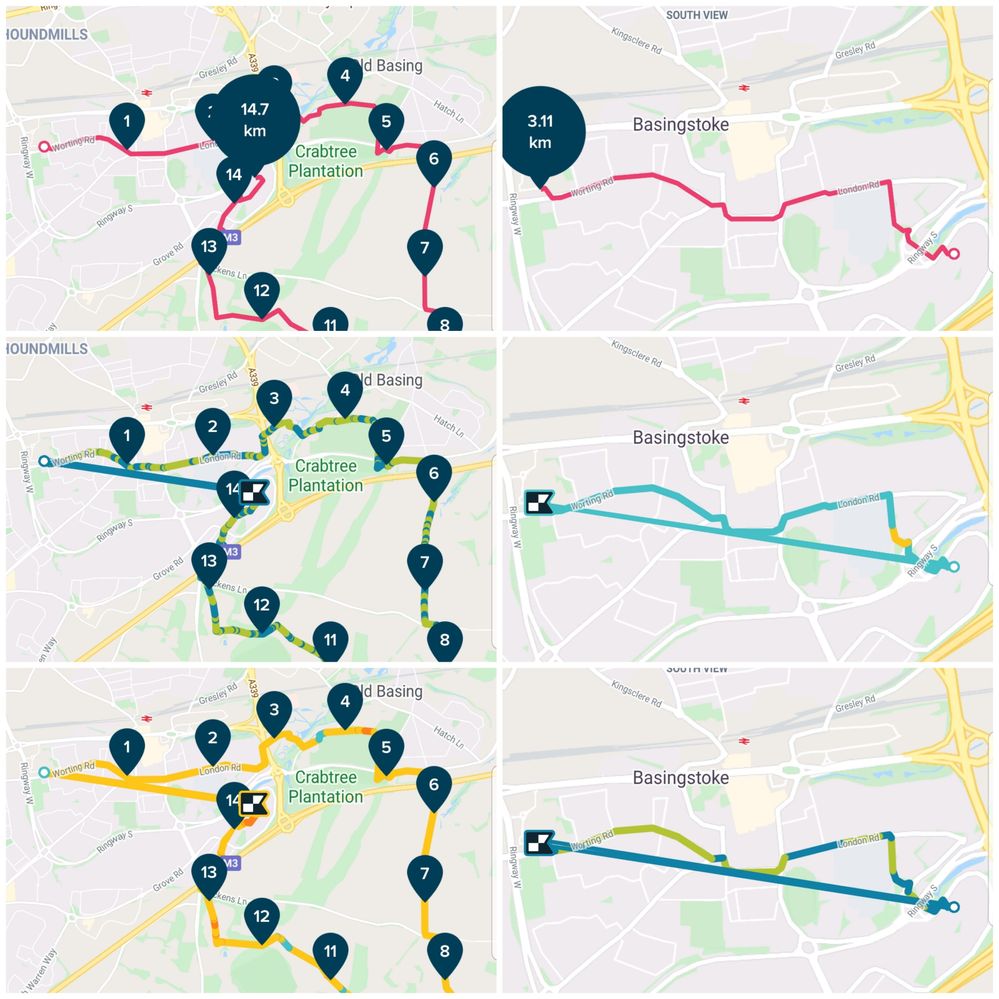
The bug is obvious but apparently, the fix isn't in Fitbit's roadmap.


 Community Moderators ensure that conversations are friendly, factual, and on-topic. We're here to answer questions, escalate bugs, and make sure your voice is heard by the larger Fitbit team. Learn more
Hi @Johnsim66, welcome to the Community Forums.
Thanks for bringing this to our attention and for the details that were shared. To better assist you with this, can you please let me know which Android mobile device are you using? When was the first time you experienced this issue and how many times since then? In the meantime I receive your answers, please try the following steps and let me know if the issue persists:
- Force quit the Fitbit app.
- Uninstall the app from your mobile device.
- Make sure that the Android version is up to date.
- Reboot your mobile device.
- Reinstall the Fitbit app.
- Login using your account credentials.
Looking forward to your reply.
Best Answer
I’m also getting this issue using a Pixel 4, with a Charge 4.

Hello,
I'm getting the same issue on my versa 3. I tried all the above suggestions but it didn't work.
Thanks,
Pavan
Best Answer
@pavankanneganti nothing will works until Fitbit fixes the issue. Looks like it's been like that for several months yet they don't bother with fixing it though. Well, not that I am surprised.
Best Answer
@Johnsim66 yes, it does happen. It happens when there are gaps between start/end or pause/resume waypoints. Somehow Fitbit assumes that routes are loops starting and ending at the very same point. See the example:
The picture below shows my two recent activities. The left column shows Run, the right column shows Bike. Both start and end at different locations, none of them was paused. The first row shows the route and the two last rows show HR and Pace:
The bug is obvious but apparently, the fix isn't in Fitbit's roadmap.
Same thing happens to me. I'm doing walk/bike loops without pausing the workout on my Fitbit. The other comments saying pausing the workout is why it happens isn't exactly right.
Android Pixel 2
It's been happening since at least March, but my app won't let me go past that for some reason.
Since then, it's happened about 20 times, but again for some reason my app won't load all the maps. Latest time it happened is today, though.
I have followed all your steps before working out today and it still happened. Doing the steps again afterwards has not worked, either.
Best Answer
It's happening to me too with Fitbit Inspire 2. (I assume at this point the model of the Fitbit is regardless and that the error is entirely rooted in the app). Even without pausing mid-run/mid-bike ride, there is still a straight connecting line connecting start and end because, well, you still DO have to pause the tracker to end it. Since who knows how long it'll be until Fitbit fixes this, anyone know of a way to instantly end an exercise and skip over the pause part?
Best Answer
 Fitbit Product Experts Alumni are retired members of the Fitbit Product Expert Program. Learn more
Latest update of the Fitbit app (3.45.1) finally fixed the issue for me
Best Answer