
Join us on the Community Forums!
-
Community Guidelines
The Fitbit Community is a gathering place for real people who wish to exchange ideas, solutions, tips, techniques, and insight about the Fitbit products and services they love. By joining our Community, you agree to uphold these guidelines, so please take a moment to look them over. -
Learn the Basics
Check out our Frequently Asked Questions page for information on Community features, and tips to make the most of your time here. -
Join the Community!
Join an existing conversation, or start a new thread to ask your question. Creating your account is completely free, and takes about a minute.
Not finding your answer on the Community Forums?
- Community
- Platform
- Android App
- Re: Unable to setup Versa 2 with Samsung Galaxy S9
- Mark Topic as New
- Mark Topic as Read
- Float this Topic for Current User
- Bookmark
- Subscribe
- Mute
- Printer Friendly Page
- Community
- Platform
- Android App
- Re: Unable to setup Versa 2 with Samsung Galaxy S9
Unable to setup Versa 2 with Samsung Galaxy S9
- Mark Topic as New
- Mark Topic as Read
- Float this Topic for Current User
- Bookmark
- Subscribe
- Mute
- Printer Friendly Page
09-16-2019
18:53
- last edited on
09-17-2019
12:07
by
RicardoFitbit


09-16-2019
18:53
- last edited on
09-17-2019
12:07
by
RicardoFitbit
I just bought the Versa 2 today and it won't pair with my Bluetooth! I am really annoyed. I had the same issue with my Charge 2, but this is ridiculous. A new product and it is the same crap. I am going to return it. Not worth the hassle. Fitbit products are not the best and they constantly have connectivity issues. This is my third fitbit product that won't connect.
Moderator edit: Subject for clarity


 Community Moderators ensure that conversations are friendly, factual, and on-topic. We're here to answer questions, escalate bugs, and make sure your voice is heard by the larger Fitbit team. Learn more
Hi @coachm, welcome to the Community Forums.
Thanks for bringing this to my attention, sorry for the difficulties experienced with your new Versa 2 device, I totally understand how frustrating this matter can be for you, the feedback provided is appreciated. If you haven't already done so, I recommend you to check all the information that's specified on: How do I set up my Fitbit device? to check if all the requirements are correctly configured to setup your device.
Then, you can move forward to the troubleshooting steps that are specified on: Why can't I set up my Fitbit device? and let me know how it goes.
Let me know if you have any additional questions, I'll be here.
09-17-2019
13:24
- last edited on
09-25-2019
20:41
by
RicardoFitbit

09-17-2019
13:24
- last edited on
09-25-2019
20:41
by
RicardoFitbit
I am having the same issues! I finally got it to show up on my bluetooth list, and it says it is "Couldn't pair. check settings for this device and try again." I have no idea what "settings" to try to fix.
Moderator edit: Format

I just got my Fitbit 2 in today and its doing the same thing as yours. Saying it cannot sync and to check settings. Did you ever resolve this?
 Best Answer
finally paired, but even now when I go to my "music" it still says to
"connect phone"... so no, I haven't figured it out yet.
Best Answer
@CGartner Maybe these steps could help you find a solution ?
https://community.fitbit.com/t5/Android-App/Samsung-Galaxy-S10-Plus/m-p/3765885/highlight/true#M1146...
right away.
connected because i get notifications and such. it just won't play music
when i go to the purple music note icon and try to play through my phone.
my BT headphones connected no problem. Not a big deal since i mainly use
Pandora.
Best Answer
@CGartner
Turning the "AudioConnectionService" switch OFF (within the "Optimise Battery Usage" settings) might help with this. Make sure you reboot your phone after this and that you also have "Bluetooth", "Bluetooth Midi Service" and "BluetoothTest" switches OFF / disabled, too. Just my 2 cents.
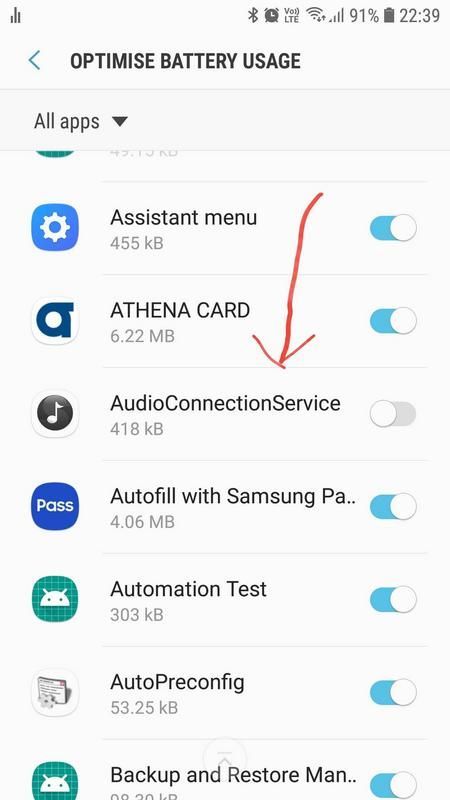

I just updated the fitbit app on my phone and then paired it through the fitbit app (click on profile photo on top left corner, then choose "set up a device"). I had the old version of the app, but once it got updated the app was able to see my versa 2.


Were you able to figure out where that setting is...I'm having the same trouble?
Best Answer
Hello,
After trying all the suggested answers, it turns out I had to change my "Phone Visibility" setting to "On" in my Bluetooth settings. That allowed me phone to connect easily.
I hope this helps anyone as frustrated as I was.
-Oakball24
Best Answer
I have an iPhone 5c and a Kindle Fire Tablet. Versa 2 will not work on either of them. My 5c phone can't get ios12, that's the problem there. My husband's Charge 2 works fine on the Kindle Fire; Versa 2 cannot be set up on it. What is the deal there? My Alta HR died (will not hold a charge). It's taken half the night to figure out I still don't have a tracker that will work. I am very peeved!!!
Best Answer