
Join us on the Community Forums!
-
Community Guidelines
The Fitbit Community is a gathering place for real people who wish to exchange ideas, solutions, tips, techniques, and insight about the Fitbit products and services they love. By joining our Community, you agree to uphold these guidelines, so please take a moment to look them over. -
Learn the Basics
Check out our Frequently Asked Questions page for information on Community features, and tips to make the most of your time here. -
Join the Community!
Join an existing conversation, or start a new thread to ask your question. Creating your account is completely free, and takes about a minute.
Not finding your answer on the Community Forums?
- Community
- Product Help Forums
- Blaze
- Re: Blaze Music Control Information Post
- Mark Topic as New
- Mark Topic as Read
- Float this Topic for Current User
- Bookmark
- Subscribe
- Mute
- Printer Friendly Page
- Community
- Product Help Forums
- Blaze
- Re: Blaze Music Control Information Post
Blaze Music Control Information Post
ANSWERED- Mark Topic as New
- Mark Topic as Read
- Float this Topic for Current User
- Bookmark
- Subscribe
- Mute
- Printer Friendly Page
02-22-2016
09:45
- last edited on
03-28-2016
07:40
by
AndreaFitbit


 Community Moderator Alumni are previous members of the Moderation Team, which ensures conversations are friendly, factual, and on-topic. Moderators are here to answer questions, escalate bugs, and make sure your voice is heard by the larger Fitbit team. Learn more
02-22-2016
09:45
- last edited on
03-28-2016
07:40
by
AndreaFitbit
Music Control gets a facelift with Blaze! Learn more about your power to control music below. For a more detailed look at Music Control on your Blaze, please see this help article.
Music Control:
With Blaze, you can control your music with the touch of a button! To access Music Control, simply swipe downward on your home screen. Improvements to this feature include a Bluetooth Low Energy (BTLE) connection for iOS instead of BT Classic. We've also added the ability to rewind and increase/decrease the volume of the song, in addition to fast forwarding and play/pause.
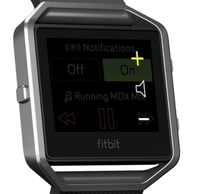
Notes:
- Android and Windows phones will still use BT Classic for using Music Control.
- While in exercise mode, press/hold Blaze's top-right button for 2 seconds to bring Music Control up.
- You'll use both buttons on the right to control volume on Blaze. See image to the right.
- As with most other Bluetooth devices, if you connect another Bluetooth device and disconnect your Blaze, you will have to connect it again the next time you want to use it to control music.
No matter what you're rocking out to, we're sure you'll love using Music Control on Blaze!

Answered! Go to the Best Answer.


Just set up my Blaze today with my G4 (Marshmallow). I was able to pair without issue, but initially it would only control volume, it wouldn't show me what was playing. I restarted the Blaze and it now displays the track I'm playing but the play/pause button does not seem to do anything, so I think there are still some bugs to be worked out here...
 Best Answer
get it to connect to music.
Nianya
Best Answer

My Blaze paired flawelessly with my iPhone 6S, and music controls are working great right out of the box. Only minor complaint I have @EmersonFitbit is that if I start a workout from my Blaze (instead of the app) I do not have access to the music controls while the workout is running on the Blaze's screen. No swiping down works for the controls. It appears I can't have my cake and eat it, too - either have real time stats on my wrist so I can tuck my phone away while running, or have music controls on my wrist, but it doesn't matter because I'd have to have my phone out to see stats.
Ultimately I prefer to be able to see the stats on my wrist - there are just times when "Boy I'd like to hear that song again as I tackle this hill that's coming up, give me a little oomph". So I'm not sure if that's something that can be eventually updated in a firmware update or if it's truly a limitation of the Blaze's hardware.
Would love to hear back on the possibilities.
Edited to add: When I have access to the controls, they do work for both iTunes and Amazon Music on iOS

@tps123 wrote:I have found, if you press and hold the top button on the two button side whie in exercise mode, the music controls pop up.
Boom! Look at that, it does. Super, thanks so much for the input, learn something new every day!!
03-02-2016
07:37
- last edited on
01-31-2026
07:39
by
MarreFitbit
Community Moderator Alumni are previous members of the Moderation Team, which ensures conversations are friendly, factual, and on-topic. Moderators are here to answer questions, escalate bugs, and make sure your voice is heard by the larger Fitbit team. Learn more
03-02-2016
07:37
- last edited on
01-31-2026
07:39
by
MarreFitbit
@jvincent78 It took me a few weeks to find/use every feature on the Blaze. I still use it differently dependent on my mood.
@tps123 Thanks for the assist!
Well, all of suddent the music controls work today. Obviously they don't work predictably though, so Fitbit needs to look at this as a lot of people are having issues...
Best Answer
Nianya
Best Answer
Apps that came with your phone when you originally got it --- ones tied with its operating system. In apple devices that's itunes. Android phones have a "Music" app. Those are the ones most likely to tie in rather than third party apps like pandora or spotify. That being said, some have been able to link with pandora and spotify in classic mode. I just checked and my blaze connected with Amazon Music.
For reference I have a Samsung S5.
Best Answer
New Blaze (yea?) iPhone 6 iOS 9.3
Paired immediately..however music controls i.e. skipping songs DOES NOT WORK
I would appreciate it if my Blaze worked like my Surge... Literally it (my Surge) will turn my music on while my phone is safely tucked away (I don't have to start my Music app first), allows me to skip songs at my leisure... Guys: I can control volume on my wireless headsets, skipping songs I have become hooked on
Best Answer