
Join us on the Community Forums!
-
Community Guidelines
The Fitbit Community is a gathering place for real people who wish to exchange ideas, solutions, tips, techniques, and insight about the Fitbit products and services they love. By joining our Community, you agree to uphold these guidelines, so please take a moment to look them over. -
Learn the Basics
Check out our Frequently Asked Questions page for information on Community features, and tips to make the most of your time here. -
Join the Community!
Join an existing conversation, or start a new thread to ask your question. Creating your account is completely free, and takes about a minute.
Not finding your answer on the Community Forums?
- Community
- Product Help Forums
- Blaze
- Re: Blaze Music Control Information Post
- Mark Topic as New
- Mark Topic as Read
- Float this Topic for Current User
- Bookmark
- Subscribe
- Mute
- Printer Friendly Page
- Community
- Product Help Forums
- Blaze
- Re: Blaze Music Control Information Post
Blaze Music Control Information Post
ANSWERED- Mark Topic as New
- Mark Topic as Read
- Float this Topic for Current User
- Bookmark
- Subscribe
- Mute
- Printer Friendly Page
02-22-2016
09:45
- last edited on
03-28-2016
07:40
by
AndreaFitbit


 Community Moderator Alumni are previous members of the Moderation Team, which ensures conversations are friendly, factual, and on-topic. Moderators are here to answer questions, escalate bugs, and make sure your voice is heard by the larger Fitbit team. Learn more
02-22-2016
09:45
- last edited on
03-28-2016
07:40
by
AndreaFitbit
Music Control gets a facelift with Blaze! Learn more about your power to control music below. For a more detailed look at Music Control on your Blaze, please see this help article.
Music Control:
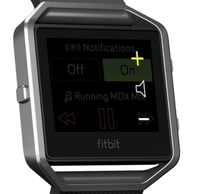
With Blaze, you can control your music with the touch of a button! To access Music Control, simply swipe downward on your home screen. Improvements to this feature include a Bluetooth Low Energy (BTLE) connection for iOS instead of BT Classic. We've also added the ability to rewind and increase/decrease the volume of the song, in addition to fast forwarding and play/pause.
Notes:
- Android and Windows phones will still use BT Classic for using Music Control.
- While in exercise mode, press/hold Blaze's top-right button for 2 seconds to bring Music Control up.
- You'll use both buttons on the right to control volume on Blaze. See image to the right.
- As with most other Bluetooth devices, if you connect another Bluetooth device and disconnect your Blaze, you will have to connect it again the next time you want to use it to control music.
No matter what you're rocking out to, we're sure you'll love using Music Control on Blaze!

Answered! Go to the Best Answer.

Nothing in the OP help? What music app are you using, and where you able to pair the classic BT?
 Best Answer
Whoa! Just got it to work on my Turbo 2. I had to start playing the music on my phone first then changed the setting on watch to pair Bluetooth Classic, then went to phone under settings, bluetooth and refreshed, Bluetooth Classic came up and I was able to pair it. The pinkey numbers popped up on my phone and watch asking to confirm. Finally!!!! Hope you have the same luck!
Best Answer Best Answer
They say both Amazon and Spotify have been tested. I would try first without having a BT sound stem hooked up.
Best Answer
It works just fine with every music service I've tried on both iOs and Android.
Presently using Google Play Music on iOs.
 Best Answer
I am glad that it does works for you, however it is still broken for myself and from this thread quite a few other people.
I get one of two problems:
- The song displays but the controls do not function
- The controls funtion (periodically) but the song displayed on screen does not change.
I have tested it with Power amp, Googleplay music and spotify with the same results.
Have rebooted and paired again with my phone but get the same results.
It would be nice to hear from Fitbit on the subject.
Best Answer
I'm not sure why Fitbit would even respond as music control works as advertised, at least for me, using Spotify, Google Play Music, Apple Music, Walkman, Shuttle Music Player et al.
I wouldn't touch Power amp with a bargepole as it is buggy crapware, even the paid version.. Also, older model androids and iPhones won't work as seamlessly.
Best Answer
Thank you so much for this post! I kept trying to connect to the regular Blaze, never realizing I needed to scan for Blaze Classic. My music control now easily works. This was drizing me nuts and I had just decided that music controls didn't work for my Samsung S5 and you just made my day!!! 🙂
Best Answer
I have a pair of Klipsch Bluetooth headphones. When I wear them with the cable attached to my phone, the Blaze's music controls work. When I unplug them the controls don't work. I can't find any information on this forum about people having this problem. In my opinion, what's the point of having bluetooth headphones if I'm teethered to my phone?
Best Answer
Try connecting the headphones, then startup the app. No try the music control.
Some BT headphones and their music control seem to want precedence over the Blaze.
Best Answer
Is it possible to control the music whilst running an exercise session? I did a weights workout earlier today and went to exercise > weights and started from there but was unable to swipe down to control the music from my phone. Is it only from the home screen that we are able to do this?
 Best Answer
My girlfriend has the same problem. She can open the music control on the screen while exercising, but none of the buttons work. She has to stop her run-timer, open the music control seperately to change the songs...
Best Answer