Join us on the Community Forums!
-
Community Guidelines
The Fitbit Community is a gathering place for real people who wish to exchange ideas, solutions, tips, techniques, and insight about the Fitbit products and services they love. By joining our Community, you agree to uphold these guidelines, so please take a moment to look them over. -
Learn the Basics
Check out our Frequently Asked Questions page for information on Community features, and tips to make the most of your time here. -
Join the Community!
Join an existing conversation, or start a new thread to ask your question. Creating your account is completely free, and takes about a minute.
Not finding your answer on the Community Forums?
- Community
- Features
- Fitbit App Gallery
- Re: Getting "to continue using ASK visit kzl.io/co...
- Mark Topic as New
- Mark Topic as Read
- Float this Topic for Current User
- Bookmark
- Subscribe
- Mute
- Printer Friendly Page
- Community
- Features
- Fitbit App Gallery
- Re: Getting "to continue using ASK visit kzl.io/co...
Getting "to continue using ASK visit kzl.io/code"?
ANSWERED- Mark Topic as New
- Mark Topic as Read
- Float this Topic for Current User
- Bookmark
- Subscribe
- Mute
- Printer Friendly Page
07-05-2018
07:42
- last edited on
07-06-2018
07:05
by
SilviaFitbit


07-05-2018
07:42
- last edited on
07-06-2018
07:05
by
SilviaFitbit
My fitbit has this message on the screen. "To continue using ASK please visit kzl.io/code and enter this code" then a code is provide. I cant get rid of it, what do I do? TIA
Moderator edit: Updated subject for clarity
Answered! Go to the Best Answer.


 Community Moderators ensure that conversations are friendly, factual, and on-topic. We're here to answer questions, escalate bugs, and make sure your voice is heard by the larger Fitbit team. Learn more
Welcome on board @T-roy85! Have you tried restarting your Versa? Then, try switching to a different clock face and see if the restart does the trick.
If you keep having difficulties with the ASK clock face. For future references, with third party apps, note that Fitbit doesn't own or maintain third party integrations. It's up to the owner of the third party app to implement or update features for their app so in this case is recommendable to contact the third party developer to learn more about future implementations.
To contact the developer please open their app on the Fitbit App Gallery, scroll/swipe down and under "App Details" you will find the information.
Hope this helps!
Was my post helpful? Give it a thumbs up to show your appreciation! Of course, if this was the answer you were looking for, don't forget to make it the Best Answer! Als...

Doesn't seem like there are any free faces and I can't figure out how to back to the default one. Seems that all the "features" versa comes with arent actual features of the watch. They are paid functions that Versa CAN perform. On screen coaching....that you have to pay for. Customizable clock face..... That you have to pay for. Use Pandora, oh wait you have Pandora? Oh, well that free subscription wont work, you have to......PAY.
Community Moderators ensure that conversations are friendly, factual, and on-topic. We're here to answer questions, escalate bugs, and make sure your voice is heard by the larger Fitbit team. Learn more
Welcome here @Watson2000! Sorry to hear about the inconveniences you've been having with the Clock Faces on your Versa.
Your Fitbit watch comes preloaded with a variety of apps including Alarms, Music, and Exercise. From the home screen, swipe left to see the apps currently installed. You can install additional apps using the Fitbit App Gallery. If you have trouble setting up an app, see How do I set up and troubleshoot apps on my Fitbit watch?
If you cannot change the current clock face, I'd recommend restarting your Versa. Then, try switching to a different clock.
Hope that helps, keep me posted!
Was my post helpful? Give it a thumbs up to show your appreciation! Of course, if this was the answer you were looking for, don't forget to make it the Best Answer! Als...

By any chance @Harley1980 have you recently reinstalled the clock face? If so you will need to register the face.
Go to the Kxl.io address and choose the I already purchased option
You will need your email address and the code from the tracker.

I followed instructions but the app related to the error message for purchase does not appear on my apps. I cannot seem to find a way to remove. They want $7! For this crazy thing
 Best Answer
Hello @Cape_Brandon19 you have gone to the Kzl.io/code page and entered the code found on the watch face. What then happens?
Note that it the watch has already been purchased then please use the I already purchased option.

@Cape_Brandon19 wrote:I followed instructions but the app related to the error message for purchase does not appear on my apps. I cannot seem to find a way to remove. They want $7! For this crazy thing
$7 is just the price of a regular coffee!
Community Moderators ensure that conversations are friendly, factual, and on-topic. We're here to answer questions, escalate bugs, and make sure your voice is heard by the larger Fitbit team. Learn more
Hi there @Cape_Brandon19! Please note that this clock face requires a payment after the free trial or a one-time activation fee (to a developer). If a developer requires an activation fee, you may see a message in the app or clock face description:
For these apps and clock faces, the developer will process and provide instructions for payment. Many developers use the third party service KiezelPay to accept payment for their app or clock face. For more information, see KiezelPay’s FAQ.
As you have been advised along this thread, to contact the developer please open their app on the Fitbit App Gallery, scroll/swipe down and under "App Details" you will find the information.
Thanks a lot for helping out @Rich_Laue and @EmTe! 
If you have any additional questions, let us know!
Was my post helpful? Give it a thumbs up to show your appreciation! Of course, if this was the answer you were looking for, don't forget to make it the Best Answer! Als...
Best Answer

 Fitbit Product Experts Alumni are retired members of the Fitbit Product Expert Program. Learn more
Welcome to the forum.
It shall be noted that the Fitbit App Store is not like your Apple Store or Play Store (depending if you use iOS or Android) where you can buy the apps/clockfaces directly from the store. Since there is not such facility the developers who wants to be paid (how to blame them!) for their effort usually implement a system called kpay and the instruction are given in the clockface description.
If the app/clockface is a pay one there is a big banner like the one shown in this post informing you about it. If the app/clockface is free the banner is not present.
I hope it clarifies.
As for where to summit the code, your Fitbit had a web address displayed on it's face. Go to that address, and follow the prompts.
The address is also found in the title of this thread.
kzl.io/code
02-01-2019
05:28
- last edited on
02-07-2019
07:37
by
MarreFitbit
02-01-2019
05:28
- last edited on
02-07-2019
07:37
by
MarreFitbit
thank you
Love your work.
Best Answer
Community Moderators ensure that conversations are friendly, factual, and on-topic. We're here to answer questions, escalate bugs, and make sure your voice is heard by the larger Fitbit team. Learn more
Thanks for helping out guys @Giampi71 and @Rich_Laue! Did this work for you new my friend @BeckySue14?
Welcome on board @jakks! Please don't hesitate to let us know if you have any questions!
We'll be around!
Was my post helpful? Give it a thumbs up to show your appreciation! Of course, if this was the answer you were looking for, don't forget to make it the Best Answer! Als...
Best Answer
Community Moderators ensure that conversations are friendly, factual, and on-topic. We're here to answer questions, escalate bugs, and make sure your voice is heard by the larger Fitbit team. Learn more
You're very welcome @tdlopez74. We're glad to hear the information provided here helped you out!
In case you have some spare time, I would like to invite you to visit our Discussions board where you will find great tips and encouragement from other members and if there's anything else I can do for you, please keep me posted! 
Was my post helpful? Give it a thumbs up to show your appreciation! Of course, if this was the answer you were looking for, don't forget to make it the Best Answer! Als...
Best Answer
I have the same issue. I have seen your suggestion of choosing the Already Purchased option in several of your replies. However, there is no such option available. All I get is a button with the price to purchase.
@FriedToast if all you see is a button to pay, you went to far.
Go here and choose all ready paid. Do not enter the code yet.
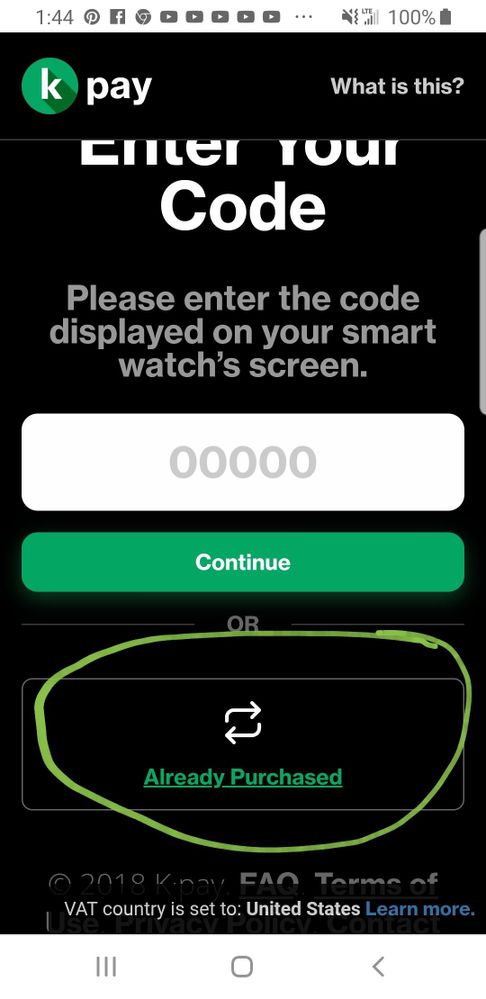
The next page you will enter the code and email.