
Join us on the Community Forums!
-
Community Guidelines
The Fitbit Community is a gathering place for real people who wish to exchange ideas, solutions, tips, techniques, and insight about the Fitbit products and services they love. By joining our Community, you agree to uphold these guidelines, so please take a moment to look them over. -
Learn the Basics
Check out our Frequently Asked Questions page for information on Community features, and tips to make the most of your time here. -
Join the Community!
Join an existing conversation, or start a new thread to ask your question. Creating your account is completely free, and takes about a minute.
Not finding your answer on the Community Forums?
- Community
- Features
- Fitbit App Gallery
- Re: Agenda app
- Mark Topic as New
- Mark Topic as Read
- Float this Topic for Current User
- Bookmark
- Subscribe
- Mute
- Printer Friendly Page
- Community
- Features
- Fitbit App Gallery
- Re: Agenda app
How do I set up Agenda App?
ANSWERED- Mark Topic as New
- Mark Topic as Read
- Float this Topic for Current User
- Bookmark
- Subscribe
- Mute
- Printer Friendly Page
08-15-2020
07:51
- last edited on
08-27-2020
14:12
by
MarreFitbit


08-15-2020
07:51
- last edited on
08-27-2020
14:12
by
MarreFitbit
Agenda says sync calender in mobile app but how do I do that
Moderator Edit: Clarified subject
Answered! Go to the Best Answer.
Accepted Solutions


 Community Moderators ensure that conversations are friendly, factual, and on-topic. We're here to answer questions, escalate bugs, and make sure your voice is heard by the larger Fitbit team. Learn more
Hi there @hazelted, welcome to the Community Forums. Thanks for the details provided in your post, I'll be glad to help you to set up Agenda app on your watch.
In order to do so:
- In the Fitbit app on your phone, tap the Today tab > your profile picture > your device image > Apps.
- Tap the gear icon next to Agenda. You may need to swipe up to find the app. You’ll see all calendars linked to the default calendar app on your phone.
- Adjust the settings to choose which calendars to show on your device, the color for events linked to each calendar, and whether you want to see blocks of free time.
- Sync your device to see today’s and tomorrow’s events from your calendars in the Agenda app
To view events in the Agenda app:
- Open the Agenda app on your device. You’ll see the events scheduled for today and tomorrow. Swipe up and down to scroll through the events.
- Tap any event to see details.
Note that the Agenda app shows up to 40 total events over 2 days.
You must allow the Agenda app to access your calendar and run in the background. For more information about adjusting an app’s permissions, see How do I install and manage apps on my Fitbit device?
If your events don't appear, check the following settings:
- Location services must be turned on for the Fitbit app. For instructions, see How do I use GPS on my Fitbit device?
- Calendar access must be turned on for the Fitbit app:
- On iPhones, open the Settings app on your phone > Fitbit > make sure Calendars is turned on.
- On Android phones, open the Settings app on your phone > Apps > Fitbit > Permissions > Calendar > make sure the access is set to Allow.
- On Windows 10 phones, open the Settings app on your phone > Privacy > Fitbit > make sure Calendar access is turned on.
Let me know if you need further assistance, I'll be around.
Was my post helpful? Give it a thumbs up to show your appreciation! Of course, if this was the answer you were looking for, don't forget to make it the Best Answer! Als...
 Best Answer
Community Moderators ensure that conversations are friendly, factual, and on-topic. We're here to answer questions, escalate bugs, and make sure your voice is heard by the larger Fitbit team. Learn more
Best Answer
Community Moderators ensure that conversations are friendly, factual, and on-topic. We're here to answer questions, escalate bugs, and make sure your voice is heard by the larger Fitbit team. Learn more
Hi there @hazelted, welcome to the Community Forums. Thanks for the details provided in your post, I'll be glad to help you to set up Agenda app on your watch.
In order to do so:
- In the Fitbit app on your phone, tap the Today tab > your profile picture > your device image > Apps.
- Tap the gear icon next to Agenda. You may need to swipe up to find the app. You’ll see all calendars linked to the default calendar app on your phone.
- Adjust the settings to choose which calendars to show on your device, the color for events linked to each calendar, and whether you want to see blocks of free time.
- Sync your device to see today’s and tomorrow’s events from your calendars in the Agenda app
To view events in the Agenda app:
- Open the Agenda app on your device. You’ll see the events scheduled for today and tomorrow. Swipe up and down to scroll through the events.
- Tap any event to see details.
Note that the Agenda app shows up to 40 total events over 2 days.
You must allow the Agenda app to access your calendar and run in the background. For more information about adjusting an app’s permissions, see How do I install and manage apps on my Fitbit device?
If your events don't appear, check the following settings:
- Location services must be turned on for the Fitbit app. For instructions, see How do I use GPS on my Fitbit device?
- Calendar access must be turned on for the Fitbit app:
- On iPhones, open the Settings app on your phone > Fitbit > make sure Calendars is turned on.
- On Android phones, open the Settings app on your phone > Apps > Fitbit > Permissions > Calendar > make sure the access is set to Allow.
- On Windows 10 phones, open the Settings app on your phone > Privacy > Fitbit > make sure Calendar access is turned on.
Let me know if you need further assistance, I'll be around.
Was my post helpful? Give it a thumbs up to show your appreciation! Of course, if this was the answer you were looking for, don't forget to make it the Best Answer! Als...
Best Answer
The Agenda worked fine on my Versa 1 but never on the Charge 4.
On the Versa 2 I get this
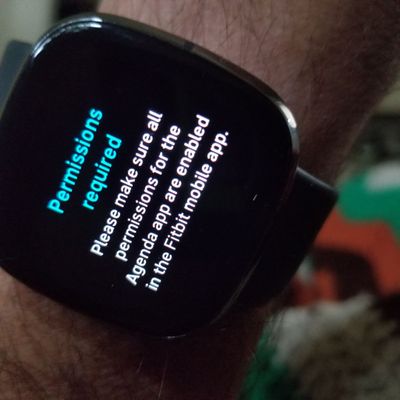
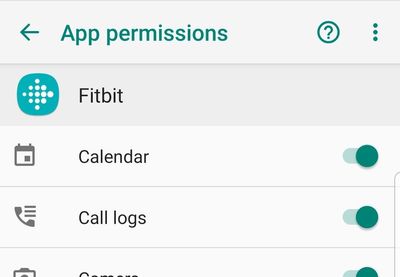
So I go to the app permissions and see that the calender already is permitted.
so let's open the Fitbit app and choose a calender.
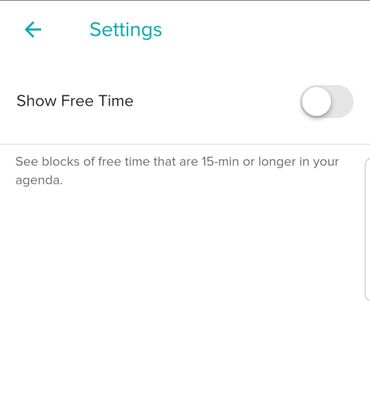
I'm at a loss.
Best Answer
This didn't work for me. What I did to fix it was to go to the APPS and find agenda. Uninstall it. Then install it again. Once installed, make sure your calendar is the default and that should wok.
Best Answer

Yes it’s now gallery! then leave on {Device Name} tab scroll down and find it, or change to apps tab and search for the one you want
Best Answer
I have the versa 2 and when I go to profile pic, device pic, their is no app settings, I cant get Agenda to work. All permissions are given
Best Answer
 Fitbit Product Experts Alumni are retired members of the Fitbit Product Expert Program. Learn more
Fitbit Product Experts Alumni are retired members of the Fitbit Product Expert Program. Learn more
Fitbit Product Experts Alumni are retired members of the Fitbit Product Expert Program. Learn more
@TommoStu- in the Gallery tile you can enter search criteria and you will only see clocks available for your watch. However if you just started with a new watch you might not have the latest firmware then many might be unavailable. See Incorrect Set up of a new device
For versions see What's changed in the latest Fitbit device update?
Author | ch, passion for improvement.
