
Join us on the Community Forums!
-
Community Guidelines
The Fitbit Community is a gathering place for real people who wish to exchange ideas, solutions, tips, techniques, and insight about the Fitbit products and services they love. By joining our Community, you agree to uphold these guidelines, so please take a moment to look them over. -
Learn the Basics
Check out our Frequently Asked Questions page for information on Community features, and tips to make the most of your time here. -
Join the Community!
Join an existing conversation, or start a new thread to ask your question. Creating your account is completely free, and takes about a minute.
Not finding your answer on the Community Forums?
- Community
- Features
- Fitbit App Gallery
- Re: Strava Authorization state: Not Authorized
- Mark Topic as New
- Mark Topic as Read
- Float this Topic for Current User
- Bookmark
- Subscribe
- Mute
- Printer Friendly Page
- Community
- Features
- Fitbit App Gallery
- Re: Strava Authorization state: Not Authorized
Strava Authorization state: Not Authorized
ANSWERED- Mark Topic as New
- Mark Topic as Read
- Float this Topic for Current User
- Bookmark
- Subscribe
- Mute
- Printer Friendly Page
08-24-2018
12:38
- last edited on
02-26-2019
10:38
by
MattFitbit


08-24-2018
12:38
- last edited on
02-26-2019
10:38
by
MattFitbit
Hello.
I got my Ionic a few days ago and I have a bit of a problem with getting Strava app to work. I don't know if this is the correct place to ask this question or it should be posted in Windows phone app section.
This is my hardware:
Fitbit Ionic
Windows 10 mobile on Microsoft Lumia 950 XL
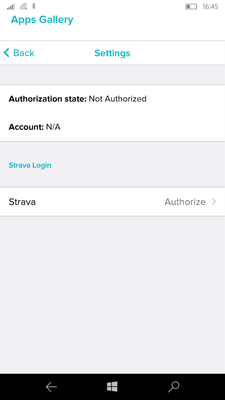
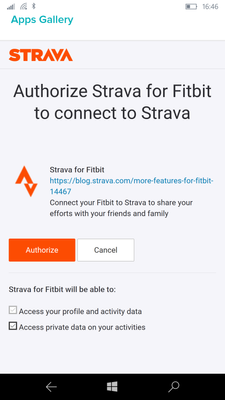
When I open settings of Strava app on my phone Fitbit app, I click on Authorize and then I'm asked to log in with my Strava loggin passwords. I do that I'm shown another window (picture 2) where I can click on authorize or cancel. I click on authorize and then I'm thrown back (picture 1) to Strava app settings and it says it's not authorized.
I can authorize Strava - Fitbit connection if I do it on my PC on a Fitbit dashboard there. Then Strava is authorized and data from my run activity was transfered to my Strava account.
But the app on my Ionic just say "no recent activity" as it still says on my phone app that Strava isn't authorized.
How can I make this app working?
Picture 1:
Picture 2:
Moderator edit: Subject for clarity.
Answered! Go to the Best Answer.


 Community Moderator Alumni are previous members of the Moderation Team, which ensures conversations are friendly, factual, and on-topic. Moderators are here to answer questions, escalate bugs, and make sure your voice is heard by the larger Fitbit team. Learn more
Hi all! Just a heads up - I have merged a few threads and moved this topic to the App Gallery board since this issue is specific to the Strava App rather than the integration between Fitbit and Strava as a whole.
Our team is still working towards a resolution for this issue. I have reached out to our engineers for an update and I will be sure to keep you all posted once I have additional information to share.
In the meantime, feel free to let me know if you have any additional questions.
Want to get more deep sleep? Join the discussion on our Sleep better forum.

I'm not sure it I understand your point @njetherington . Which canned response are you referring to that gives instructions for the user to follow?
@MattFitbit 's post clearly states that this issue is being looked at and worked on by the developers. Clearly implying that for now there is nothing the user will be able to do to get the app to login.
I can no longer link to my Strava account. Have tried the fixes on here and the aren't working - ie my Strava account is no longer authorised. Any updates?
Community Moderator Alumni are previous members of the Moderation Team, which ensures conversations are friendly, factual, and on-topic. Moderators are here to answer questions, escalate bugs, and make sure your voice is heard by the larger Fitbit team. Learn more
@Jillyholli Thanks for posting! I do not have any updates on this issue as of right now but I will be sure to let you know once our team has determined a fix.
@Rich_Laue Thanks for the help!
Want to get more deep sleep? Join the discussion on our Sleep better forum.
 Best Answer
I've just had a look at the start of this thread which is from August. So these issues have been going on for nearly 8 months with no resolution. I'll just start taking my phone out with me again or use Garmin. This watch is consistently disappointing.
Community Moderator Alumni are previous members of the Moderation Team, which ensures conversations are friendly, factual, and on-topic. Moderators are here to answer questions, escalate bugs, and make sure your voice is heard by the larger Fitbit team. Learn more
@Jillyholli Sorry this issue has not been resolved yet. I assure you that our team is looking into it and I hope to have some additional news to share soon. Let me know if you have additional questions in the meantime.
Want to get more deep sleep? Join the discussion on our Sleep better forum.
Best Answer

Sorry are you referring to the message that says no solution? Surely this can’t be still an issue.
Best Answer
Yes I am, these kind of problems usually are not caused by a simple programming error, but from some unforeseen interaction with another routine that could be within the Fitbit app or not. As mentioned, the source has been identified, no a fix needs to be found. This fix also needs to be done in a way that it does not cause another problem..
Also since we know that this issue will not be fixed by your fellow Fitbit users and all updates and a fix will need to come from Fitbit, using the term "Anyone find a fix", has the obvious answer of Not Yet. If Fitbit has a resolution it will be posted in the thread. Maybe something like "I hope to have additional news to share soon"
Best Answer
Ok thank you for the clarification. I am sure you understand people’s annoyance.
As as I have had my ionic for just under a year am I likely to be eligible for a refund?
Best Answer
Sorry also, may be a silly question but is it all ionics that are likely to have this problem if I get an exchange. Hi really love my ionic!
Best Answer
This error is not about the Ionic, but about an app that was not available at the time your Ionic was purchased. Since this is about an interface between Fitbit and Strava, and an app written by Strava and has nothing to do with the Ionic hardware or firmware I have my doubts, but you can always ask support.
Best Answer
available since the Ionic launched. This compatibility was a deciding
factor when I purchased it.
Whether the problem is on Strava's end or Fitbit's, it's beyond the control
of ordinary users to fix it. Fitbit's instructions don't work, and they
haven't updated them to reflect the fact that there's a known problem
pairing with Strava, so it's entirely reasonable for users to take to the
forums or support chat and vent their frustration.
Completely agree anthropologist. I’ve been too frustrated to reply.
Buying a Fitbit for near £250 that advertises that it connects with Strava is then what you expect to happen.
Its been connecting for me for 11 months. Ive always been a huge advocate of Fitbit and am very disappointed by the response and how long it’s taken to resolve.
Not clear either if I fork out for a new one if the same problem will happen with any Fitbit as seems to be the app. Strava is connecting fine in the Strava app.
I do do understand that Fitbit don’t own Strava but these company’s that rely on each other just have a relationship to resolve issues.
The helpdesk are are trying to help me. If they find a solution I will
post on here.
Best Answer
I would advise you to hold off on buying another one. It's not a hardware issue, so a new device won't fix it. I had to RMA my original Ionic because of the mysterious sudden death issue that has been reported elsewhere in the forums, and the new / factory-reset Ionic I received would not sync with Strava.
Best Answer
Hi,
Thank you, good to know! Do you think it’s all Fitbit’s then? I’m really not keen on having to defect to garmin!
Surely it cant be everyone with a Fitbit is effecting as there would be a lot more noise.
Best Answer
Your Fitbit account does connect to your Strava account @Gailemmar. if your Ionic runs are not syncing to Strava then please start a new thread rather than jumping an unrelated discussion .This thread is about the Strava Ionic app not being able to access the users Strava account and has nothing to do with the Fitbit -Strava sync in of data .
Hi Rich
I’m very confused, page one of this thread where it all started is exactly the problem I have. The fact it won’t sync to strava is because I can’t get it to authorise.
Im not an expert at this at all just trying to get help to resolve my problem.
Best Answer