
Join us on the Community Forums!
-
Community Guidelines
The Fitbit Community is a gathering place for real people who wish to exchange ideas, solutions, tips, techniques, and insight about the Fitbit products and services they love. By joining our Community, you agree to uphold these guidelines, so please take a moment to look them over. -
Learn the Basics
Check out our Frequently Asked Questions page for information on Community features, and tips to make the most of your time here. -
Join the Community!
Join an existing conversation, or start a new thread to ask your question. Creating your account is completely free, and takes about a minute.
Not finding your answer on the Community Forums?
- Community
- Features
- Fitbit App Gallery
- Re: Ionic Strava Authorization
- Mark Topic as New
- Mark Topic as Read
- Float this Topic for Current User
- Bookmark
- Subscribe
- Mute
- Printer Friendly Page
- Community
- Features
- Fitbit App Gallery
- Re: Ionic Strava Authorization
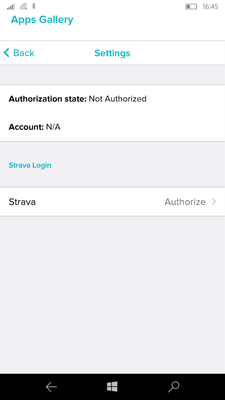
Strava Authorization state: Not Authorized
ANSWERED- Mark Topic as New
- Mark Topic as Read
- Float this Topic for Current User
- Bookmark
- Subscribe
- Mute
- Printer Friendly Page
08-24-2018
12:38
- last edited on
02-26-2019
10:38
by
MattFitbit


08-24-2018
12:38
- last edited on
02-26-2019
10:38
by
MattFitbit
Hello.
I got my Ionic a few days ago and I have a bit of a problem with getting Strava app to work. I don't know if this is the correct place to ask this question or it should be posted in Windows phone app section.
This is my hardware:
Fitbit Ionic
Windows 10 mobile on Microsoft Lumia 950 XL
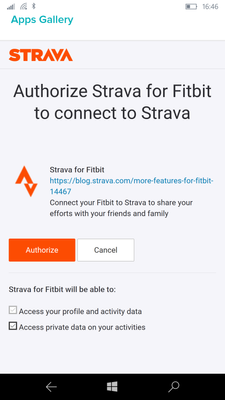
When I open settings of Strava app on my phone Fitbit app, I click on Authorize and then I'm asked to log in with my Strava loggin passwords. I do that I'm shown another window (picture 2) where I can click on authorize or cancel. I click on authorize and then I'm thrown back (picture 1) to Strava app settings and it says it's not authorized.
I can authorize Strava - Fitbit connection if I do it on my PC on a Fitbit dashboard there. Then Strava is authorized and data from my run activity was transfered to my Strava account.
But the app on my Ionic just say "no recent activity" as it still says on my phone app that Strava isn't authorized.
How can I make this app working?
Picture 1:
Picture 2:
Moderator edit: Subject for clarity.
Answered! Go to the Best Answer.

Any update on this? Another week has passed....?
Kind of feels like this isn't a priority for Fitbit to solve?
 Best Answer

 Community Moderators ensure that conversations are friendly, factual, and on-topic. We're here to answer questions, escalate bugs, and make sure your voice is heard by the larger Fitbit team. Learn more
Hello @JamesUKrunner, we're sorry for the trouble with Strava.
Our team is still working to have a fix implemented and I appreciate your patience. We understand that this isn't the resolution you're hoping for, but rest assured we're always working to improve our products.
We'll keep you all updated when updates are available.
Was my post helpful? Give it a thumbs up to show your appreciation! Of course, if this was the answer you were looking for, don't forget to make it the Best Answer! Als...
Another week has past....
ANY UPDATE FITBIT?
Best Answer
FITBIT!!!
Any update!
Best Answer

Just picked up an Ionic, and I am running into the issue described, tried all the solutions in this thread. This issue is most certainly not solved and I don't know the reason for the misrepresentation. Please offer a working solution, Fitbit

My Strava has worked fine until last month, when it suddenly lost permission. Unable to turn it back on.
Best Answer
Hello @Kzasch are you referring to your Fitbit data is not being sent to Strava?
Or is it that the Strava app on your Versa or ionic is unable to log into your Strava account. This is what this thread is about.
Best Answer
I purchased a Versa 2 days ago to take advantage of its Strava compatibility when out running. I have been sorely disappointed as I have run in to the issue described here. I've tried all the suggestions in this thread and spent hours struggling to get it to work to no avail. Is there any solution to this that will actually work? This is in addition to having major syncing problems too with my Galaxy S9. Help!
Best Answer
Hello @Starkaryen may I ask what is not happening?
The issue described here is about the user not being able to see their Strava dashboard from the wrist and is not related to the Strava / Fitbit link.
May I ask what is not happening @Starkaryen?
Best Answer
summerise for you.
The Ionic records data and sends to my strava account and I can view the
run on the strava app on my phone.
The problem is with the Ionic itself as when I go into the strava app on
the ionic it does not display any data.
It is supposed to display the run and a map on the ionic but instead, it
says "NO recent activity" This has never worked and Fitbit seems unwilling
or unable to resolve this issue.
Best Answer
 Fitbit Product Experts Alumni are retired members of the Fitbit Product Expert Program. Learn more
Actually it is not true that it never worked as it works for me (see this post for example where I already replied to you).
I'm not saying you are not saying the truth, for what reasons then. The point with Fitbit is that there not consistency of behavior among the users: some users don't have problems, many others have. And this Strava thing is just one example.
I agree that Fitbit must find definitive solutions.
Best Answer
To Clarify
It is 100% true to say this has never worked for me and still does not work despite reporting the issue along with many other disappointed users, Fitbit still have not offered any solutions
I have a Versa and I am having problems with the Strava app on the watch. If I click on the app on the watch it says I need to link my account via the app settings in the Fitbit app on my phone. If I go to the app and look it continues to say "not authorized" despite it showing my account name beneath under Strava Login heading.

Best Answer
I did follow the instructions in the post but had no luck. I didn't get any error messages, it just wouldn't show my account as authorized. The app update seems to have done the trick and my account now shows as authorized. Thanks for your help @Rich_Laue
Best Answer
Just for clarity @Starkaryen. is it your Strava account that shows authorized. Or is it the Strava app on the Ionic that now shows you as logged in?
Best Answer