
Join us on the Community Forums!
-
Community Guidelines
The Fitbit Community is a gathering place for real people who wish to exchange ideas, solutions, tips, techniques, and insight about the Fitbit products and services they love. By joining our Community, you agree to uphold these guidelines, so please take a moment to look them over. -
Learn the Basics
Check out our Frequently Asked Questions page for information on Community features, and tips to make the most of your time here. -
Join the Community!
Join an existing conversation, or start a new thread to ask your question. Creating your account is completely free, and takes about a minute.
Not finding your answer on the Community Forums?
- Community
- Fitbit Community Basics
- Re: access denied when clicking forum links
- Mark Topic as New
- Mark Topic as Read
- Float this Topic for Current User
- Bookmark
- Subscribe
- Mute
- Printer Friendly Page
- Community
- Fitbit Community Basics
- Re: access denied when clicking forum links
Access Denied!
- Mark Topic as New
- Mark Topic as Read
- Float this Topic for Current User
- Bookmark
- Subscribe
- Mute
- Printer Friendly Page

Edit:
I'm able to move in and out using this bookmark : "https://community.fitbit.com/t5/Fitbit-com-Dashboard/bd-p/website"
The link from the dashboard that is not working is "https://community.fitbit.com"
*****************************************************************
Ok, not sure what's going on today but trying to get to the Community page via the Dashboard gets me this:
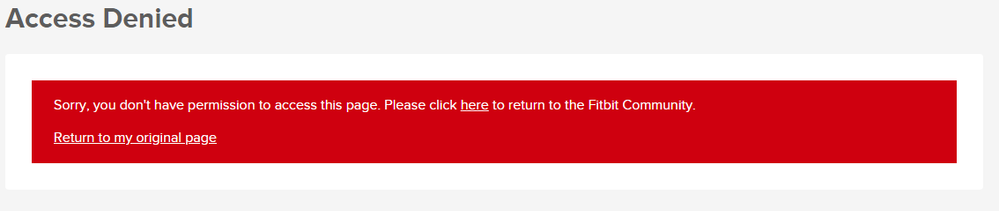
It doesn't matter what browser I use (although IE 11 is being incorrectly identified as IE 10 again) and what I had to do was log out of my account, return to Fitbit.com, navigate to the Community page and then log back in. Then I was able to get to the forums.
Sal

 Fitbit Product Experts Alumni are retired members of the Fitbit Product Expert Program. Learn more

Wendy | CA | Moto G6 Android
Want to discuss ways to increase your activity? Visit the Lifestyle Forum
 Best Answer
I've cleared the cache and I've used 3 different browsers... I can access it via a separate link, just not the link at the top of the dashboard.
Sal
Best Answer
SunsetRunner
Same here!
Clearing the cache and data, login out and in the app and so on, doesn't change anything.
Best Answer
please delete, reposted in correct forum
Best Answer
when clicking on the fitbit community logo on the top left, or open https://community.fitbit.com in a web browser, it comes up with access denied?
it opens up https://community.fitbit.com/t5/Help-Forums/ct-p/product and then comes up with access denied
same if you goto https://www.fitbit.com/settings/device and then click on community
however https://help.fitbit.com/ works
as does https://community.fitbit.com/t5/Community/ct-p/EN
is this the same for everyone else?
also asks for label, but if I use one, it fails to post, but if I leave the label part blank, it posts fine
Best Answer

 Community Moderators ensure that conversations are friendly, factual, and on-topic. We're here to answer questions, escalate bugs, and make sure your voice is heard by the larger Fitbit team. Learn more
Thanks for letting us know about this error. I have made an adjustment which may have resolved this - please let me know if you are still encountering the "Access Denied" message when visiting the forum.
Best Answer
SunsetRunner
Hi @MatthewFitbit Since this morning the problem with "Access Denied" is over for me.
I also installed Android app version 3.15 this morning, so I cannot say whether your adjustment or the app update made the difference. I am very glad the problem is solved.
However my problem with the privacy settings (I am blocked from seeing my own badges and challenges results, except the top badges) still persists.
Best Answer
Not sure why my post got moved from the Dashboard forum but yes, whatever you changed corrected the issue - thanks.
Sal
Best Answer
SunsetRunner
I am getting the same "Access Denied" message (see below). Using iPhone 14.
Sorry, you don't have permission to access this page. Please click here to return to the Fitbit Community.
Return to my original page
Best Answer