
Join us on the Community Forums!
-
Community Guidelines
The Fitbit Community is a gathering place for real people who wish to exchange ideas, solutions, tips, techniques, and insight about the Fitbit products and services they love. By joining our Community, you agree to uphold these guidelines, so please take a moment to look them over. -
Learn the Basics
Check out our Frequently Asked Questions page for information on Community features, and tips to make the most of your time here. -
Join the Community!
Join an existing conversation, or start a new thread to ask your question. Creating your account is completely free, and takes about a minute.
Not finding your answer on the Community Forums?
- Community
- Fitbit Community Basics
- Re: How To: Create Your Community Signature
- Mark Topic as New
- Mark Topic as Read
- Float this Topic for Current User
- Bookmark
- Subscribe
- Mute
- Printer Friendly Page
- Community
- Fitbit Community Basics
- Re: How To: Create Your Community Signature
How To: Create Your Community Signature
- Mark Topic as New
- Mark Topic as Read
- Float this Topic for Current User
- Bookmark
- Subscribe
- Mute
- Printer Friendly Page
- « Previous
-
- 1
- 2
- Next »



Signatures are a great way to share a bit of your personality and flare with the Community! You can insert an inspirational quote or a link to your website. You can even update your signature regularly to invite others to join your current favorite Community discussions.
Get started by heading to the Personal Profile section of your Account Preferences, as pictured below:
- Go to your Community profile settings by clicking the gear to the top-right. Choose “Settings"
- Click on “Personal Information”
- Create your signature and hit "Save"
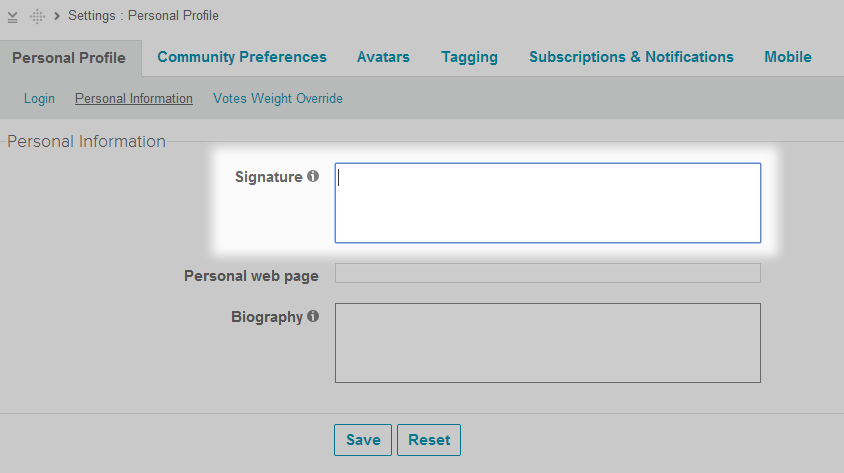
*Please make sure that your signature follows the Community Guidelines.
Get creative with HTML
Without HTML code, your signature will look like this:
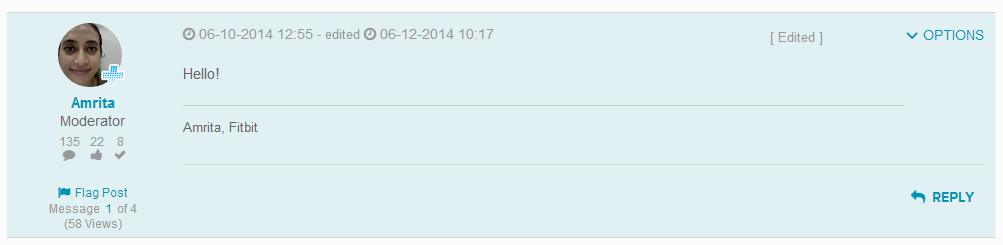
Add some flavor with these HTML tags. (Fill-in the bolded text with your words of choice.)
- To change font type: <font face="FONT NAME HERE">TEXT HERE</font>
- Font size: <font size="FONT SIZE #">TEXT HERE</font>
- Text color: <font color="#XXXXXX">TEXT HERE</font> (For a list of HTML color codes, click here.)
- To bold: <p><b>TEXT HERE</b></p>
- To italicize: <p><i>TEXT HERE</i></p>
- To link a word or phrase: <a href="INSERT URL HERE">TEXT HERE</a>
- To enter a line break: <br> (Insert before the word/phrase you’d like to appear on a new line.)
HTML in action
Here are a few examples of ways the above tags can be used.
1. Font size and color.

HTML: <font size="2"><font color="#787878">Love my Fitbit Flex!</font>
2. Font type, color, and bolded text.

HTML: <p><b><font face="calibri"><font size="3"><font color="#190707">Fitbitter Amrita,</b> <font face="calibri"><font size="3">mastering the art of ten-thousand steps</font></p>
3. Font type, size, color, and a line break.

HTML: <font face="calibri"><font size="2.5"><font color="#1C1C1C">“You’re off to great places! Today is your day! Your mountain is waiting, So get on your way!”<br>-Dr. Seuss</font>
4. Font type, size, color, and a phrase linked to the Community’s “What’s Cooking?” forums.

HTML: <font face="calibri"><font size="3"><font color="#FF0000">Harry Potter, the boy who lived</font> <font color="#190707">| <a href="https://community.fitbit.com/t5/What-s-Cooking/bd-p/cooking"><font color="#787878">Foodies unite</a></font>!
To test out your HTML tags before saving your signature, click here.
Ready, set, craft!

@MatthewFitbit wrote:@mb127 Brand new forum members will have to wait a little bit before they can use the Signature feature - this is to prevent malicious spam accounts from using it for spammy purposes. I went ahead and approved you, so you should be all set now. Sorry for the confusion!
Ahh thank you Matthew! 

@MatthewFitbit wrote:@mb127 Brand new forum members will have to wait a little bit before they can use the Signature feature - this is to prevent malicious spam accounts from using it for spammy purposes. I went ahead and approved you, so you should be all set now. Sorry for the confusion!
@MatthewFitbit could you please also approve me for the signature feature? I promise I won't use it for any spammy purposes 
 Best Answer
@MatthewFitbitwrote:@mb127 Brand new forum members will have to wait a little bit before they can use the Signature feature - this is to prevent malicious spam accounts from using it for spammy purposes. I went ahead and approved you, so you should be all set now. Sorry for the confusion!
Matthew,
I've just spent an hour or so trying to find where to create a signature line, mainly because other community members request people list their devices etc in their signature. Now I find that as a new member it was never going to display for me.
It would be useful if the section about creating a signature in the Community FAQ be updated 1) to remove the reference to the "Gear" symbol that is no longer used (replaced by the profile picture), and 2) that some mention of the signature restriction for newbies be added to the FAQ.
See https://community.fitbit.com/t5/help/faqpage#signature
Cheers,
Ron

How long does one new to the community have to wait before the option to have a signature opens up? Just curious because I thought I was losing my mind when I couldn't locate the option.
times and read about 10% of all Ionic threads before making a my first post.
Best Answer
@MatthewFitbitwrote:@mb127 Brand new forum members will have to wait a little bit before they can use the Signature feature - this is to prevent malicious spam accounts from using it for spammy purposes. I went ahead and approved you, so you should be all set now. Sorry for the confusion!
How long is the wait period? Just a curiosity. I created my account yesterday 🙂
Best Answer
I found where to change it, but it won't save. Do I need to get permissions granted or something?
Thanks, in advance, for your help.
Best Answer
These directions do not work, has something changed in 7 months? Are we not able to put signatures in any more? See below for the problem:
Go to the Community: DONE
Click on your profile photo in the top right corner: DONE
Click on Settings: DONE
Click on Personal: DONE
Click on Personal Information: DONE
Create your signature: Not able to do. The only options here are "Personal webpage" and "About me".
Click SAVE.
Can someone let me know if we can input signatures still, and if so give updated directions?
Best Answer
Best Answer
There is a delay from when you first start posting until you can setup a signature. I don't know how long, but you can see this discussed earlier in this thread.
I see that now, thank you.
Best Answer
For those that are having trouble creating a signature my advice is just to be patient, as I, Mike and others have found out.
However, four months after I suggested that the instructions be updated they are still incorrect and need updating in both the original post in this thread and the Community FAQ. The interface has changed considerably since the instructions were written.
My suggested edit, replacing the second paragraph in the original post (and the FAQ), is:
"To create or edit your personal signature:
- Click on your personal profile photo in the top-right of the screen. If you haven't added a photo yet, you will see an icon there instead.
- From the drop-down menu click on the gear icon against Settings from the menu.
- On the settings screen, navigate to Personal tab > Personal Information sub-tab
- Enter your signature text in the Signature box. Please note that you may not see a signature box if you only recently joined the community.
(You can use some simple HTML in your signature, if you'd like.) - Click Save to commit your changes."
Thank you Ron!
Best Answer
I got mine up and running now, I think you just need a certain number of posts, or maybe certain number of days; not sure, but it's working for me now.
Best Answer
For those struggling to create a signature, patience is key—many of us, including myself and others like Mike, have been there.
That said, it’s been four months since I suggested updating the instructions, and they’re still outdated in both the original post and the Community FAQ. The interface has changed significantly since those instructions were written.
Here’s my suggested update for the second paragraph (for both the post and FAQ):
"To create or edit your personal signature:
Click on your profile photo (or icon) in the top-right corner.
Select the gear icon next to Settings from the drop-down menu.
Go to the Personal tab > Personal Information sub-tab.
Enter your signature in the Signature box. (Note: New members may not see this option immediately.)
You can use basic HTML if desired.
Click Save to apply your changes."
Hope this helps clarify the process for everyone!
Best Answer
- « Previous
-
- 1
- 2
- Next »