
Join us on the Community Forums!
-
Community Guidelines
The Fitbit Community is a gathering place for real people who wish to exchange ideas, solutions, tips, techniques, and insight about the Fitbit products and services they love. By joining our Community, you agree to uphold these guidelines, so please take a moment to look them over. -
Learn the Basics
Check out our Frequently Asked Questions page for information on Community features, and tips to make the most of your time here. -
Join the Community!
Join an existing conversation, or start a new thread to ask your question. Creating your account is completely free, and takes about a minute.
Not finding your answer on the Community Forums?
- Community
- Fitbit Community Basics
- Re: How do I add a comment/ post in a discussion?
- Mark Topic as New
- Mark Topic as Read
- Float this Topic for Current User
- Bookmark
- Subscribe
- Mute
- Printer Friendly Page
- Community
- Fitbit Community Basics
- Re: How do I add a comment/ post in a discussion?
How do I add a comment/ post in a discussion?
ANSWERED- Mark Topic as New
- Mark Topic as Read
- Float this Topic for Current User
- Bookmark
- Subscribe
- Mute
- Printer Friendly Page

I'm new and have no idea how to add a post to the https://community.fitbit.com/t5/Be-Inspired/Looking-for-Fitbit-Friends-Find-some-here/td-p/1257283/j...
Answered! Go to the Best Answer.
 Best Answer
Accepted Solutions

 Fitbit Product Experts Alumni are retired members of the Fitbit Product Expert Program. Learn more
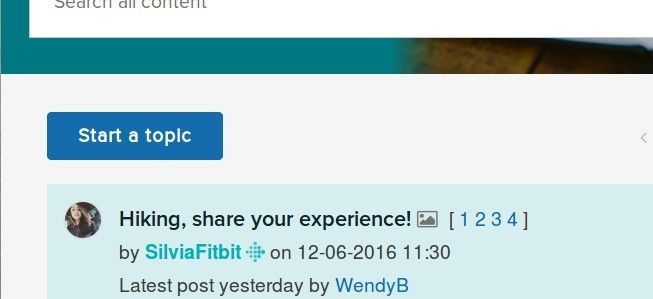
It is quite easy, @Jane_N_Roses. To add a new post, open the forum and click on the Start A Topic link at the top of the threads.
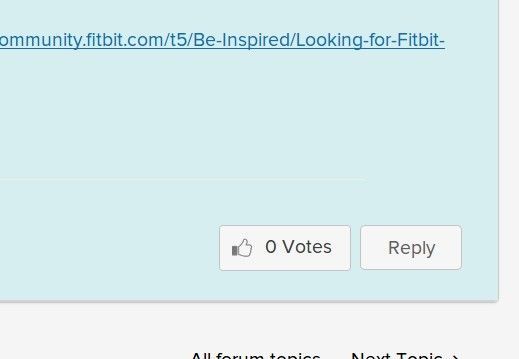
To reply to a current comment, just click on the Reply link at the bottom of the post.
Fitbit Product Experts Alumni are retired members of the Fitbit Product Expert Program. Learn more
It is quite easy, @Jane_N_Roses. To add a new post, open the forum and click on the Start A Topic link at the top of the threads.
To reply to a current comment, just click on the Reply link at the bottom of the post.
Thanks, but how do I add a comment to a discussion that is already going?
I don't want to start my own topic or reply to current comment. I hope that makes some sense
Fitbit Product Experts Alumni are retired members of the Fitbit Product Expert Program. Learn more
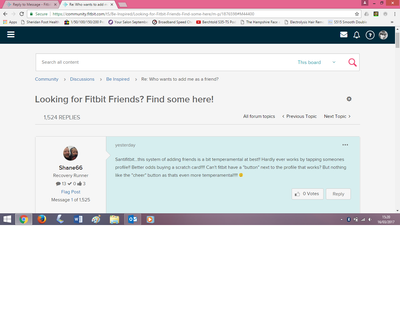
@Jane_N_Roses, just click on that REPLY link to open a new message window and then type away...click POST when you're done.
 Fitbit Product Experts Alumni are retired members of the Fitbit Product Expert Program. Learn more

I cannot do anything here in Community with my main account, I get the red box saying error loading page. I searched and it said it had been solved in september but I cannot login to community as my normal account. From Dashboard, I click Community and I am logged out I try logon and get looped to the red error screen. All browsers! This account is hit or miss
Best Answer
What am I missing. I am new to the community.
There are several discussions that I would like to comment/ask in and yet the only reply buttons are on already comments in the discussion group.
How do I comment in a discussion and not on an existing comment in the discussion?
I hope that made sense.
Tex
up date... just figured out that each reply on each post for the discussion is a reply to the discussion and not the post.
sorry
Best Answer
Fitbit Product Experts Alumni are retired members of the Fitbit Product Expert Program. Learn more
@TexNolan, just click on the Reply Button in the latest post in the thread, and it will open the message window where you can add your comments. I does not reference the post you selected "reply" in, so you need not refer to it unless you wish to.
Best Answer
I posted a reply to a post in the community forum and I got a notification but when I clicked on it, it disappeared and nothing happened. And now I cannot find the posts I replied on. Or if someone posted in response to my post.
Best Answer
Fitbit Product Experts Alumni are retired members of the Fitbit Product Expert Program. Learn more
@Ninie08, your profile says that this is your first and only post. Open your profile page (click on the Profile icon in the upper righthand corner of this page, and select "Profile"), then scroll down to see if the message you created was auto-saved there. You may have not clicked on the "Post" button after you created the message.
Best Answer
Hi! Thanks so much for the prompt reply. That was my first post here.
But I was referring to posts made in the Fitbit app-> Community. Someone posted something about sleeping, for example and I responded with a possible solution... I did this a few times but I can't find those posts.
Best Answer Fitbit Product Experts Alumni are retired members of the Fitbit Product Expert Program. Learn more
@Ninie08 In the fitbit App Community you should get a notification if someone responded to you. When that happens just click on that notification and it will take you there.
Otherwise I find it very hard to find what I posted to. I know of no way to do so either.

Wendy | CA | Moto G6 Android
Want to discuss ways to increase your activity? Visit the Lifestyle Forum
Best Answer
SunsetRunner
I cant even find start a topic location. I am so frustrated trying to fix my fit bit I am ready to toss it. Help please.
Best Answer
Fitbit Product Experts Alumni are retired members of the Fitbit Product Expert Program. Learn more
@SunsetRunnerWe need to know whats wrong so we can help
Wendy | CA | Moto G6 Android
Want to discuss ways to increase your activity? Visit the Lifestyle Forum
Best Answer
Start a topic is grayed out for me.

How do you go to forum to post a question. I don't see a Start a topic link?
Have questions bout my new Altra HE this is the first time to fitbit
Thanks
Best Answer
I have same problem I can't find Start a topic
Best Answer
When I entered my Username, it said I should post something to see something in "notifications."
Best Answer