Join us on the Community Forums!
-
Community Guidelines
The Fitbit Community is a gathering place for real people who wish to exchange ideas, solutions, tips, techniques, and insight about the Fitbit products and services they love. By joining our Community, you agree to uphold these guidelines, so please take a moment to look them over. -
Learn the Basics
Check out our Frequently Asked Questions page for information on Community features, and tips to make the most of your time here. -
Join the Community!
Join an existing conversation, or start a new thread to ask your question. Creating your account is completely free, and takes about a minute.
Not finding your answer on the Community Forums?
- Community
- Health & Wellness
- Get Moving
- Shoveling Snow
- Mark Topic as New
- Mark Topic as Read
- Float this Topic for Current User
- Bookmark
- Subscribe
- Mute
- Printer Friendly Page
- Community
- Health & Wellness
- Get Moving
- Shoveling Snow
Shoveling Snow
- Mark Topic as New
- Mark Topic as Read
- Float this Topic for Current User
- Bookmark
- Subscribe
- Mute
- Printer Friendly Page

Earlier today I shoveled snow for 30 minutes and it showed up on my Dashboard as Sport. An hour or so later I went out to shovel again but the second round isn't showing on my desktop. On my I-phone, it did show up as Active Minutes.....but I'd like to have the positive reinforcement and satisfaction of seeing it in both places.
How do folks track their activity? And how to they keep it going? I seem to get going in spurts and then something happens that interrupts the routine and I get off-track. All suggestions welcome!
 Best Answer
 Fitbit Product Experts Alumni are retired members of the Fitbit Product Expert Program. Learn more
you could manually log the activity if it doesn't come up automatically.
As for tracking my activity. The ones I want to see calories burned for are auto detected with the tracker so I don't need to choose one. For weight lifting if I want to have it come up, I set the exercise on my tracker and it captures it that way. I have been keeping active for years now so it is part of my day like eating, drinking, talking, etc. It is a routine and a habit. It keeps me sane and I am guaranteed me time.
Elena | Pennsylvania
Thanks for the reply! Appreciate it. And good for you being so locked in and consistent over time....something I am aspiring to.....
Best Answer Fitbit Product Experts Alumni are retired members of the Fitbit Product Expert Program. Learn more
For automatically detected exercise, I find it's not worth it to stress over the tracking. It will either pick it up or not, and I've been unable to do much to affect it either way.
The important part for me is the active minutes. If the activity generates active minutes, then we know the heart rate was elevated and a number of calories were burned. The activity list of exercises is, for me, just for hitting the weekly goal. If I need a day of tracked exercise for that, a walk will do. Other than that, I try to make sure there are active minutes.
Best Answer
That makes total sense! Thanks! And now another take on the snowfall outside my window by Lowell
The snow had begun in the gloaming,
And busily all the night
Had been heaping field and highway
With a silence deep and white.
Every pine and fir and hemlock
wore ermine too dear for an earl,
And the poorest twig on the elm-tree
Was ridged inch-deep with pearl.
Best Answer Fitbit Product Experts Alumni are retired members of the Fitbit Product Expert Program. Learn more
@SunsetRunnerwrote:Under the exercise choices I would like to see shoveling snow.
If you enter "snow" in the search box and click on the magnifying glass icon, you will see "snow removal":
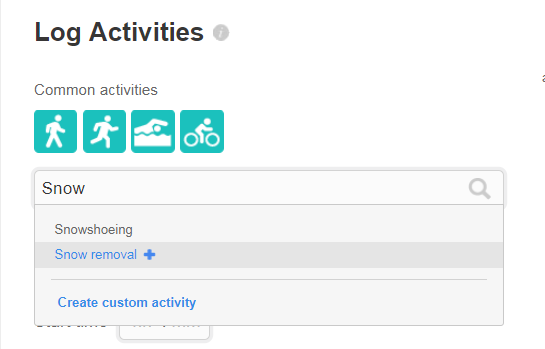
If you want to have it called "Shoveling snow", just create your own custom activity.
Dominique | Finland
Ionic, Aria, Flyer, TrendWeight | Windows 7, OS X 10.13.5 | Motorola Moto G6 (Android 9), iPad Air (iOS 12.4.4)
Take a look at the Fitbit help site for further assistance and information.
Best Answer
SunsetRunner
Thanks
Sent from my iPad
Best Answer
Fitbit Product Experts Alumni are retired members of the Fitbit Product Expert Program. Learn more
You need to do this in your browser (go to https://www.fitbit.com/activities), not in the Fitbit app.
Dominique | Finland
Ionic, Aria, Flyer, TrendWeight | Windows 7, OS X 10.13.5 | Motorola Moto G6 (Android 9), iPad Air (iOS 12.4.4)
Take a look at the Fitbit help site for further assistance and information.
Best Answer
 Fitbit Product Experts Alumni are retired members of the Fitbit Product Expert Program. Learn more
I myself would use workout mode. Then I would set up a custom record and when it synced I can change it

Wendy | CA | Moto G6 Android
Want to discuss ways to increase your activity? Visit the Lifestyle Forum