
Join us on the Community Forums!
-
Community Guidelines
The Fitbit Community is a gathering place for real people who wish to exchange ideas, solutions, tips, techniques, and insight about the Fitbit products and services they love. By joining our Community, you agree to uphold these guidelines, so please take a moment to look them over. -
Learn the Basics
Check out our Frequently Asked Questions page for information on Community features, and tips to make the most of your time here. -
Join the Community!
Join an existing conversation, or start a new thread to ask your question. Creating your account is completely free, and takes about a minute.
Not finding your answer on the Community Forums?
- Community
- Product Help Forums
- Ionic
- Re: Last ditch attempt for support...
- Mark Topic as New
- Mark Topic as Read
- Float this Topic for Current User
- Bookmark
- Subscribe
- Mute
- Printer Friendly Page
- Community
- Product Help Forums
- Ionic
- Re: Last ditch attempt for support...
Ionic Display Stuck in Logo Screen
ANSWERED- Mark Topic as New
- Mark Topic as Read
- Float this Topic for Current User
- Bookmark
- Subscribe
- Mute
- Printer Friendly Page
07-17-2018
12:57
- last edited on
07-18-2018
17:12
by
SantiR


07-17-2018
12:57
- last edited on
07-18-2018
17:12
by
SantiR
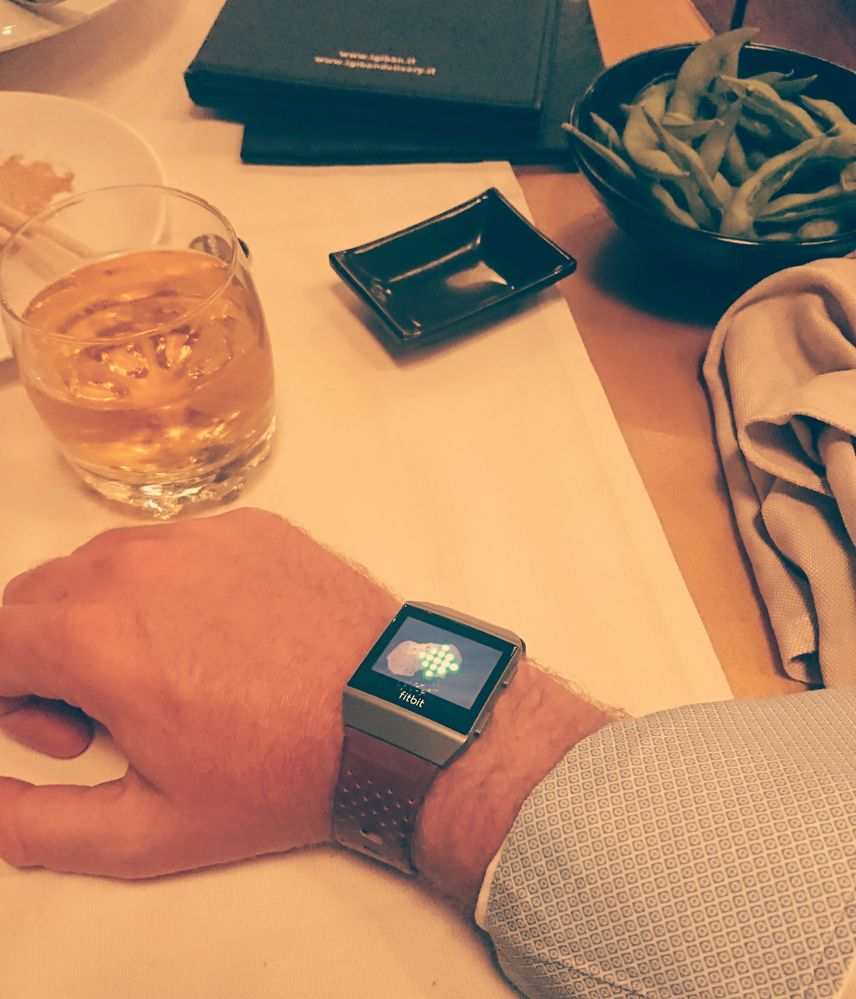
Factory reset applied as per support request. Stuck in a loop as shown above the last hour. @fitbitsupport how far do I have to go to prove the problem is with the FITBIT ?
Moderator Edit: Updated Subject for Clarity
Answered! Go to the Best Answer.



I have the same issue with my ionic. Tried the 3 button restart, but it doesn't vibrate or reset or anything.
What is the next step?
 Best Answer
To do Factory Reset process properly:
(I called Fitbit they gave me technical method. )
1. Hold all 3 ionic buttons for 15 secs
(* tip count 15 secs)
2. After 15 secs , release lower right button.( Keep other 2 buttons pressed.)
3. Holding the other 2 buttons. Only Until The ionic vibrates. Then now let go of all buttons.
4. screen should go fully black.
5. At this point Support said wait 2 mins while ionic clears and resets data. (it could take longer) . Get a cuppa tea! it you come back and its still blank just press left button to turn it on.
6. The follow normal procedure to install updates and sync with your phone app.
END
Thanks for your response TangoWhiskey.
UPDATE - the fix you suggested worked, for a few days. Now the watchface has become non-responsive; I let it fully charge overnight and it's still black, no fitbit logo or anything even when I hold all three buttons for over 15 seconds.

I have the same issue. Just the fitbit logo on the screen.
This is my 3rd Ionic and have been told by fitbit i need a new watch. The one i have on is the 3rd replacement and arrived May2019 but I have found out the warranty is from the original watch.
So basically this one lasted 7months and failed again.
They said as a good will they will give me 25% off a new one.
So you can see my issue with the Ionic not being reliable.
3 Ionics 3 different faults.
1st failed to hold charge
2nd failed to charge
3rd has just failed and got the fitbit logo on it.
NOT A HAPPY CUSTOMER
I had 2x Surge prior which failed to hence my upgrade with the 25% off to the Ionic.
Bad move
01-14-2020
15:09
- last edited on
07-14-2020
10:07
by
AlvaroFitbit
01-14-2020
15:09
- last edited on
07-14-2020
10:07
by
AlvaroFitbit
Oh man. That stinks! Very unfortunate. I moved to the Fitbit Versa 2 and so far, so good. But I would be lying if I said I wasn’t worried about how long it will last. Can’t believe Fitbit won’t do the right thing given your history. Bummer.
Moderator Edit: Personal info removed
Best Answer
So did everyone finally realize that the Over the Air updates fitbit is sending is what is causing these ionics to stop working, but wait... there is more... this OTA update only happens after your warranty has expired. How convenient.
-_-

I had the same issue and finally got mine to reset by doing the same steps while it was plugged into my computer.
Best Answer
Fitbit Ionic, logo stuck on the screen and can't get past it. How do I fix this ?
Best Answer
The logo has been stuck on my phone for days. I tried the 3 button button pushing and reloaded the app. Nothing works.
Best Answer
Mine did the same. . stuck for months. Consider the Fitbit fried if you've attempted that & it doesn't work.
Best Answer
having the same issue. Got this watch only in June 2019. contacted Fitbit and they have opened a ticket for fix. Hopefully they will respond and get me fixed soon. Will keep you all posted.
Best Answer
ok, it works now!!
Here is what i did.
contacted Tech Support.
They told me to do the 3 button reset process - Reproducing the steps below. - some more to do AFTER this, see bottom of message..
--------
Before we can move forward to the next step, we just need to make sure that we haven't missed any troubleshooting steps. Please try the factory reset:
- Please Note: You'll need to reinstall any apps on your device after the reset, and if you couldn’t sync your device, then any data on the Fitbit device will be lost.
- On the device, hold all three buttons for about 10 to 12 seconds.
- When the Fitbit logo disappears, quickly release the bottom right button, continuing to hold down the left and top right buttons (releasing the bottom right button as soon as the logo disappears is time sensitive).
- When the device vibrates, release all buttons.
- Wait for approximately 1-2 minutes while the device clears all data. Eventually, the Fitbit logo appears and the device boots and displays Fitbit.com/setup.
- When the device successfully resets, please use the normal out of the box process of updating the firmware (See How do I update my Fitbit device?).
------
After doing this for God knows how many times, i got an error message (like - Unable to Sync).
Tech told me to now treat it as NEW ionic.
So, in my phone, unpaired the current Ionic and tried as if i am repairing a NEW one.
After a few missteps - going back and forward,
IT WORKED!!!
hope you will be able to get it back again. GOOD LUCK!!
Best Answer
03-01-2020
18:16
- last edited on
07-14-2020
10:08
by
AlvaroFitbit
03-01-2020
18:16
- last edited on
07-14-2020
10:08
by
AlvaroFitbit
Thank you so much!!! I really appreciate you sharing!
Moderator Edit: Personal info removed
Best Answer
im sorry but even the best answer doesnt work for me. It started happening when i forgot to recharge it before going to bed and when i woke up, it was showing 0%. After that, I charged it the whole morning and when i picked it up, it's just showing the fitbit logo and does not respond
Best Answer

My Ionic is doing the same.
Best Answer